Hyperliquid API Guide: Endpoints, API Keys, Limits and Python Examples
How the Hyperliquid API works: which request answers which question, how to create an API key, where to get testnet USDC, tested limits and the common mistakes, with code you can copy.
Want to pull Hyperliquid prices into a spreadsheet, check a wallet's positions, build a trading bot or put live order books in your own app? Everything on Hyperliquid runs on-chain, and the official API gives anyone free access to it. No sign-up, and for reading data, no API key.
The API is simple at its core, but its reference docs list dozens of request types and the limits are spread over several pages. This guide puts it in one place:
Trader, not a developer? The tables tell you what's possible without reading any code.
Developer? Every limit, response and error message in this guide comes from requests we ran on 14 October 2026: reads on the live mainnet API, orders on testnet with a real API wallet.
The read-only snippets only need pip install requests websockets.
How does the Hyperliquid API work?
The official API has three parts:
| Part | Address | What it's for | Needs a key? |
|---|---|---|---|
| Info endpoint | POST https://api.hyperliquid.xyz/info |
Reading data: markets, prices, books, candles, any wallet's account |
No |
| Exchange endpoint | POST https://api.hyperliquid.xyz/exchange |
Doing things: orders, cancels, leverage, transfers |
Yes, a signed request |
| WebSocket | wss://api.hyperliquid.xyz/ws |
Live updates: trades, books, your fills and orders |
No for market data |
There is also a testnet with the same API at api.hyperliquid-testnet.xyz, for trying orders before real money is involved. The testnet section below covers where to get test USDC.
Every info request is a POST with a JSON body, and the type field decides what comes back. Here's a complete first request:
import requests

INFO = "https://api.hyperliquid.xyz/info"

mids = requests.post(INFO, json={"type": "allMids"}).json()
print("BTC mid price:", mids["BTC"])
That single call returns the mid price of every market: 1,294 at the time of writing.
This guide covers HyperCore, where Hyperliquid's order books live.
HyperEVM, Hyperliquid's smart-contract chain, uses a normal Ethereum-style RPC instead; see Hyperliquid RPC vs data API if you're not sure which one you need.
Hyperliquid API endpoints: which request answers which question
These are the info requests most builders use. Each request costs a number of points, called its weight, and every IP address (roughly, every server) gets 1,200 points a minute. Weights come from Hyperliquid's rate limits page.
Market data: prices, order books and candles
| You want to know… | Request body | Weight |
|---|---|---|
| Current price of every market |
{"type": "allMids"} |
2 |
| Which perps exist, their max leverage and size decimals |
{"type": "meta"} |
20 |
| Mark price, oracle price, funding, open interest, 24h volume |
{"type": "metaAndAssetCtxs"} |
20 |
| Spot pairs and tokens | {"type": "spotMeta"} |
20 |
| HIP-3 markets (stocks, indices and more from other deployers) |
{"type": "perpDexs"}, then meta with "dex": "" |
20 |
| The order book | {"type": "l2Book", "coin": "BTC"} |
2 |
| Candles | {"type": |
20 + extra per items returned |
| Funding rate history | {"type": "fundingHistory", "coin": "BTC", "startTime": …} |
20 + extra |
| Markets at their open interest cap |
{"type": "perpsAtOpenInterestCap"} |
20 |
At the time of writing, meta lists 234 perps on the main exchange, 56 of them delisted, leaving 178 live. On top of that there are 10 HIP-3 exchanges, and spotMeta lists 331 spot pairs across 504 tokens.
l2Book returns the top 20 price levels per side, each with price (px), total size (sz) and number of orders (n). Add "nSigFigs": 2 to 5 to group prices into wider levels: at 2 significant figures, BTC's best bid and ask became 83,000 and 84,000.
For the difference between book types, see BBO vs L2Book vs L4Book.
metaAndAssetCtxs is the most useful request for market dashboards: one call gives every perp's mark price, oracle price, mid price, funding, premium, open interest and 24-hour volume.
Account data: positions, balances and trade history
Every wallet on Hyperliquid is public. Pass any address as user. The request bodies in these tables show the shape only: replace 0x… with a full address and … with a Unix timestamp in milliseconds.
| You want to know… | Request body | Weight |
|---|---|---|
| Perp positions, margin, liquidation prices |
{"type": "clearinghouseState", "user": "0x…"} |
2 |
| Spot balances | {"type": "spotClearinghouseState", "user": "0x…"} |
2 |
| Open orders (with TP/SL details) |
{"type": "frontendOpenOrders", "user": "0x…"} |
20 |
| Recent fills (trades) | {"type": "userFills", "user": "0x…"} |
20 + extra |
| Fills in a time range | {"type": "userFillsByTime", "user": "0x…", "startTime": …} |
20 + extra |
| Past orders | {"type": "historicalOrders", "user": "0x…"} |
20 + extra |
| Deposits, withdrawals, transfers |
{"type": |
20 + extra |
| Funding paid or received | {"type": "userFunding", "user": "0x…", "startTime": …} |
20 + extra |
| Trading fee rates | {"type": "userFees", "user": "0x…"} |
20 |
| Is it a normal account, sub-account, vault or API wallet? |
{"type": "userRole", "user": "0x…"} |
60 |
| Remaining trading allowance |
{"type": "userRateLimit", "user": "0x…"} |
20 |
clearinghouseState gives one position per market, with the signed size szi (positive is long, negative is short), entry price, leverage, liquidation price, unrealized profit and funding paid. One catch: wallets on a unified account keep their balance in spot, so check spotClearinghouseState too or you'll undercount them.
userRole is handy for spotting sub-accounts: it returns subAccount along with the master account's address.
How to create a Hyperliquid API key (API wallet)
Reading data needs nothing. Trading needs a signature, because every action on /exchange changes your account on-chain.
Hyperliquid doesn't have API keys in the usual sense. Instead you create an API wallet (the docs also call it an agent wallet): a separate key pair that your main account approves to trade on its behalf.
To create one in the Hyperliquid app:
Your bot or app needs two things: the API wallet's private key, which signs, and your main account address, which is the account it trades for.
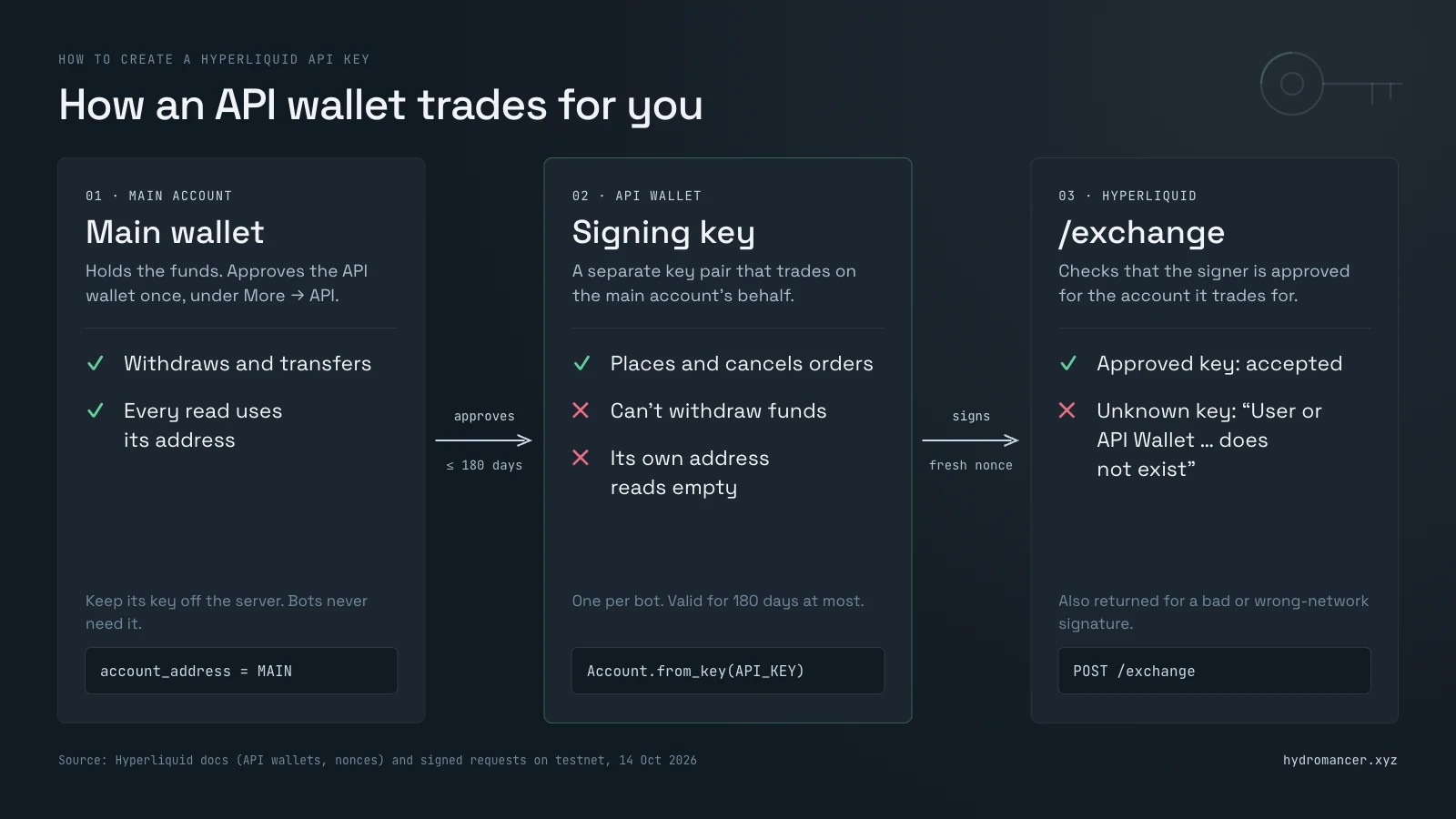
What the docs say about API wallets:
For sub-accounts and vaults, the main account signs and the request includes vaultAddress set to the sub-account or vault.
What an API wallet can't do: withdraw. Withdrawals are signed by the main wallet, and so is approving a builder fee. A leaked API wallet key can still place and cancel orders on your account, so treat it like a password, and remove it on the API page if it leaks.
Running more than one bot? Give each one its own API wallet. Hyperliquid tracks nonces per signing key, so two processes sharing one key can reject each other's orders.
How to sign requests: use a Hyperliquid SDK
Hyperliquid has two different signing schemes for different actions, and a wrong signature doesn't say "wrong signature" (see mistake #6 below). Small details matter, such as removing trailing zeros from numbers before signing. The docs strongly recommend not writing it yourself; use an SDK:
| Language | SDK | Notes |
|---|---|---|
| Python | hyperliquid-python-sdk | Official. Info class forreading, Exchange classfor signed actions |
| TypeScript | @nktkas/hyperliquid, hyperliquid |
Community |
| Rust | hypersdk | Community, listed in the Hyperliquid docs |
| Go | go-hyperliquid | Community, follows the Python SDK |
Community SDKs aren't audited by Hyperliquid. Read the code before giving one a private key.
How to place your first order with Python
This places a small buy order far below the current price, so it rests on the book instead of filling, then cancels it. Check the current BTC price first and keep your limit well below it.
Install the SDK with pip install hyperliquid-python-sdk, and keep the key in an environment variable rather than in the code:
import os
from eth_account import Account
from hyperliquid.exchange import Exchange
from hyperliquid.utils import constants

agent = Account.from_key(os.environ["HL_AGENT_KEY"])   # the API wallet's private key
MAIN = os.environ["HL_MAIN_ADDRESS"]                   # your main account's address
ex = Exchange(agent, constants.TESTNET_API_URL, account_address=MAIN)

r = ex.order("BTC", True, 0.0003, 50000, {"limit": {"tif": "Gtc"}})  # buy 0.0003 BTC at $50,000
if r.get("status") != "ok":                       # e.g. an unapproved key or a bad signature
    raise RuntimeError(r.get("response"))
status = r["response"]["data"]["statuses"][0]
print(status)          # {'resting': {'oid': ...}} or {'error': '...'}

if "resting" in status:
    print(ex.cancel("BTC", status["resting"]["oid"]))
The order rests on the book, and the cancel comes back success. Switch TESTNET_API_URL to MAINNET_API_URL only once everything works on testnet.
Asset IDs, price rules and minimum order size
Orders refer to markets by number, not name:
| Market type | Asset ID |
|---|---|
| Main-exchange perps | Position in the meta list. BTC is 0 |
| HIP-3 perps | 100000 + dex index × 10000 + position in that dex's meta |
| Spot | 10000 + position in.HYPE/USDC is 10107 onmainnet |
| Outcomes (HIP-4) | 100000000 + 10 × outcome + side |
Mainnet and testnet use different IDs, so look them up rather than hard-coding them:
meta = requests.post(INFO, json={"type": "meta"}).json()
live = [a for a in meta["universe"] if not a.get("isDelisted")]
print(len(live), "live perps; BTC asset ID =", [a["name"] for a in meta["universe"]].index("BTC"))
Prices can have at most 5 significant figures (whole-number prices are exempt), and no more than 6 decimal places minus the market's szDecimals for perps (8 for spot). Sizes round to szDecimals. The minimum order is $10. Orders that break these rules are rejected.
Hyperliquid API limits: the docs vs. real responses
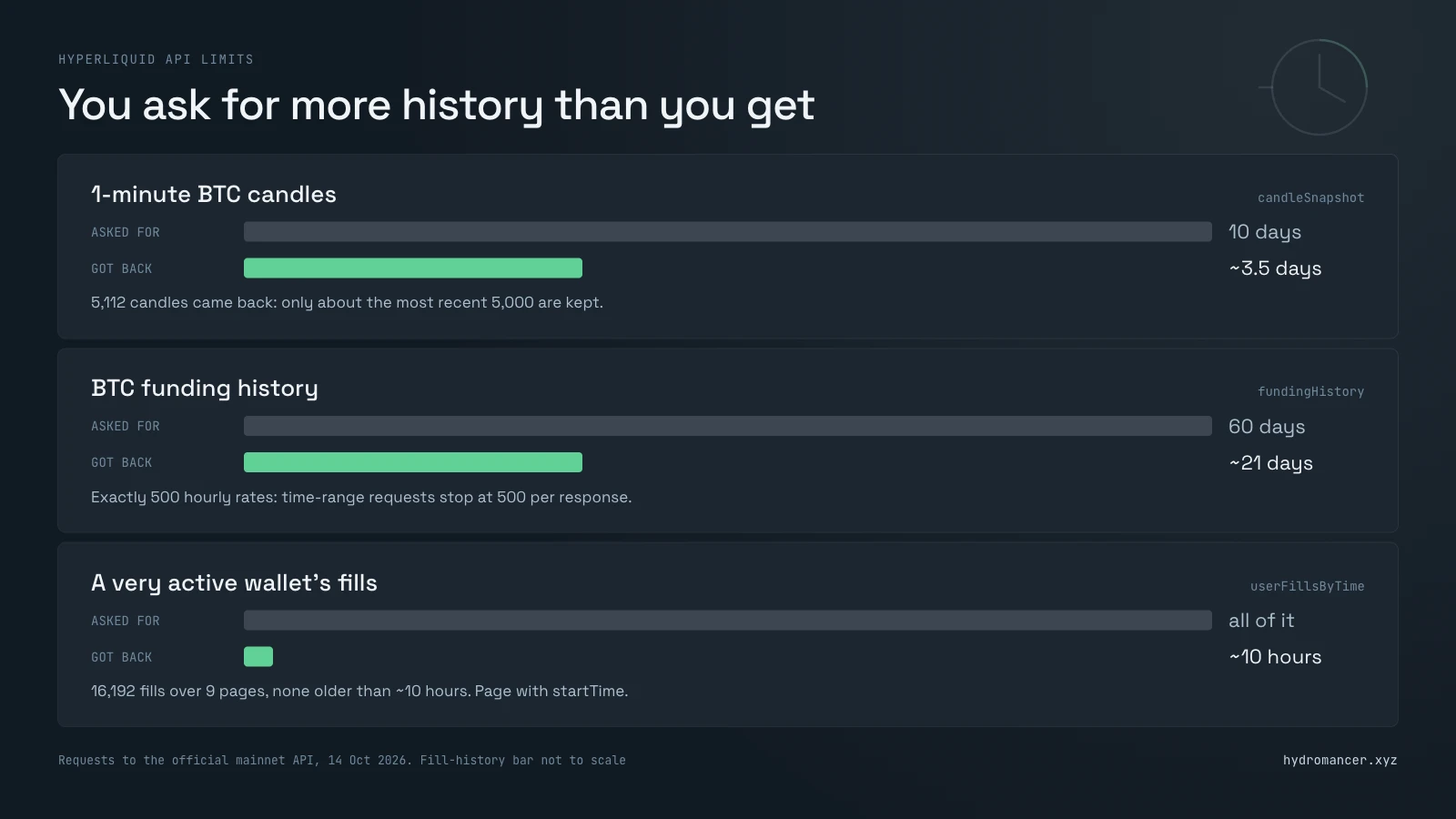
The API is free, so it has limits. Here's what the docs say next to what the API actually returned:
| Limit | What the docs say | What we saw on 14 Oct 2026 |
|---|---|---|
| Fills per response | At most 2,000 | userFills stopped at exactly 2,000 for a busy wallet |
| Fill history | Only the 10,000 most recent fills |
Paging userFillsByTimefor a very active wallet returned 16,192 fills, a little more than documented, but none older than about 10 hours. Treat it as a short window, not a full history |
| Time-range responses | 500 items per response for most requests (fills: 2,000) |
fundingHistory for 60days returned exactly 500 hourly rates, about 21 days |
| Candles | Only the most recent 5,000 |
Asking for 10 days of 1-minute BTC candles returned 5,112, about 3.5 days' worth |
| REST weight | 1,200 per minute per IP | Most wallet requests cost 2 or 20 |
| Trading allowance | 10,000 requests + 1 per USDC traded |
userRateLimit matchedexactly: a wallet with $2,824,512 lifetime volume had a cap of 2,834,512 |
| Batches and the allowance |
A batch of n orderscounts once for your IP but n times for youraddress |
One order used 1 of the allowance, and a batch of 3 orders used 3. Cancels counted the same way |
| Scheduled cancel (dead man's switch) |
Cancels all your orders at a set time if your bot stops checking in |
Refused on testnet: "Cannot set scheduled cancel time until enough volume traded. Required: $1000000" |
| WebSocket idle timeout | Closed after 60 seconds without a message |
A heartbeat every 50 seconds kept a stream alive past 70 seconds |
| WebSocket connections | 10 open at once, 30 new per minute, 1,000 subscriptions, and user-specific streams for at most 10 different wallets |
Not tested |
To get more than one page, start the next request at the last fill's timestamp and skip the fills you already have. Don't add 1 millisecond: several fills can share a timestamp, and a page can end in the middle of them.
import time

def all_fills(user, start_ms):
    fills, seen = [], set()
    end_ms = int(time.time() * 1000)
    while True:
        page = requests.post(INFO, json={"type": "userFillsByTime", "user": user,
                                         "startTime": start_ms, "endTime": end_ms}).json()
        for f in page:
            key = (f["coin"], f["tid"], f["oid"], f["side"])
            if key not in seen:
                seen.add(key)
                fills.append(f)
        if len(page) < 2000:          # a full page means there may be more
            return fills
        start_ms = page[-1]["time"]   # same timestamp again; duplicates are skipped above
And to check how many trading actions an address has left:
def allowance(user):
    r = requests.post(INFO, json={"type": "userRateLimit", "user": user}).json()
    return r["nRequestsCap"] - r["nRequestsUsed"]
The three limit systems (per IP, per address and during congestion) are explained in detail in Hyperliquid rate limits.
How to get live data from the WebSocket
For anything live, use the WebSocket instead of polling. Subscribe with a message, and the server confirms with a subscriptionResponse before data starts:
import asyncio, json, websockets

async def stream(coin):
    async with websockets.connect("wss://api.hyperliquid.xyz/ws") as ws:
        await ws.send(json.dumps({"method": "subscribe",
                                  "subscription": {"type": "trades", "coin": coin}}))

        async def heartbeat():
            while True:
                await asyncio.sleep(50)          # server closes after 60 s of silence
                await ws.send(json.dumps({"method": "ping"}))
        asyncio.create_task(heartbeat())

        async for raw in ws:
            msg = json.loads(raw)
            if msg.get("channel") == "trades":
                for t in msg["data"]:
                    print(t["coin"], t["side"], t["sz"], "@", t["px"])

asyncio.run(stream("BTC"))
The official channels include trades, l2Book, bbo, allMids and candle for markets, and userFills, orderUpdates, userFundings, userNonFundingLedgerUpdates, clearinghouseState and openOrders for an account.
You can also send info requests and signed actions over the same connection with {"method": "post", ...}.
Each market channel takes one coin per subscription. Hydromancer's Hyperliquid WebSocket API accepts many coins, or every market, in one subscription. For every stream in one place, see Hyperliquid data feeds.
How to use the Hyperliquid testnet API
The testnet is a copy of Hyperliquid where the money has no value. The requests are identical; only the addresses change:
| Mainnet | Testnet | |
|---|---|---|
| Info and exchange | https://api.hyperliquid.xyz |
https://api.hyperliquid-testnet.xyz |
| WebSocket | wss://api.hyperliquid.xyz/ws |
wss://api.hyperliquid-testnet.xyz/ws |
| Web app | app.hyperliquid.xyz | app.hyperliquid-testnet.xyz |
| HyperEVM chain ID | 999 | 998 |
| BTC perp asset ID | 0 |
3 |
| HYPE/USDC spot asset ID | 10107 |
11035 |
BTC isn't even the same number on both, which is another reason to look them up from meta and spotMeta instead of hard-coding them.
How to get Hyperliquid testnet USDC
Most guides only mention Hyperliquid's own faucet. It's the easiest, but you can only claim once, and only after a mainnet deposit. Here are the alternatives:
| Source | What you get | The catch |
|---|---|---|
| Hyperliquid faucet | 1,000 mock USDC, straight into your testnet trading account |
The same address must have deposited on mainnet. One claim per address |
| Circle faucet, network "HyperEVM Testnet" |
20 USDC per request, no account or deposit needed |
One request every 2 hours per network. It arrives on HyperEVM, so you move it into your trading account yourself (see below) |
| Circle faucet on Arbitrum Sepolia, then Circle's bridge (CCTP) |
20 USDC per request, sent to your trading account |
Needs Arbitrum Sepolia ETH for gas and a 0.20 USDC forwarding fee. Mostly for developers testing deposit flows |
| Another tester | Any amount | A teammate who already has test USDC can send it to your address |
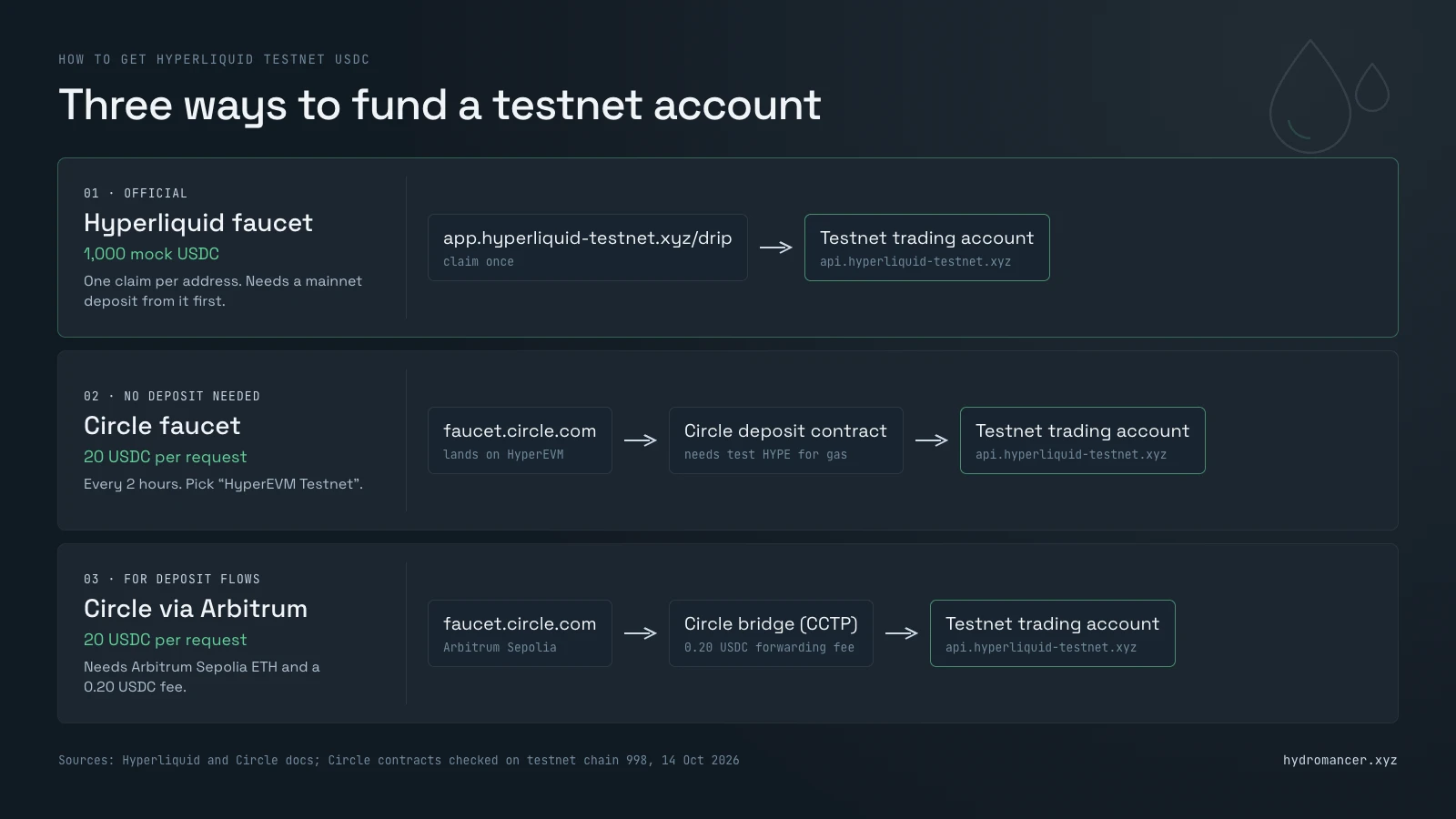
Moving Circle's USDC into your trading account. Testnet USDC from Circle's faucet lands on HyperEVM, at 0x2B3370eE501B4a559b57D449569354196457D8Ab. To trade with it, approve and deposit it into Circle's deposit contract, 0x0B80659a4076E9E93C7DbE0f10675A16a3e5C206, which credits your Hyperliquid testnet account. Testnet spotMeta lists this contract as USDC's link between HyperEVM and the trading layer, and other testers' deposits were going through it on 14 October 2026.
That deposit needs a little test HYPE for gas. You can get it from Alchemy's faucet (0.2 HYPE every 12 hours; the address needs 0.01 HYPE on mainnet), Chainstack's faucet (1 HYPE every 24 hours with a free Chainstack account) or QuickNode's faucet. If you already have mock USDC, you can also buy HYPE on the testnet spot market and transfer it to HyperEVM.
Hyperliquid API best practices
Whatever you're building, whether it's a dashboard, a bot or an analytics tool, these habits save the most trouble:
Common Hyperliquid API mistakes and how to fix them
These are the mistakes most likely to trip you up, each with the exact response the API sends back.
#1: An empty account when you query the API wallet
You queried the API wallet's address. For an API wallet, clearinghouseState returns an account value of 0.0 and spotClearinghouseState returns no balances, even when the main account is funded. Use the main account's address for every read; API wallets only sign.
If you only have the API wallet's address, userRole tells you whose it is: {"role": "agent", "data": {"user": "<main account address>"}}.
#2: A null response instead of an error for an unknown coin
Ask for l2Book on a coin that doesn't exist and you get HTTP 200 with null, not an error:
{"type": "l2Book", "coin": "NOTACOIN"}  ->  200  null
{"type": "notAType"}                    ->  422  Failed to deserialize the JSON body into the target type
{"type": "clearinghouseState", "user": "0xabc"}  ->  422  (same message)
Check for null before reading the response. A 422 means the body itself is wrong: a misspelled type, a missing field or a malformed address.
#3: Wrong coin names for HIP-3 and spot markets
Main-exchange perps use plain names like BTC. HIP-3 markets are prefixed with their exchange, like xyz:SP500. Spot pairs use @ plus an index, except PURR/USDC. Take names from meta and spotMeta instead of guessing.
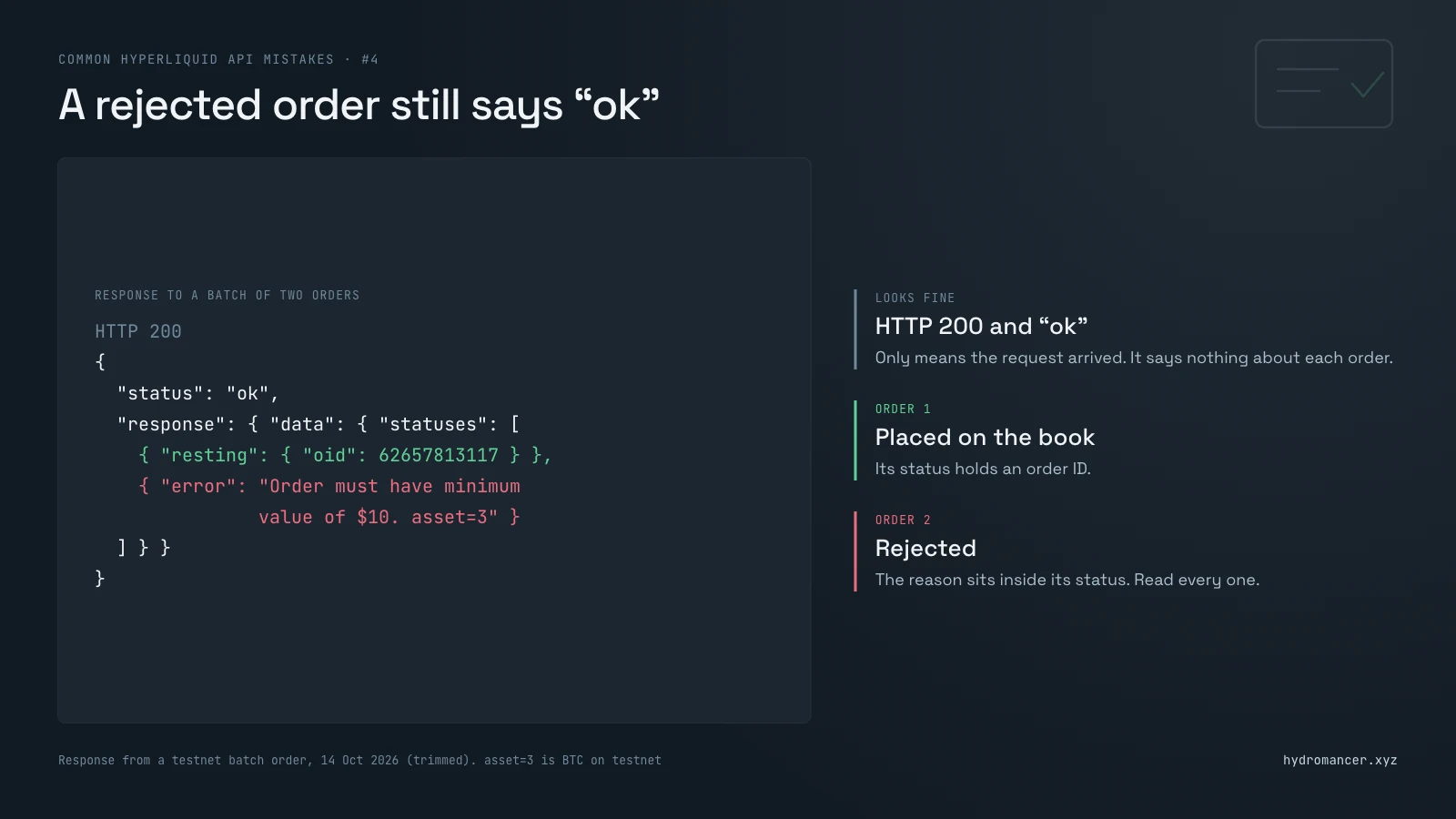
#4: Rejected orders that still return "status": "ok"
A rejected order still comes back as HTTP 200 with "status": "ok". The error sits inside, one status per order. In a batch of two where the second order is too small, the response looks like this:
{"statuses": [{"resting": {"oid": 62657813117}},
              {"error": "Order must have minimum value of $10. asset=3"}]}
The first order was placed and the second wasn't. Read every status, not just the HTTP code. These are the messages you'll see:
| What you send | Error |
|---|---|
| An order worth $5 | Order must have minimum value of $10. asset=3 |
| A BTC price of 49887.3 (6 significant figures; the limit is 5) |
Price must be divisible by tick size. asset=3 |
A size with more decimals than szDecimals |
Order has invalid size. |
| A post-only order priced through the book |
Post only order would have immediately matched, bbo was 83145@83146. asset=3 |
| An IOC order far from the market |
Order could not immediately match against any resting orders. asset=3 |
| A cancel for an order that doesn't exist |
Order was never placed, already canceled, or filled. asset=3 |
| A spot asset ID that doesn't exist (99999) |
Invalid spot |
asset=3 is BTC's asset ID on testnet.
#5: The WebSocket disconnects after 60 seconds
Quiet channels go a minute without a message and the server closes the connection. Send {"method": "ping"} every 50 seconds or so; the server replies with {"channel": "pong"}.
#6: The "User or API Wallet does not exist" error
This is what most signing mistakes look like. The server works out who signed a request from the signature itself. If anything about the signature is off, it gets a different address, one that has never been registered, and rejects the request with that address in the message:
"User or API Wallet 0x7c52cc7bf673e706f8fc886d7def58e34106bf32 does not exist."The same message comes back for three different mistakes:
If the address in the error isn't yours, the problem is the signing, not the account. An SDK handles the network and number formatting for you, but it can't approve the key: that still has to happen on the API page.
#7: "Invalid nonce" and "Action already expired" errors
Every signed request carries a nonce: a number that can only be used once, normally the current time in milliseconds. The server rejects reused and stale ones:
| What you send | Error |
|---|---|
| The same nonce twice | Invalid nonce: duplicate nonce 1791948143833 |
| A nonce from 3 days ago | Invalid nonce: nonce too low … |
An expiresAfter time that had already passed |
Action already expired |
Two processes sharing one API wallet can hit the first error, which is why each bot should have its own.
#8: Duplicate orders after a timeout
If an order request times out, the order may still have been placed. Sending it again can leave you with two, and a client order ID doesn't prevent that on its own. We sent the same order twice with the same cloid, and both were accepted:
{"resting": {"oid": 62658938378, "cloid": "0xa6c4…e885"}}
{"resting": {"oid": 62658938680, "cloid": "0xa6c4…e885"}}   <- second order, same cloid
(The cloid is shortened here for display; a real one is 0x plus 32 hex characters.)
So check before you resend. orderStatus with the cloid returns the order if it exists, or {"status": "unknownOid"} if Hyperliquid has no order with that ID:
from hyperliquid.info import Info
from hyperliquid.utils import constants
from hyperliquid.utils.types import Cloid

info = Info(constants.TESTNET_API_URL, skip_ws=True)
MAIN = "0x..."                                            # your main account's address
cloid = Cloid.from_str("0x00000000000000000000000000000001")  # the cloid you sent

r = info.query_order_by_cloid(MAIN, cloid)
print(r)   # {'status': 'unknownOid'} if no order has this cloid
Wait a few seconds after the timeout before checking, since the original request may still be on its way. If it's still unknownOid, the order wasn't placed and you can send it again.
What changes with Hydromancer?
The official API is free, and it's enough for a bot trading one account or a dashboard watching a few markets. It gets harder when you need to:
Hydromancer uses the same request formats with higher limits:
Wallet intelligence tool Cielo and social trading platform fomo both run their Hyperliquid integrations on it (customers).
Hydromancer starts at $300 a month, and early-stage teams may qualify for free access. Or compare data sources in How to get Hyperliquid data.
FAQ
Is the Hyperliquid API free?
Yes. Reading data and trading through the official API are free. You pay normal trading fees on orders, and requests are rate-limited.
Do I need an API key for the Hyperliquid API?
Not to read data. To trade, you need an API wallet approved by your account, which signs each request. Create one under More → API in the Hyperliquid app; it can stay valid for up to 180 days, and it can't withdraw funds.
Does Hyperliquid have a testnet API?
Yes, at https://api.hyperliquid-testnet.xyz, with the same requests as mainnet. Hyperliquid's faucet gives 1,000 mock USDC once to addresses that have deposited on mainnet. Circle's faucet gives 20 USDC every 2 hours on HyperEVM testnet, with no deposit needed.
Is there an official Hyperliquid Python SDK?
Yes: hyperliquid-python-sdk on Hyperliquid's GitHub. It handles signing, which is the hardest part to get right.
How far back does Hyperliquid's API history go?
Not far. The docs limit fills to the most recent 10,000 (for a very active wallet, that can be just the last 10 hours or so) and candles to the most recent 5,000. For older data, use an archive such as Reservoir (see Hyperliquid historical data).
What's the difference between the Hyperliquid API and an RPC?
The API serves HyperCore, the order-book exchange. An RPC serves HyperEVM, the smart-contract chain. See Hyperliquid RPC vs data API.
Read next

How to Build a Hyperliquid Whale Tracker (Live Positions, Fills and Alerts)
Find the biggest traders on Hyperliquid, see what they hold and get an alert when they move, first with the official Hyperliquid API, then without its limits.
Read ↗
How to Build with Liquidation Data from Hyperliquid
Learn how to build a Hyperliquid liquidation dashboard with historical data, live events and reliable monitoring.
Read ↗
How to set up a Hyperliquid non-validator node
A dropped peer can stall your node for 10–30 seconds. Discover how Hydromancer engineers set up a Hyperliquid non-validator — machine, peers, alerts, and flags.
Read ↗