Hyperliquid API Rate Limits Explained (With Fixes)
Hyperliquid’s API allows 1,200 weight points per minute per IP, plus address and WebSocket limits. How each works, and three ways to send fewer requests.

Hyperliquid’s official REST API has a shared limit of 1,200 weight points per minute per IP. Trading actions also face separate address-based limits, while WebSocket connections and subscriptions have their own caps. Increasing your polling interval can help with one limit without solving the others.
The practical question is not just “How many requests can I send?” It is “Which requests does my application need to make?”
This guide explains the limits, then works through three examples: refreshing a wallet dashboard, streaming order books and backfilling trade history.
First, identify which limit you are hitting
| Symptom | What to check | Practical response |
|---|---|---|
| REST requests are throttled across several services | Shared per-IP weight budget | Account for every service using that IP; batch or reduce reads |
| Trading actions are restricted despite light REST traffic | Address-based action allowance | Inspect the address’s usage; reduce unnecessary actions |
| More user subscriptions cannot be added | WebSocket user and subscription caps | Check distinct users, not just connection count |
| Older fills never appear after repeated requests | Historical-data availability | Change the data source, not the retry interval |
| Actions are constrained during heavy exchange activity | Congestion-based allocation | Avoid duplicate actions and unnecessary cancel retries |
These are different mechanisms. In particular, moving market-data reads to another provider does not remove Hyperliquid’s limits on trading actions.
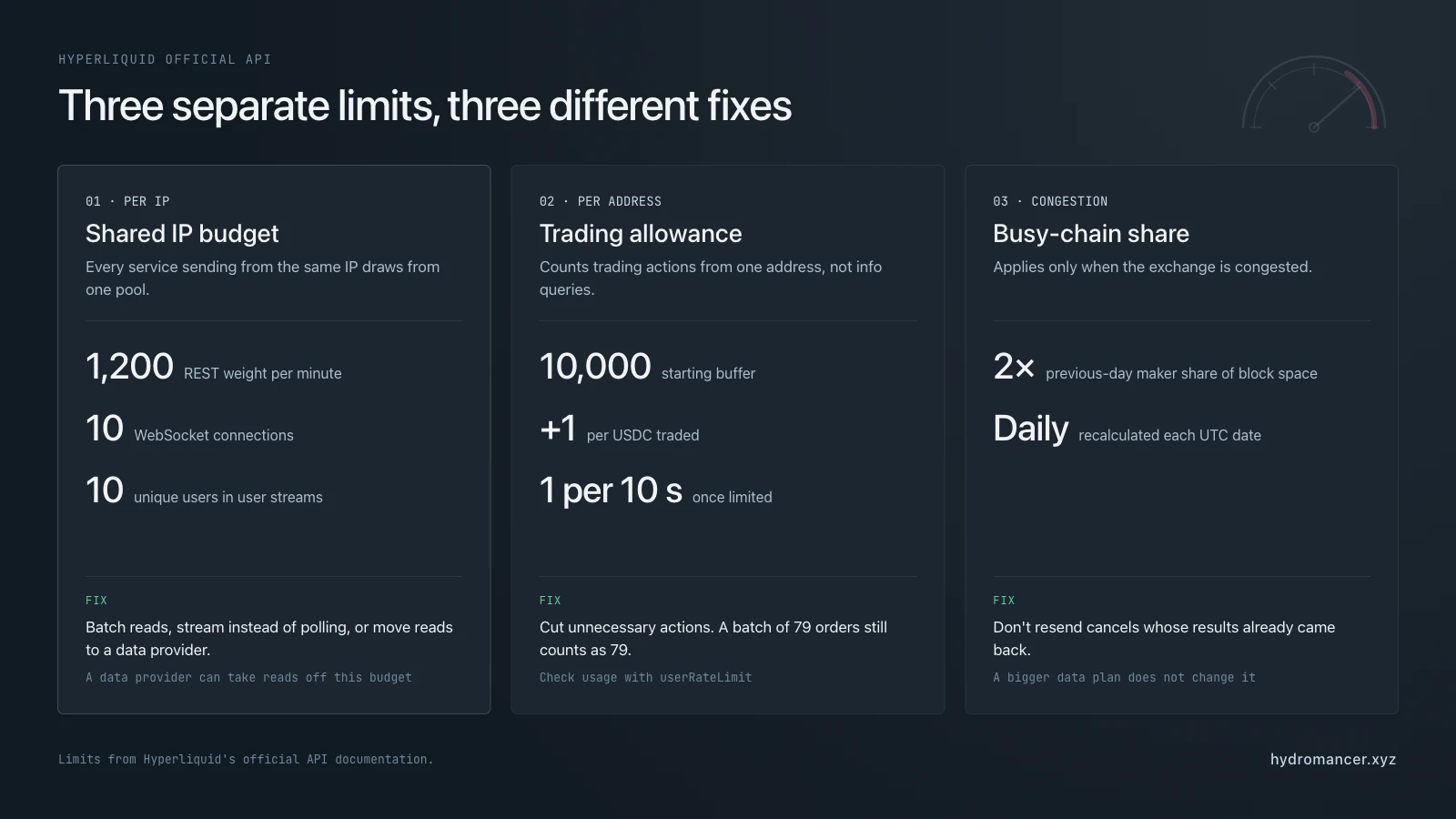
System 1: Per-IP limits
REST: request weight, not simply request count
The official REST API combines requests into a 1,200-weight-per-minute budget per IP. Different requests consume different amounts.
| Request | Official weight |
|---|---|
l2Book, allMids, clearinghouseState, orderStatus, spotClearinghouseState, exchangeStatus | 2 |
userRole | 60 |
| Other documented info requests | 20, before applicable surcharges |
| Exchange request | 1 + floor(batch_length / 40) |
Historical endpoints such as userFills, userFillsByTime, historicalOrders, fundingHistory and userFunding add weight for returned items. The surcharge is one point per 20 items; candleSnapshot adds one per 60 items.
For example, a userFills response containing 2,000 fills costs 120 points: 20 base points plus 100 for the returned fills. Ten such responses consume 1,200 points—the entire minute’s budget, before any other requests.
This matters when a dashboard and trading service share an outbound IP. Their REST reads and exchange requests draw from the same IP budget. Heavy data fetching can leave less capacity for placing or cancelling orders.
WebSocket: connections are only one constraint
The official limits apply per IP:
| Limit | Allowance |
|---|---|
| Concurrent connections | 10 |
| New connections per minute | 30 |
| Total subscriptions | 1,000 |
| Unique users across user-specific subscriptions | 10 |
| Messages sent to Hyperliquid per minute | 2,000 |
Simultaneous inflight post messages | 100 |
Opening more connections from the same IP does not raise the ten-user cap. A wallet tracker needs to count the distinct users in its subscriptions, not just its sockets.
For a broader explanation of available streams, see Hyperliquid data feeds: every real-time stream, explained.
HyperEVM RPC
The public rpc.hyperliquid.xyz/evm endpoint allows 100 JSON-RPC requests per minute per IP. This is a separate interface from the HyperCore info and exchange APIs; its allowance should not be treated as their request budget.
System 2: Address-based trading limits
Hyperliquid also limits trading actions per address. The allowance grows by one request per USDC of cumulative traded volume, with an initial buffer of 10,000 requests. Once rate-limited, an address is allowed one request every ten seconds. These limits apply to actions, not info queries, and subaccounts are treated as separate users.
Three details matter:
- Cancels have additional headroom. Their cumulative limit is
min(limit + 100,000, limit × 2), wherelimitis the normal action allowance. This is extra capacity, not unlimited cancellations. - Batching does not reduce address usage. A batch of 79 orders is one HTTP request with an IP weight of two, but it still counts as 79 requests against the address allowance.
- Open orders have a separate cap. The default is 1,000, increasing by one per 5 million USDC of volume, up to 5,000. When an account already has at least 1,000 open orders, new reduce-only and trigger orders are rejected.
If actions are throttled while data queries still work, inspect the official userRateLimit response. It exposes cumulative volume and request-usage fields; looking only at your HTTP requests per second can miss the actual constraint.
System 3: Congestion limits
During high congestion, an address is limited to twice its previous-day maker share of block space. The share is calculated once per UTC date and uses the same asset scaling as volume contributions toward fee tiers.
A larger data-provider plan does not change that allocation. Under congestion, avoid repeatedly resending cancels whose results have already been returned. Separate the need for fresher market data from the need to submit another trading action.
During congestion, Hyperliquid weighs a batched action by its batch size plus a fixed per-action weight, so batching orders or cancels together lowers your usage under this limit.
The history limit that retries cannot fix
The official userFills endpoint returns at most the 2,000 most recent fills. userFillsByTime returns at most 2,000 fills per response and makes only the most recent 10,000 fills available.
That is a data-availability limit, not just a throughput limit. Waiting for a new minute or retrying the same query does not recover records outside the endpoint’s available history.
For older records, choose a source with the coverage you need. Check the dataset, market and date range rather than treating “historical data” as a promise of complete history for every address.
What changes with Hydromancer?
Hydromancer’s data API uses tiered, per-key allowances rather than the official API’s per-IP REST budget. The published REST and WebSocket limits are:
| Hydromancer allowance | Starter | Growth | Scale |
|---|---|---|---|
| REST weight per minute | 5,000 | 20,000 | 50,000 |
| WebSocket connections | 50 | 500 | 1,000 |
| Total subscriptions | 500 | 5,000 | 10,000 |
| Messages sent to Hydromancer per minute | 300 | 3,000 | 6,000 |
l2Book coins | 10 | 50 | 100 |
The REST weight table and WebSocket limits are the references to use for capacity planning. Weights are provider-specific; an official API weight point is not a universal unit that transfers between providers.
Hydromancer’s default REST request weight is two, but exceptions include ten-point historical-fill requests, twenty-point performance endpoints, hundred-point builder-approved history endpoints and per-user batch pricing. Certain market-data snapshots also have a separate limiter: five calls per ten minutes, with l4Book allowing ten per five minutes.
For supported multi-address WebSocket feeds, each address counts toward the total subscription allowance. “Unlimited per key” in a channel-specific row does not remove the plan’s total subscription cap. All-market feeds also have separate permission requirements.
The benefit is therefore not “no limits.” It is a different data allowance and additional ways to organise queries. Reads sent to Hydromancer no longer consume the official API’s IP budget, but trading actions sent to Hyperliquid remain subject to its rules.
Hyperliquid vs Hydromancer Rate Limit: Side-by-side Comparison & Test
The tables above are published limits. Here’s what they mean for the requests people actually send, tested side by side on 30 October 2026. Hyperliquid’s API was called from a server in Tokyo, and Hydromancer’s with an API key. Hydromancer’s weight for every request is listed in its rate-limit table.
How to read the tables: weight is the price of a request, paid out of a per-minute allowance, so a lower weight is better. “Per minute” is how many of that one request fit in a minute if you send nothing else, so a higher number is better. Hyperliquid’s budget is 1,200 weight per minute per IP address, shared with your trading. Hydromancer’s is per API key: 5,000 on Starter, 20,000 on Growth and 50,000 on Scale.
#1: Fill history: userFillsByTime
| Hyperliquid | Hydromancer | |
|---|---|---|
| Weight of a full page (2,000 fills) | 120 (20, plus 1 per 20 fills) | 10 |
| Full pages per minute | 10 | 500 / 2,000 / 5,000 |
| 60-day window, active wallet | 2,000 fills, all from the last day | 2,000 fills from the start of the window, with more pages after |
| Week of 28 July 2025, same wallet | 0 fills | 2,000 fills, from 28 July 00:10 UTC |
Hyperliquid keeps only each wallet’s latest 10,000 fills, so for a busy wallet an older window comes back empty. Waiting or retrying doesn’t change that.
Hydromancer docs: userFillsByTime, and userFills for the latest 2,000 fills.
#2: Wallet positions: clearinghouseState vs batchClearinghouseStates
| Hyperliquid | Hydromancer | |
|---|---|---|
| One wallet | Weight 2, 600 per minute | Weight 2, 2,500 / 10,000 / 25,000 per minute |
| 100 wallets | 100 requests, weight 200 | 1 request, weight 100 |
| Refreshes of 100 wallets per minute | 6 | 50 / 200 / 500 |
| Tested | 100 wallets in one request: 100 returned, 0 failed |
Hydromancer docs: clearinghouseState and batchClearinghouseStates.
#3: Funding payments: userFunding
| Hyperliquid | Hydromancer | |
|---|---|---|
| Rows per response | Up to 500 | Up to 2,000 |
| Weight of a full response | 45 (20, plus 1 per 20 rows) | 10 |
| Full responses per minute | 26 | 500 / 2,000 / 5,000 |
Hydromancer docs: userFunding.
#4: Candles: candleSnapshot
| Hyperliquid | Hydromancer | |
|---|---|---|
| Weight of a full response (5,000 candles) | About 103 (20, plus 1 per 60 candles) | 20 |
| Full responses per minute | 11 | 250 / 1,000 / 2,500 |
| BTC 1-minute candles, 1 to 3 August 2025 | 0 candles | 4,315 candles |
| BTC 1-second candles, last hour | Rejected: 1-second candles aren’t supported | 2,860 candles |
Hyperliquid keeps only about the latest 5,000 candles for each market and interval.
Hydromancer docs: candleSnapshot.
#5: Order books: l2Book
| Hyperliquid | Hydromancer | |
|---|---|---|
| Polling one book | Weight 2, 600 per minute (shared with everything else) | 60 requests per 5 minutes, on its own limit |
| Live updates | Stream | Stream, with several coins in one subscription |
This is the one row where Hyperliquid allows more polling. Hydromancer’s order-book requests are meant for an occasional snapshot, and its stream is the way to follow a book continuously (see “Stream order books instead of polling them” below).
Hydromancer docs: l2Book for snapshots, and the l2Book stream for live updates.
What hitting the limit looks like
| Hyperliquid | Hydromancer | |
|---|---|---|
| When it happened in our test | The 15th full userFills request in under a second | The 6th request in 10 minutes to globalStakingSummary, which allows 5 |
| Error | HTTP 429 with an empty body | HTTP 429 with a message, the points remaining and required, and how many seconds to wait |
| Headers on every response | None about the limit | X-RateLimit-Cost, X-RateLimit-Remaining, X-RateLimit-Limit and X-RateLimit-Reset (plus Retry-After on a 429) |
| Working again | After about 5 seconds | After the time given in Retry-After |
Because Hydromancer reports the cost and the remaining budget on every response, your code can slow down before it hits the limit instead of finding out from an error. The headers and the recommended retry approach are explained in Hydromancer’s handling rate limits guide.
Three practical ways to reduce API requests
The examples below are calculations using published limits and documented request formats, not measured performance benchmarks. They exclude unrelated traffic and retries; production applications should leave headroom rather than operate at a limit continuously.
1. Refresh 100 wallets with a batch request
Suppose a dashboard refreshes the native perpetual positions of 100 wallets every ten seconds. Calling the official clearinghouseState endpoint separately for each wallet produces 600 requests per minute. At two points each, that consumes the full 1,200-weight IP budget.
Hydromancer’s batchClearinghouseStates accepts multiple addresses in one request. Its published weight is two points per user, capped at 100 points per request. The same refresh schedule therefore uses six batch requests and 600 Hydromancer weight points per minute.
| Approach | Requests per minute | Weight per minute |
|---|---|---|
| Official API: 100 individual requests per refresh | 600 | 1,200 against the official IP budget |
| Hydromancer: one 100-wallet batch per refresh | 6 | 600 against the Hydromancer key budget |
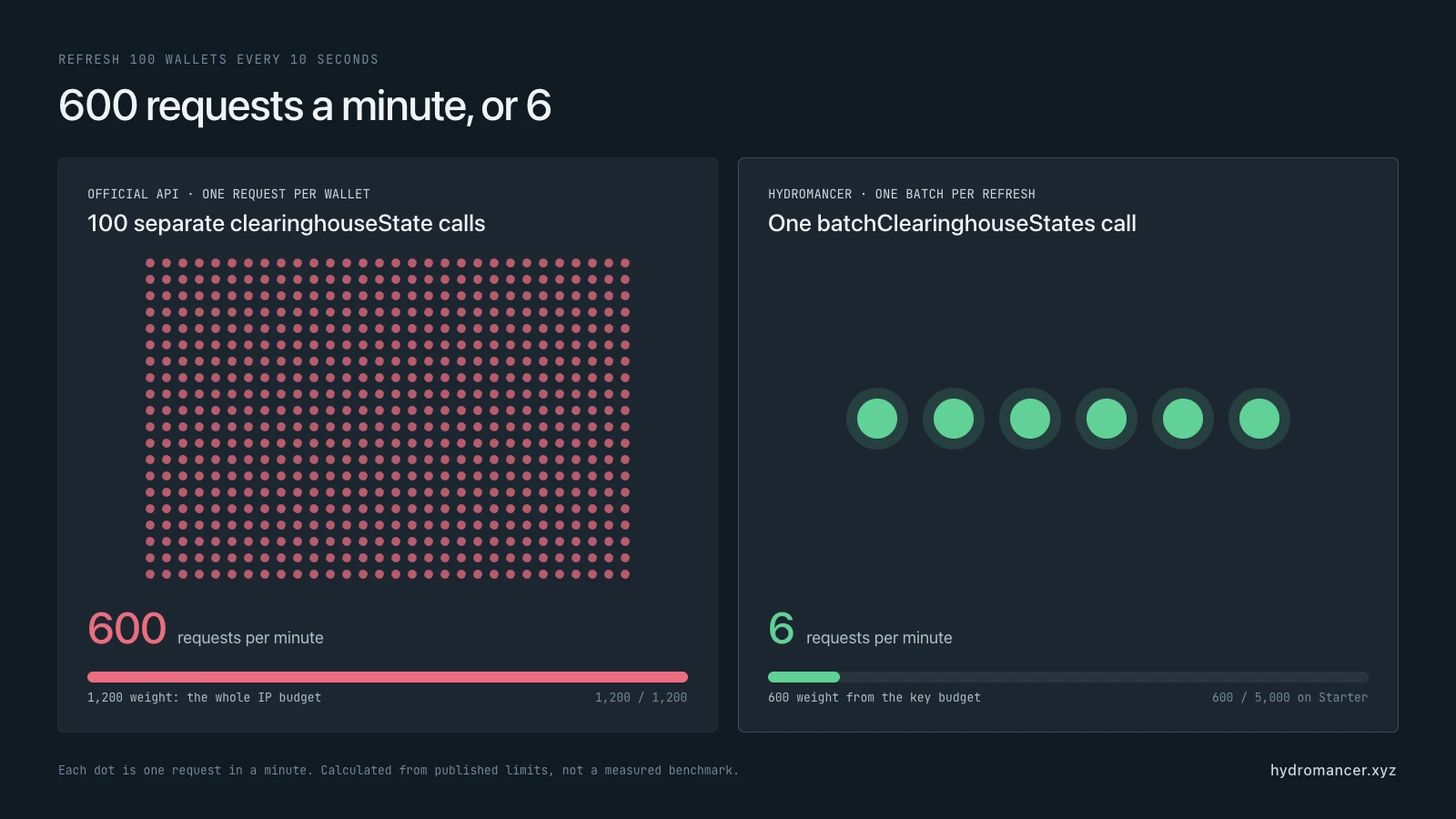
This is not just a larger allowance: it also reduces the number of HTTP requests your application manages.
Implementation details matter:
- Put the wallet addresses in the endpoint’s
usersarray. Omittingdexselects the native DEX. - Inspect both
successful_statesandfailed_wallets. Retry failed addresses rather than repeating successful work. - Treat
ALL_DEXESseparately. It reduces the maximum batch size from 1,000 to 100 users, and the published cost is multiplied by the number of DEXes.
See the batchClearinghouseStates request and response schema.
2. Stream order books instead of polling them
Polling ten markets once per second creates 600 official l2Book requests per minute. At two points per request, that also consumes the entire 1,200-weight minute.[1]
For a continuously updating display, use a WebSocket stream. The official API supports live data subscriptions; Hydromancer additionally documents multi-coin l2Book subscription messages.[1][6]
For example, send this payload over an authenticated Hydromancer WebSocket connection:
{
  "method": "subscribe",
  "subscription": {
    "type": "l2Book",
    "coins": ["BTC", "ETH"]
  }
}
This is a subscription payload, not a complete connection client. Connection setup, heartbeat handling and reconnection still need to be implemented.
For a multi-coin subscription, data is an array of snapshots. Keep the latest snapshot for each coin and replace that coin’s stored book when a new snapshot arrives. Do not parse the array as a single book or apply full snapshots as incremental price-level changes.
Serve that cached state to your application rather than having each viewer poll upstream. This removes recurring REST book requests, but the WebSocket’s coin, subscription and message limits still apply.
Choose the amount of detail you actually need. Our BBO vs L2Book vs L4Book guide explains the trade-offs between top-of-book prices, aggregated depth and individual orders.
3. Backfill a fixed time range and save your progress
A backfill should move through history, not repeatedly download the latest page.
Hydromancer’s userFillsByTime supports time-range queries and a cursor composed of the last record’s time and txIndex, separated by an underscore. Its published request weight is ten points.
A practical backfill sequence is:
- Choose a fixed
startTimeandendTime, in Unix milliseconds. - Request the first page and save the returned records.
- Build the next cursor from the final record’s
timeandtxIndex. When a cursor is supplied,startTimeis ignored. - Keep the same
endTimeon subsequent requests so the target range does not keep moving. - Persist your checkpoint only after the page has been stored successfully. Use deduplication so retrying a page does not create duplicate records.
- Run requests through a bounded queue, leaving capacity for live application queries.
Do not replace the documented composite cursor with a timestamp-only shortcut. The API exposes both components for pagination.
Coverage still matters. Hydromancer documents full fill availability from 28 July 2025, with earlier history available for most traders but exceptions for some high-volume addresses. TWAP fills are included from 2 August 2025.
For bulk market research, downloading date-partitioned archive files may be more appropriate than querying wallets individually. Reservoir’s Hyperliquid historical S3 archive explains the datasets and access model. It requires no Hydromancer API key, but uses AWS requester-pays S3, so AWS request and transfer charges can apply.
Reservoir’s Hyperliquid page specifies complete data from 28 July 2025 onward. Check the relevant dataset’s coverage instead of assuming every record since the exchange’s launch is available.
Measure the workload before increasing capacity
Log the endpoint, request frequency, response status and retry count for each service. For WebSockets, track active subscriptions and reconnect attempts as well as connection count. This helps distinguish useful traffic from repeated failures or unnecessary refreshes.
Hydromancer’s apiUsage endpoint provides daily statistics by request type, including total, successful and failed requests, average processing time and billable tokens consumed.
The request body for a seven-day view is:
{
  "type": "apiUsage",
  "days": 7
}
Send it to the authenticated REST API using the apiUsage documentation. Daily totals are useful for finding expensive workloads, but they do not replace minute-level client logs for diagnosing bursts. Billable tokens should not be assumed to equal rate-limit weight points.
When a request is throttled, avoid immediate retry loops. Honour a retry delay if the service provides one; otherwise use bounded exponential backoff with jitter. For trading actions, reconcile the result before resubmitting rather than treating every timeout as proof that the original action failed.
Frequently asked questions
What is the Hyperliquid API rate limit?The official REST budget is 1,200 weight points per minute per IP. Endpoint weights vary. Trading actions also face address-based allowances and congestion limits, while WebSockets have separate connection, subscription and message caps.
Do data requests and orders share a rate limit?They share the official REST IP budget. Address-based limits apply to actions, not info queries. Moving reads to another data provider reduces use of the official IP budget but does not remove trading limits.
Does batching orders reduce rate-limit usage?It reduces IP-weight consumption compared with sending each order separately. A batch of 79 orders costs two IP-weight points, but still counts as 79 requests against the address allowance.
Can WebSockets eliminate rate-limit problems?They can replace repeated REST polling, but they have their own limits. The official service allows ten unique users across user-specific subscriptions per IP, regardless of how those subscriptions are divided between connections.
Why can’t I retrieve more than 10,000 fills?The official userFillsByTime endpoint only makes the most recent 10,000 fills available. To retrieve older records, use an archive or historical-data API with suitable coverage; retrying the official endpoint does not extend its history.
When your workload fits its limits and available history, you may not need another provider. First eliminate unnecessary polling and duplicate requests. Consider a different data source when you need more users, broader history, different query shapes or separate capacity for data reads.
The takeaway
Batch related reads, stream changing data and checkpoint historical backfills. Those changes address the work generating the traffic, rather than just increasing the number of requests you can send.
Keep trading-action limits separate from data access, and check coverage separately from throughput. A larger request allowance cannot recover missing historical records or change the exchange’s rules for placing orders.
Sources
#4: Hydromancer WebSocket Limits
#5: Batch Clearinghouse States (Hydromancer docs)
#6: L2 Book Streaming (Hydromancer docs)
#7: Historical Fills by Time (Hydromancer docs)
#8: Reservoir Overview (Hydromancer docs)
#9: Reservoir Hyperliquid Coverage (Hydromancer docs)
#10: API Usage Statistics (Hydromancer docs)
Read next

How to Build a Hyperliquid Copy Trading Bot
Build a copy trading bot on Hyperliquid: follow a trader's fills live, size each copy, re-check positions for missed trades, and know its limits.

Hyperliquid Leaderboard: How to Track Top Addresses' PnL
See Hyperliquid's top 10 traders by PnL over the last 365 days, then build your own leaderboard from public data and avoid its common traps.

How to Build a Hyperliquid Trading Bot
Learn how to build a Hyperliquid trading bot: a signal from market data, signed orders through Hyperliquid's API, risk limits and a kill switch, with examples.