How to Build a Hyperliquid Whale Tracker (Live Positions, Fills and Alerts)
Find the biggest traders on Hyperliquid, see what they hold and get an alert when they move, first with the official Hyperliquid API, then without its limits.

Ever wondered what the biggest traders on Hyperliquid are doing right now? Maybe you want to check a whale's position before you take a trade, get a heads-up when a big wallet starts selling, or give your own users a whale feed inside your app.
On Hyperliquid you can, because the whole exchange runs on-chain. Every position, trade and transfer is public, so anyone can see what whales hold and when they move. A whale tracker puts all of that in one place: who the big traders are, what they're holding, and an alert the moment they trade.
This guide shows you how to build one in three steps:
- Find whales: spot big trades and the wallets behind them.
- See what they hold: account size, open positions, entry prices and liquidation prices.
- Get live alerts: a message every time a whale trades.
Then we'll look at where the free official Hyperliquid API starts to get in your way as your watchlist grows, how builders work around it, and an easier way to do it with Hydromancer.
Trader, not a developer? Each step starts with what it does in plain English, so you can skip the code and still follow along. Developer? Every code snippet was tested against the live APIs on 8 October 2026. We show only the part that calls the API, and you'll need pip install requests websockets.
Step 1: Find whales by watching big trades
Whales give themselves away with big trades. Hyperliquid doesn't publish a list of its biggest traders, but it does show every trade as it happens, along with the two wallets behind it. Watch for large trades and you'll find large wallets.
On the official API, the trades WebSocket subscription streams every trade for a coin, and each trade's users field holds both wallets: buyer and seller.
import asyncio, json, websockets

async def watch_big_trades(coins, min_usd=100_000):
    async with websockets.connect("wss://api.hyperliquid.xyz/ws") as ws:
        for coin in coins:
            await ws.send(json.dumps({"method": "subscribe",
                                      "subscription": {"type": "trades", "coin": coin}}))
        async for raw in ws:
            msg = json.loads(raw)
            if msg.get("channel") != "trades":
                continue
            for t in msg["data"]:
                usd = float(t["px"]) * float(t["sz"])
                if usd >= min_usd:
                    buyer, seller = t["users"]          # both sides of the trade
                    print(f"{t['coin']} ${usd:,.0f}  buyer {buyer}  seller {seller}")

asyncio.run(watch_big_trades(["BTC", "ETH", "HYPE", "SOL"]))
In our test on BTC, ETH, HYPE and SOL, with the threshold lowered to $10,000, 45 seconds produced 57 trades. Two things to keep in mind:
- One side is often a market maker. Every trade has two wallets, and on busy coins one of them is usually a market-making bot rather than a whale placing a bet. Step 2 helps you filter by account size; you'll still want to exclude known market makers.
- Big orders arrive in pieces. A large market order fills against many resting orders, so it shows up as several smaller trades. Add up trades from the same wallet and timestamp if you want the full order size.
Step 2: See what a whale is holding
Once you have a wallet address, you can look up its whole account: how much money it holds, which positions are open, whether each one is long or short, the entry price, the leverage, and the price at which it would be liquidated.
On the official API, that's one clearinghouseState request per wallet:
import requests

INFO = "https://api.hyperliquid.xyz/info"

def get_account(address):
    r = requests.post(INFO, json={"type": "clearinghouseState", "user": address})
    r.raise_for_status()
    return r.json()

state = get_account(address)
print("account value", state["marginSummary"]["accountValue"])
for p in state["assetPositions"]:
    pos = p["position"]
    print(pos["coin"], pos["szi"], pos["positionValue"], pos["entryPx"], pos["liquidationPx"])
szi is the signed position size: positive is long, negative is short. Keep wallets whose account value or total position value clears your bar (say, $1M), and you have your whale list. In our test, 4 of the first 20 wallets from the trades stream held more than $1M, the largest about $45M.
One catch: many traders now use a unified account, which keeps their balance in spot instead of the perp account. For them, clearinghouseState shows only the margin in open positions, so check spotClearinghouseState as well, or you'll miss some of the biggest whales.
Step 3: Get an alert when a whale trades
Now the useful part: a message the moment a whale trades. On the official API, you subscribe to userFills (on the same subscriptions page) for each address:
async def follow(addresses):
    async with websockets.connect("wss://api.hyperliquid.xyz/ws") as ws:
        for address in addresses:
            await ws.send(json.dumps({"method": "subscribe",
                                      "subscription": {"type": "userFills", "user": address}}))
        async for raw in ws:
            msg = json.loads(raw)
            if msg.get("channel") != "userFills":
                continue
            data = msg["data"]
            if data.get("isSnapshot"):            # first message = recent history, not new trades
                continue
            for f in data["fills"]:
                print(data["user"], f["dir"], f["sz"], f["coin"], "@", f["px"])
Two details that trip developers up:
- Skip the snapshot. The first message for each address replays its recent fills (
isSnapshot: true). If you don't skip it, your bot fires a burst of stale alerts on every restart. - Send heartbeats. The server closes connections that go 60 seconds without a message. Quiet whales don't trade every minute, so send
{"method": "ping"}on a timer.
For deposits, withdrawals and liquidations, the userNonFundingLedgerUpdates subscription works the same way, also one address at a time.
Following 10 wallets for 40 seconds gave us 72 live fills. That's a working whale tracker. Now let's grow the watchlist.
What are the challenges of building a whale tracker on the official API?
The official API is free and complete enough to build this, but it's designed for trading your own account, not watching hundreds of others. As your watchlist grows, you'll run into four limits.
#1: There's no official list of whales or popular addresses to start from
The official API has no endpoint that ranks traders by size or profit, or separates humans from bots. You have to collect addresses from the trades stream yourself, filter out market makers, and wait for each whale to trade before you can find them.
Hyperliquid's own leaderboard page does rank traders, but the file behind it isn't part of the documented API, so it can change without notice. We downloaded it on 8 October 2026. It was a single 38.8 MB file listing 47,192 traders, 2,893 of them with at least $1M in their account.
That's a useful starting point, but the file shows only account size, profit and trading volume. It doesn't show what anyone is holding, and it doesn't say who is a bot. Sort it by monthly volume and the problem is clear:
- 0x85ecf584…: $63.2M account, $40.6B volume last month (642× its account)
- 0xf5d81a13…: $70.5M account, $25.9B volume last month (368× its account)
- 0x399965e1…: $25.1M account, $23.1B volume last month (923× its account)
- 0x8c625ff5…: $5.4M account, $21.9B volume last month (4,042× its account)
- 0x87f9cd15…: $117.7M account, $20.1B volume last month (171× its account)
Top 5 wallets by monthly volume on Hyperliquid's leaderboard file, 8 October 2026.
A wallet that trades its whole account 4,000 times in a month looks far more like a market maker or trading bot than a whale taking a position. The leaderboard doesn't label them, so separating the two is up to you. Then you still need to look up every remaining wallet's positions one at a time, which leads to the next problem.
#2: Positions come one wallet at a time
Each clearinghouseState request covers one address, and unified-account wallets need a spotClearinghouseState request too. Hyperliquid gives every IP address (roughly, every server) a budget of 1,200 points a minute, and each lookup costs 2, so you can check at most about 600 wallets a minute, and only if your app does nothing else.
To see what that means in practice, we looked up the 50 largest accounts from the leaderboard one after another, from Singapore:
50 wallets checked in 31.6 seconds
median 537 ms per wallet, slowest 1,214 ms
272 open positions found
At that pace, checking all 2,893 wallets with $1M or more would take about 30 minutes. Sending requests in parallel helps, but the budget still caps you at about 600 wallets a minute. A full refresh would take nearly 5 minutes and use your entire budget, leaving nothing for the rest of your app. By the time you finish, the first whales on your list may already have changed their positions.
#3: Live alerts are capped per IP
Hyperliquid's rate limits page sets the limit:
Maximum of 10 unique users across user-specific websocket subscriptions
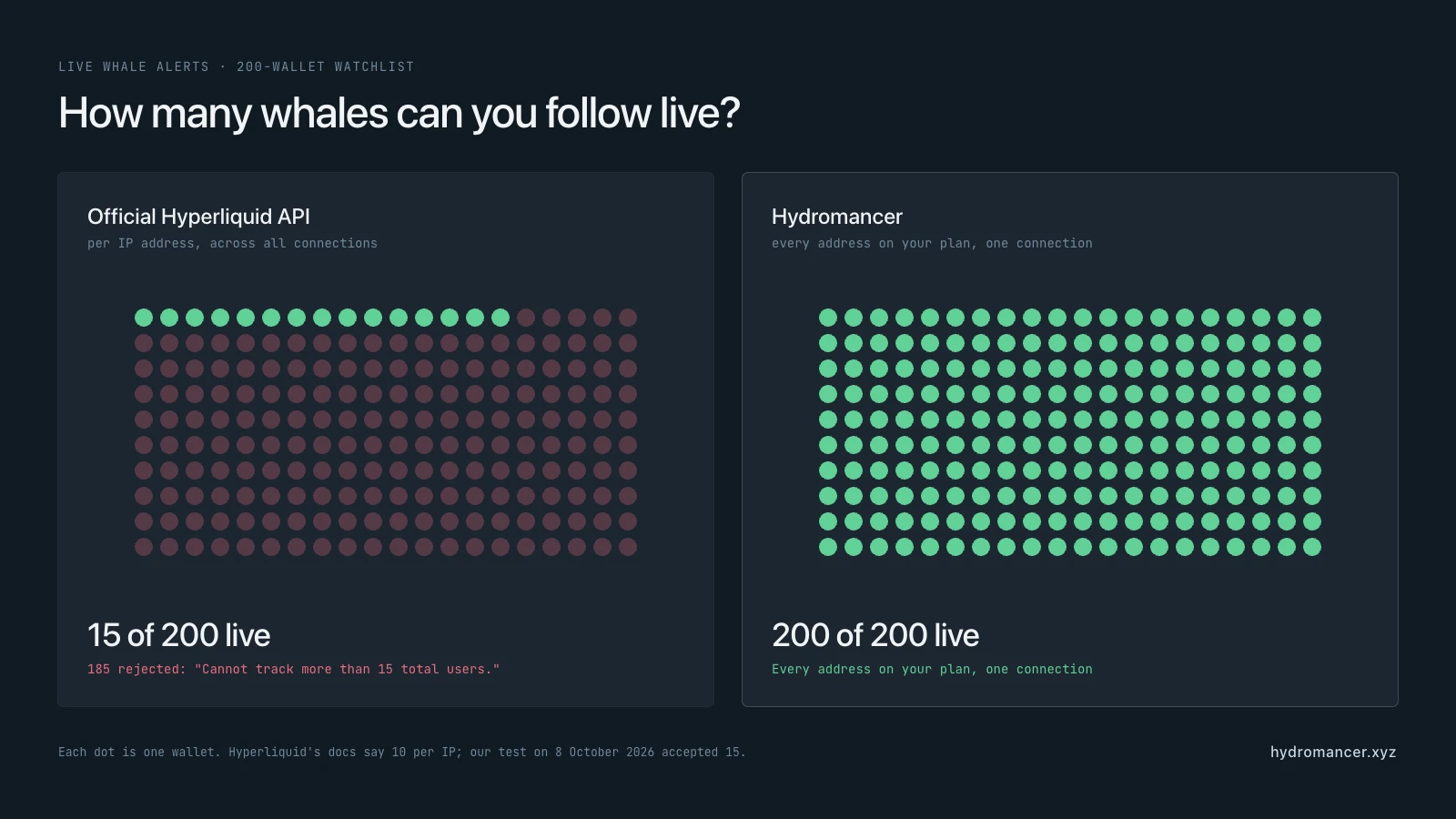
In our tests the server was slightly more generous, accepting 14 to 15 wallets before rejecting the rest with Cannot track more than 15 total users.
Opening a second connection doesn't help, because the cap counts every connection from the same IP address. We subscribed to 10 wallets on one connection and 10 more on a second:
Connection A: 10 wallets accepted, 0 rejected
Connection B:  4 wallets accepted, 6 rejected
  "Cannot track more than 15 total users."
Either way, a watchlist of 200 whales won't fit on one server. Beyond the first 10–15 wallets, you'd only find out about a whale's trade minutes later, which is often too late to act on.
#4: A dropped connection means a gap
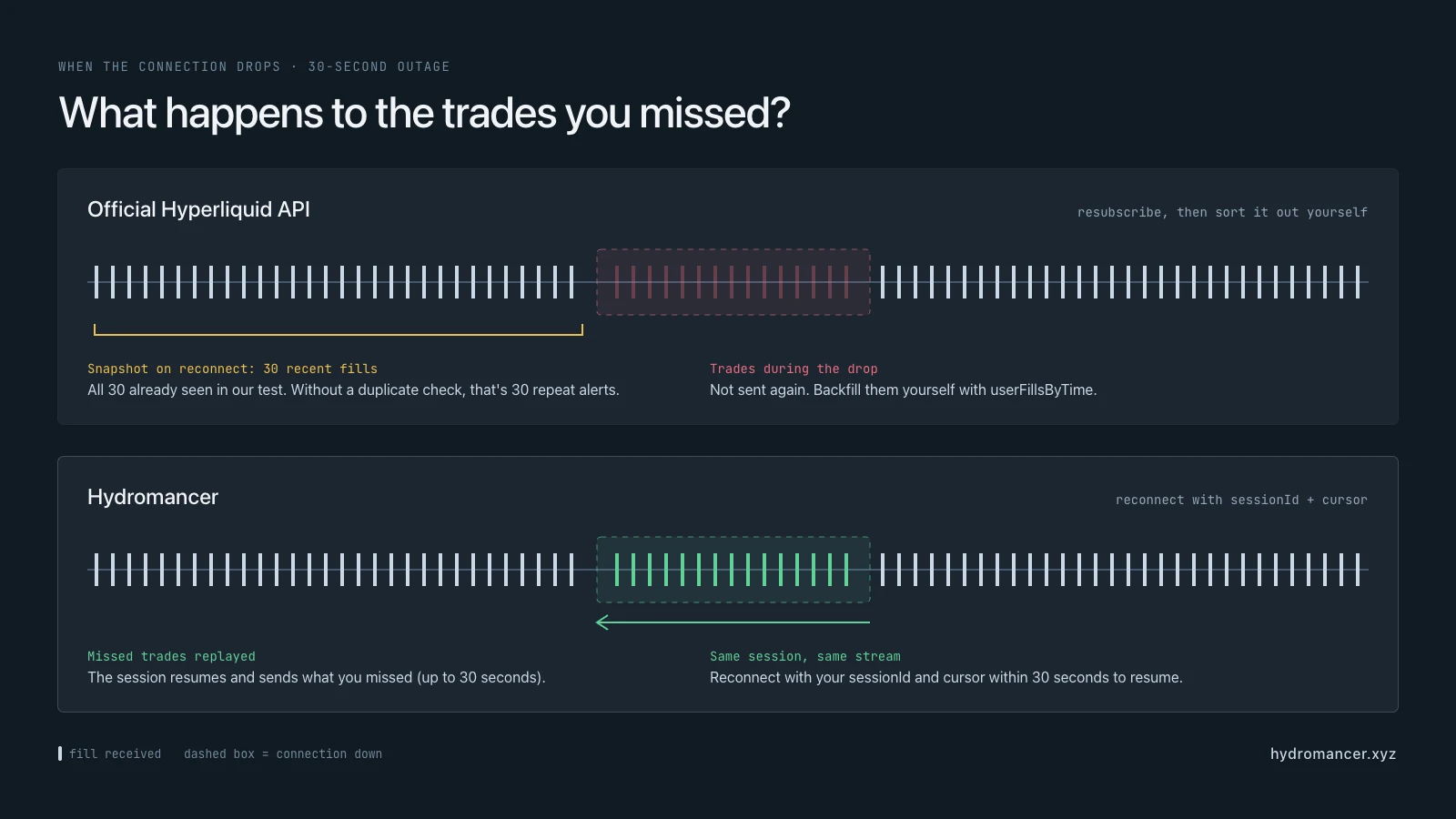
Live connections drop from time to time. When yours does, the official API doesn't pick up where you left off. You subscribe again, get a fresh batch of recent fills, and have to work out yourself which trades you missed in between.
We tested this by following an active BTC trader, cutting the connection for 30 seconds, then reconnecting:
Before the drop:            32 fills received
After reconnecting:         snapshot of 30 recent fills
Already seen before:        30 of 30
Time covered by snapshot:   4.5 minutes
Two things stand out. First, every fill in the snapshot was one we already had, so a tracker that doesn't check for duplicates would have sent 30 repeat alerts. Second, in both of our tests the snapshot held exactly 30 fills, which for this trader covered just 4.5 minutes. If your tracker is down for longer than that, the older trades aren't in the snapshot at all, and you need extra userFillsByTime requests to fill the gap.
If you skip those steps, your tracker can quietly miss a whale's trade, or alert you twice about the same one.
How builders work around these limits
Stream the top whales, poll the rest. Keep your 10–15 most important wallets on live userFills, and check everyone else on a timer with userFillsByTime:
def new_fills(address, since_ms):
    r = requests.post(INFO, json={"type": "userFillsByTime", "user": address,
                                  "startTime": since_ms, "aggregateByTime": True})
    r.raise_for_status()
    return r.json()
The catch is the budget. Each userFillsByTime check costs at least 20 points, so one IP can check about 60 wallets a minute. A 200-wallet watchlist would refresh roughly every 3–4 minutes, which is too slow for alerts. Each call also returns at most 2,000 fills, and only a wallet's 10,000 most recent fills are available.
Spread across more IPs. Each server gets its own user cap and request budget. It works, but now you're running a small fleet and keeping its watchlists in sync.
Run your own node. A Hyperliquid non-validator node gives you the full stream of everything on-chain, with no per-IP caps. In return you build the indexing, position tracking and alerting yourself, on hardware that starts around $835 a month plus engineering time.
All three work. If you'd rather spend that time on your product than on plumbing, this is where a data API helps.
What changes with Hydromancer?
Hydromancer adds endpoints made for watching many wallets at once. Here's the same tracker, step by step. Requests need an API key (how to get one).
Find and size up whales in two requests
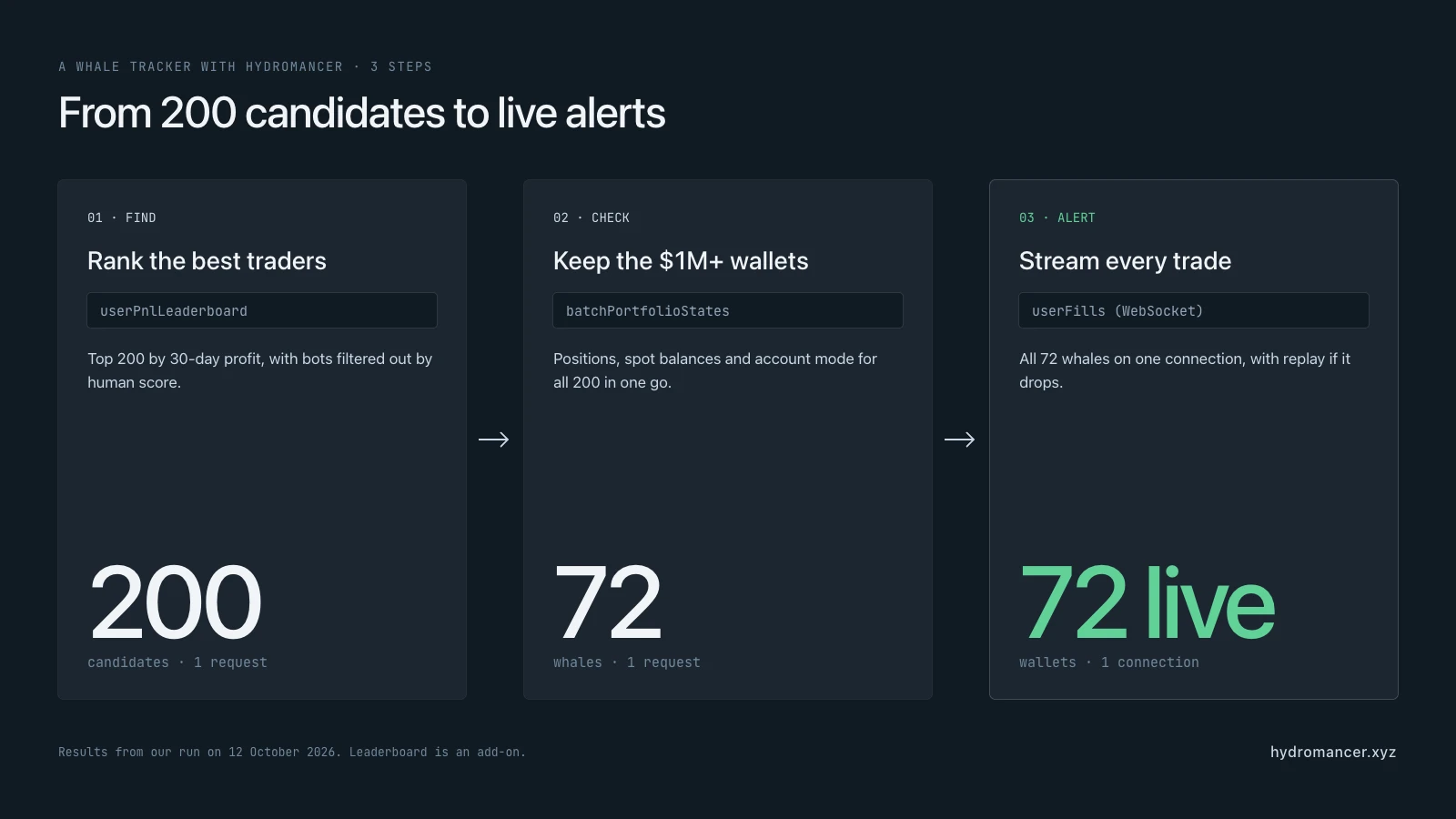
Instead of waiting for whales to show up in the trades stream, you can start from a ranked list. userPnlLeaderboard (an add-on) ranks traders by realized profit (PnL), win rate or volume, and its filters drop one-off wallets (minTrades, minDaysActive) and likely bots (minHumanScore). Then batchPortfolioStates returns positions, spot balances and account mode for up to 500 addresses in one request, so unified-account whales are counted correctly. If you only need perp positions, batchClearinghouseStates takes up to 1,000.
import os, requests

URL = "https://api.hydromancer.xyz/info"
HEADERS = {"Authorization": f"Bearer {os.environ['HYDROMANCER_API_KEY']}"}

board = requests.post(URL, headers=HEADERS, json={
    "type": "userPnlLeaderboard", "window": "30d", "sortBy": "totalPnl",
    "limit": 200, "minTrades": 20, "minDaysActive": 5, "minHumanScore": 60,
}).json()
candidates = [u["user"] for u in board["users"]]

states = requests.post(URL, headers=HEADERS, json={
    "type": "batchPortfolioStates", "users": candidates,     # up to 500 per request
}).json()

STABLES = {"USDC", "USDT0", "USDH", "USDE"}

def balance(state):
    spot = sum(float(b["total"]) for b in state["spotClearinghouseState"]["balances"]
               if b["coin"] in STABLES)
    if state["userAbstraction"] in ("unifiedAccount", "portfolioMargin"):
        return spot                                            # these accounts keep their money in spot
    return float(state["clearinghouseState"]["marginSummary"]["accountValue"]) + spot

whales = [(address, state) for address, state in states["successful_states"]
          if balance(state) >= 1_000_000]
In our test on 12 October 2026, those two requests turned the top 200 traders of the last 30 days into 72 whales with at least $1M. Counting only perp account value would have found just 31, because most of these traders use unified accounts. On the official API that would have taken up to 400 separate lookups (perp and spot for each wallet) and no ranking at all. Add "dex": "ALL_DEXES" to include positions on HIP-3 markets (up to 100 addresses per request). The perp account value then comes back per DEX.
Live alerts for every whale on one connection
On Hydromancer's WebSocket API, userFills and userNonFundingLedgerEvents take a whole list of addresses, so trades, deposits, withdrawals and liquidations for all your whales come through one connection:
WS_URL = f"wss://api.hydromancer.xyz/ws?token={os.environ['HYDROMANCER_API_KEY']}"

async def follow(addresses):
    async with websockets.connect(WS_URL, max_size=None) as ws:
        async for raw in ws:
            msg = json.loads(raw)
            if msg["type"] == "connected":
                await ws.send(json.dumps({"type": "subscribe", "subscription": {
                    "type": "userFills", "addresses": addresses, "aggregateByTime": True}}))
                await ws.send(json.dumps({"type": "subscribe", "subscription": {
                    "type": "userNonFundingLedgerEvents", "addresses": addresses}}))
            elif msg["type"] == "ping":
                await ws.send(json.dumps({"type": "pong"}))
            elif msg["type"] == "userFills":
                for address, f in msg["fills"]:
                    print(address, f["dir"], f["sz"], f["coin"], "@", f["px"])
            elif msg["type"] == "userNonFundingLedgerEvents":
                for e in msg["events"]:
                    print(e["user"], e["eventType"], e.get("amount") or e.get("liquidatedNtl"))
We subscribed all 200 leaderboard addresses on a single connection. Compare that with the 15-user cap per IP on the official API. A few things this handles for you:
aggregateByTime: truemerges the pieces of one big order into a single fill, so a $1M order triggers one $1M alert instead of many small ones. In a 45-second test, aggregation surfaced 9 trades over $100k where the raw stream showed 4.- Here the server sends the
ping, and you reply withpong. - Dropped connections resume. The
connectedmessage includes asessionId. Reconnect with&sessionId=...&cursor=...(the cursor comes from the last message) and Hydromancer replays what you missed, up to 30 seconds, without resubscribing. We cut the connection mid-test, and fills kept arriving on the resumed session.
Catch whales you aren't following yet
The leaderboard finds proven traders, but new whales appear every day. allFills streams every trade on the coins you pick, with each trade already attributed to its wallet. It's the trades-stream idea from step 1, with aggregation and HIP-3 support:
async def watch_big_trades(coins, min_usd=250_000):
    async with websockets.connect(WS_URL, max_size=None) as ws:
        async for raw in ws:
            msg = json.loads(raw)
            if msg["type"] == "connected":
                await ws.send(json.dumps({"type": "subscribe", "subscription": {
                    "type": "allFills", "coins": coins, "aggregateByTime": True}}))
            elif msg["type"] == "ping":
                await ws.send(json.dumps({"type": "pong"}))
            elif msg["type"] == "allFills":
                for address, f in msg["fills"]:
                    usd = float(f["px"]) * float(f["sz"])
                    if usd >= min_usd:
                        print(address, f["dir"], f["coin"], f"${usd:,.0f}")
In testing, it flagged a wallet we weren't following opening a $400,908 ETH long within 40 seconds of starting. Per-coin allFills is included in every plan (20, 100 or 200 coins). HIP-3 markets use their DEX prefix, like xyz:XYZ100.
For a whole-market view of every trader's positions in a market, including liquidation prices, the add-on perpSnapshot endpoint gives you the full picture in one download.
Wallet intelligence tool Cielo uses Hydromancer to power its Hyperliquid Insights feature, and social trading platform fomo runs its Hyperliquid integration on it (customers).
Official API, workaround or Hydromancer?
| Official Hyperliquid API | Official API + workarounds | Hydromancer API | |
|---|---|---|---|
| Finding whales | Collect addresses from the trades stream | Same | Leaderboard with bot and quality filters (add-on) |
| Positions | 1 wallet per request (~600/min per IP) | More IPs, more requests | Up to 500 wallets per request with spot balances (1,000 for perp only) |
| Live trade alerts | 10–15 wallets per IP | Stream 15, poll the rest every few minutes | Every address on your plan, one connection |
| After a disconnect | Resubscribe, find the gap yourself | Same | Session resumes with replay (30 s) |
| Cost | Free | Free API, but more servers or a node (~$835+/month) | From $300/month |
If you're tracking a handful of wallets, the official API is all you need. Once your watchlist reaches the hundreds, the Hydromancer API is often simpler than maintaining the workarounds.
Hydromancer starts at $300 a month. Each address you follow uses one WebSocket subscription per stream, so the Starter plan's 500 subscriptions cover up to 250 whales with both trade and ledger alerts. Limits for every plan are on the WebSocket limits page, and early-stage teams may qualify for free access.
FAQ
Is it allowed to track other traders on Hyperliquid?
Yes. All Hyperliquid activity is public on-chain data, and a whale tracker only reads it.
How many wallets can I track with the official Hyperliquid API?
Live, 10 per IP according to Hyperliquid's docs (the server accepted 14 to 15 in our tests, across all connections from that IP). Beyond that you poll, at roughly 60 wallets per minute per IP with userFillsByTime.
Why does my whale bot send old alerts when it restarts?
The official userFills subscription sends a snapshot of recent fills first (isSnapshot: true). Skip that message and alert only on what comes after.
Can I track HIP-3 and spot trades too?
Yes. userFills includes every market a wallet trades. HIP-3 perps appear with their DEX prefix (like xyz:XYZ100) and spot pairs as @ plus the pair's index.
What about sub-accounts and vaults?
They have their own addresses, so you track them the same way.
Related reading
Read next
How to Build with Liquidation Data from Hyperliquid
Learn how to build a Hyperliquid liquidation dashboard with historical data, live events and reliable monitoring.
Read ↗
How to set up a Hyperliquid non-validator node
A dropped peer can stall your node for 10–30 seconds. Discover how Hydromancer engineers set up a Hyperliquid non-validator — machine, peers, alerts, and flags.
Read ↗
Hyperliquid data latency benchmark
Slow data feeds mean depriving your users of maximum edge. Discover why latency is Hydromancer's core focus as a Hyperliquid data provider.
Read ↗