Hyperliquid Funding Rates: How They Work and its History
Learn how Hyperliquid funding rates work: hourly payments, who pays whom, the 4% cap, and how to check live rates and pull funding rate history by API.
Hyperliquid settles funding every hour, where many exchanges settle it every eight hours. Hold a perp position for a day and that's 24 small payments, each one either taken from your account or paid into it. Funding is the payment between longs and shorts that keeps a perp's price close to the spot price, and over days it can add up to more than your trading fees.
How funding rate works on Hyperliquid
If you've traded perps on a centralized exchange (CEX), funding works on the same idea. The details on Hyperliquid change how you trade and build around it:
| Funding on Hyperliquid | Funding on many CEXs | |
|---|---|---|
| How often it's paid | Every hour | Often every 8 hours |
| How it's set | A public formula: premium plus a fixed interest rate | Each exchange's own method |
| Cap | 4% an hour, for every asset | Varies by exchange and market |
| Who can see the payments | Every payment is on-chain and public | Usually only your own account's |
Hourly funding means smaller, more frequent payments for the same total rate.
Below, we start with how the rate is set, including why so many markets show 0.00125%, then check the current rate, pull its history and find your own payments.
Hyperliquid funding rate at a glance
These figures describe Hyperliquid's main markets. HIP-3 deployers can change some of them for their own markets (see below).
| How often | Every hour |
|---|---|
| Who pays | Positive rate: longs pay shorts. Negative rate: shorts pay longs |
| Usual rate | 0.00125% an hour (0.01% per 8 hours) |
| Maximum | 4% an hour, for every asset |
| What you pay | Position size × oracle price × hourly rate |
| Fees on funding | None. It goes straight between traders |
Source: Hyperliquid docs: Funding.
How Hyperliquid funding rate is calculated
The rate has two parts:
- Premium: how far the perp trades above or below its oracle price. It's sampled every 5 seconds and averaged over the hour. The oracle price is a weighted median of spot prices on major exchanges.
- Interest: a fixed 0.01% per 8 hours.
Together they make an 8-hour rate, and one eighth of it is charged each hour:
8-hour rate    = premium + clamp(0.01% − premium, −0.05%, +0.05%)
hourly rate    = 8-hour rate ÷ 8, capped at ±4%
payment (USDC) = position size × oracle price × hourly rate
Here's the docs' example. When the impact bid is 1% above the oracle price, the premium is 1%. The clamp term hits its limit of −0.05%, so the 8-hour rate is 0.95%.
Why so many markets show 0.00125%
While the hour's average premium stays between −0.04% and +0.06%, the clamp cancels it out. Only the interest part is left: 0.01% per 8 hours, or 0.00125% an hour. So a funding table full of 0.0013% is normal. The rate only moves when a market leans hard one way.
HIP-3 markets can differ
Markets listed by outside deployers under HIP-3 can set their own funding multiplier, interest rate and clamp for each asset. Their rates can sit well away from the main markets'. In the API, you name them with the deployer's prefix, such as xyz:GOLD.
Every snippet is short, read-only Python that needs only requests; the Hydromancer one also needs HYDROMANCER_API_KEY set. Rates shown are from our test runs.
Step 1: Check the current funding rate
In the Hyperliquid app, each market shows Funding / Countdown above the chart: the current hourly rate and the time to the next payment. The Funding tab next to the chart plots its history.
To read every market at once, one API request returns the current rate for every perp on Hyperliquid's main DEX (add "dex" for a HIP-3 DEX). No key is needed:
import requests

meta, ctxs = requests.post(
    "https://api.hyperliquid.xyz/info",
    json={"type": "metaAndAssetCtxs"},
).json()

for asset, ctx in zip(meta["universe"], ctxs):
    if asset["name"] in ("BTC", "ETH", "HYPE"):
        rate = float(ctx["funding"])
        yearly = rate * 24 * 365
        print(f"{asset['name']:4} {rate * 100:+.5f}% per hour"
f" (about {yearly * 100:+.1f}% a year)")BTC +0.00125% per hour (about +11.0% a year)
ETH +0.00125% per hour (about +11.0% a year)
HYPE +0.00125% per hour (about +11.0% a year)The funding field is the estimate for the next payment, and it updates during the hour. The yearly figure is the hourly rate × 24 × 365, a quick way to compare, not a return.
Step 2: Get Hyperliquid funding rate history
To see how a market's funding has behaved, fundingHistory returns one coin's hourly rates, oldest first. How far back it goes depends on the coin; BTC's goes back to May 2023. A week of BTC takes one call:
import time
import requests

# one week ago, in milliseconds
start = int(time.time() * 1000) - 7 * 86_400_000

rows = requests.post(
    "https://api.hyperliquid.xyz/info",
    json={"type": "fundingHistory", "coin": "BTC", "startTime": start},
).json()
print(len(rows), "hourly rates. Latest:", rows[-1])168 hourly rates. Latest: {'coin': 'BTC', 'fundingRate': '0.0000125', 'premium': '-0.0003637475', 'time': 1792940400022}Each call returns up to 500 rows. For a longer window, call again from the last row's time plus 1 millisecond. Here are 90 days of BTC, pulled that way:
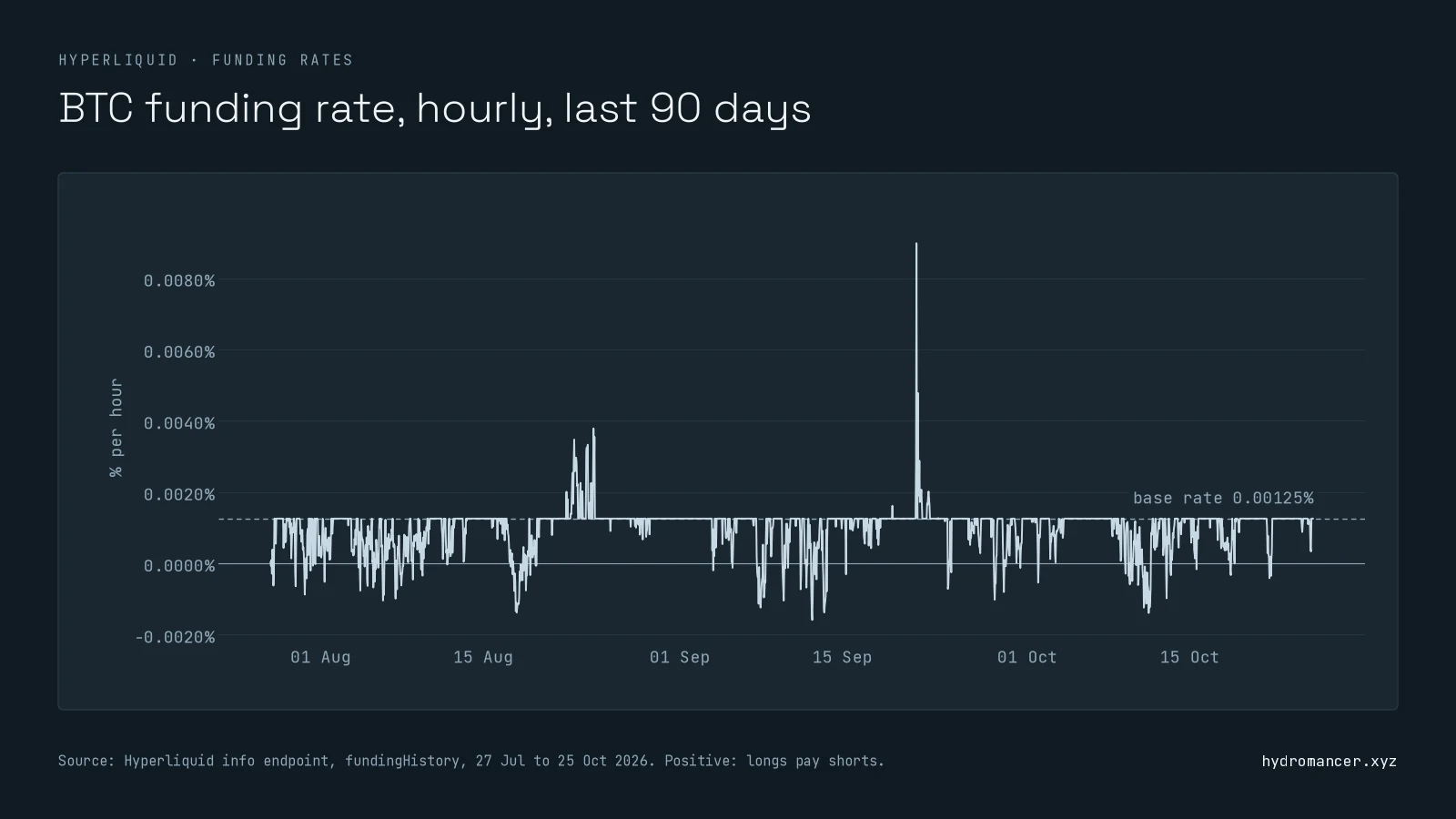
The flat line at 0.00125% is the base rate from the formula above. BTC sat there in most hours, and longs paid shorts in 91% of them. Each row also carries the hour's average premium, which shows which way the market leaned.
What to know when you pull history:
- 500 rows is about 21 days of one coin. Ask for more in one call and you get the first 500 hours of your window, so page forward.
- Mind the rate limit. A full page costs 45 of the 1,200 request weight each IP gets per minute. That's still about 26 pages a minute. See Hyperliquid rate limits.
- Older rows used older rules. Treat 2023 rows as what was paid, not something to recalculate with the current formula.
Step 3: See your own funding payments
Your payments live on your account, and two requests cover them. Their signs are opposite, which catches people out:
| Request | What it gives you | Positive means |
|---|---|---|
userFunding | Your funding payments: coin, USDC amount, position size, rate | You received funding |
clearinghouseState | cumFunding for eachopen position: since open, and all time | The position paid funding |
userFunding returns up to 500 rows per call, and older payments can come back grouped by day. All of an account's payments for one hour share a timestamp, so restart each page at the last row's time and skip rows you already have. Our Hyperliquid API guide covers info requests in general.
Funding payments across all of Hyperliquid
Steps 1 to 3 use Hyperliquid's own API, and that's enough for a trader checking their own positions. Dashboards, risk tools and apps that report net PnL need funding across many accounts or every market:
| What you need | Without Hydromancer (Hyperliquid's API only) | With Hydromancer's API |
|---|---|---|
| Every market's rate when funding is applied | metaAndAssetCtxsper DEX, or activeAssetCtxper coin | fundingRates :every market, HIP-3 included, pushed once an hour |
| Every funding payment on the exchange | userFunding orthe userFundingssubscription, one account at a time | fundingPayments: every payment of the latest hour, for every account and market |
| Funding for your app's users | userFundingfor each user | builderApprovedFundingByTime: funding for users while they had your builder code approved |
| One coin's rate history | fundingHistory ,free (BTC back to May 2023) | The same: use Hyperliquid's fundingHistory |
Example: funding across the whole exchange
Without Hydromancer: one request per account. One busy account alone had 177 payments in an hour:
import time
import requests

start = int(time.time() * 1000) - 3_600_000  # the last hour

rows = requests.post(
    "https://api.hyperliquid.xyz/info",
    json={"type": "userFunding", "user": ACCOUNT, "startTime": start},
).json()
print(len(rows), "funding payments in the last hour, for one account")177 funding payments in the last hour, for one accountWith Hydromancer: one request tells you how many payments the whole exchange made in the latest hour, and fundingPayments then returns them all in one snapshot:
import os
import requests

latest = requests.post(
    "https://api.hydromancer.xyz/info",
    json={"type": "fundingPaymentTimestamp"},
    headers={"Authorization": f"Bearer {os.environ['HYDROMANCER_API_KEY']}"},
).json()
print("Funding payments in the latest hour, across every account and market:",
f"{latest['count']:,}")Funding payments in the latest hour, across every account and market: 424,763ACCOUNT here is one of HLP's strategy vaults, 0x010461c14e146ac35fe42271bdc1134ee31c703a. To build the second picture on Hyperliquid's API alone, you'd poll userFunding for every account, every hour.
For one coin's history or your own payments, Hyperliquid's free API is all you need. Hydromancer is for when you need funding for many accounts or markets, as soon as it's applied.
Funding rate arbitrage: what to know first
Funding moves money from one side of a market to the other. A trader who is short the perp and long the same asset collects a positive rate while staying roughly flat on price. On Hyperliquid, the long side can be a spot market where one exists, such as HYPE.
The usual rate works out at about 11% a year on the perp's notional value, before costs. Before building on that:
- The rate changes every hour and can flip sign. Past hours aren't a promise.
- The 4% cap is a ceiling, not a guard. In a squeeze, the perp leg can pay up to 4% of its notional in one hour.
- Fees come off both legs, on the way in and out. See Hyperliquid fees.
- The perp leg can still be liquidated. The spot leg hedges the price, not the margin.
This explains how the mechanism works. It isn't financial advice.
FAQ
What is the current funding rate on Hyperliquid?
Each market shows it as Funding / Countdown above the chart in the app. By API, metaAndAssetCtxs returns the current hourly rate for every perp on a DEX. Many main markets sit at the 0.00125% base rate.
How much is the funding rate on Hyperliquid?
The base rate is 0.00125% an hour, about 11% a year on a position's notional. It moves when a market's premium leaves a narrow band, and it can never exceed 4% an hour.
Which coin has the highest funding rate on Hyperliquid?
It changes every hour. Sort the funding field from metaAndAssetCtxs to rank a DEX's perps by their current rate, and repeat for each DEX to cover all of Hyperliquid.
Is the Hyperliquid funding rate per hour or per 8 hours?
Both. The formula gives an 8-hour rate, and one eighth of it is paid every hour. The rate in the app's market header and in the API is hourly.
What are the fees for Hyperliquid?
Funding itself carries no fee; it goes straight between traders. Trading fees are separate and depend on your volume tier. Our Hyperliquid fees guide covers them.
Who receives Hyperliquid funding payments?
Traders on the other side. When the rate is positive, shorts receive it from longs. When it's negative, longs receive it from shorts.
Next steps
- Check a market now: run the Step 1 snippet, or open any market in the Hyperliquid app.
- Build on the API: our Hyperliquid API guide covers requests, signing and errors.
- Plan your requests: Hyperliquid rate limits explains the weight budget.
- Need funding for every market or account? See Hydromancer's REST API.
Read next
How to Build a Hyperliquid Copy Trading Bot
Learn how to build a Hyperliquid copy trading bot on Hyperliquid with the Hyperliquid API.
Read ↗
Hyperliquid Leaderboard: How to Track Top Addresses' PnL
Learn how to get Hyperliquid leaderboard data using the Hyperliquid API.
Read ↗
How to Build a Hyperliquid Trading Bot
Learn how to build a Hyperliquid trading bot: a signal from market data, signed orders through Hyperliquid's API, risk limits and a kill switch, with examples.
Read ↗