How to Build a Hyperliquid Trading Bot
Learn how to build a Hyperliquid trading bot: a signal from market data, signed orders through Hyperliquid's API, risk limits and a kill switch, with examples.

Trading by hand means watching the screen all day and night. If you have an idea you want to run on Hyperliquid, such as buying when buyers rush in or cutting a position the moment it moves against you, a trading bot can do the watching and the clicking for you.
Why build a trading bot on Hyperliquid?
Many traders build their first bot on a centralized exchange (CEX) such as Binance or Bybit. Hyperliquid works differently, and for a bot those differences matter:
| Hyperliquid | A centralized exchange | |
|---|---|---|
| Order book | Fully on-chain: every order, cancel, trade and liquidation is public | Runs on the exchange's private servers |
| What your bot can see | Any wallet's trades and open positions | Market data and your own account |
| Your account | Your wallet, with balances on-chain | An account the exchange holds your funds in |
| How a bot gets access | An API wallet signs orders for your account, one per bot | API keys issued by the exchange |
What that gives a bot builder:
- Hyperliquid's speed supports diverse capabilities for any builder. Hyperliquid's docs put its capacity at about 200,000 orders a second. A co-located client sees a median of 0.2 seconds end to end, allowing anyone to port automated strategies "from other crypto venues with minimal changes".
- Strategies a CEX can't support. Every wallet's fills and positions are public, so a bot can react to what other traders actually do. It can follow a wallet, watch liquidations as they happen, or track the biggest positions in a market.
- More than crypto, on one API. Builder-deployed markets (HIP-3) list assets such as the S&P 500 and gold next to crypto perps. Your bot trades them with the same orders.
- A bot can become a business. With builder codes, an app that places orders for other users can earn a fee of up to 0.1% on their perp fills.
In this article, we'll show how to build one and the practices that keep it safe. You'll learn how to:
- Stream live market data to decide when to trade.
- Turn that data into a buy or sell decision.
- Place signed orders through Hyperliquid's API.
- Add risk limits and a kill switch so the bot can't run away.
- See how Hydromancer's API comes in, with and without it side by side.
We'll build a mini example on Hyperliquid's own API first, then plug in Hydromancer's. The code is Python, but the structure is the same in any language. It's one use case to adapt, not a production template. Prices are a snapshot from when we tested.
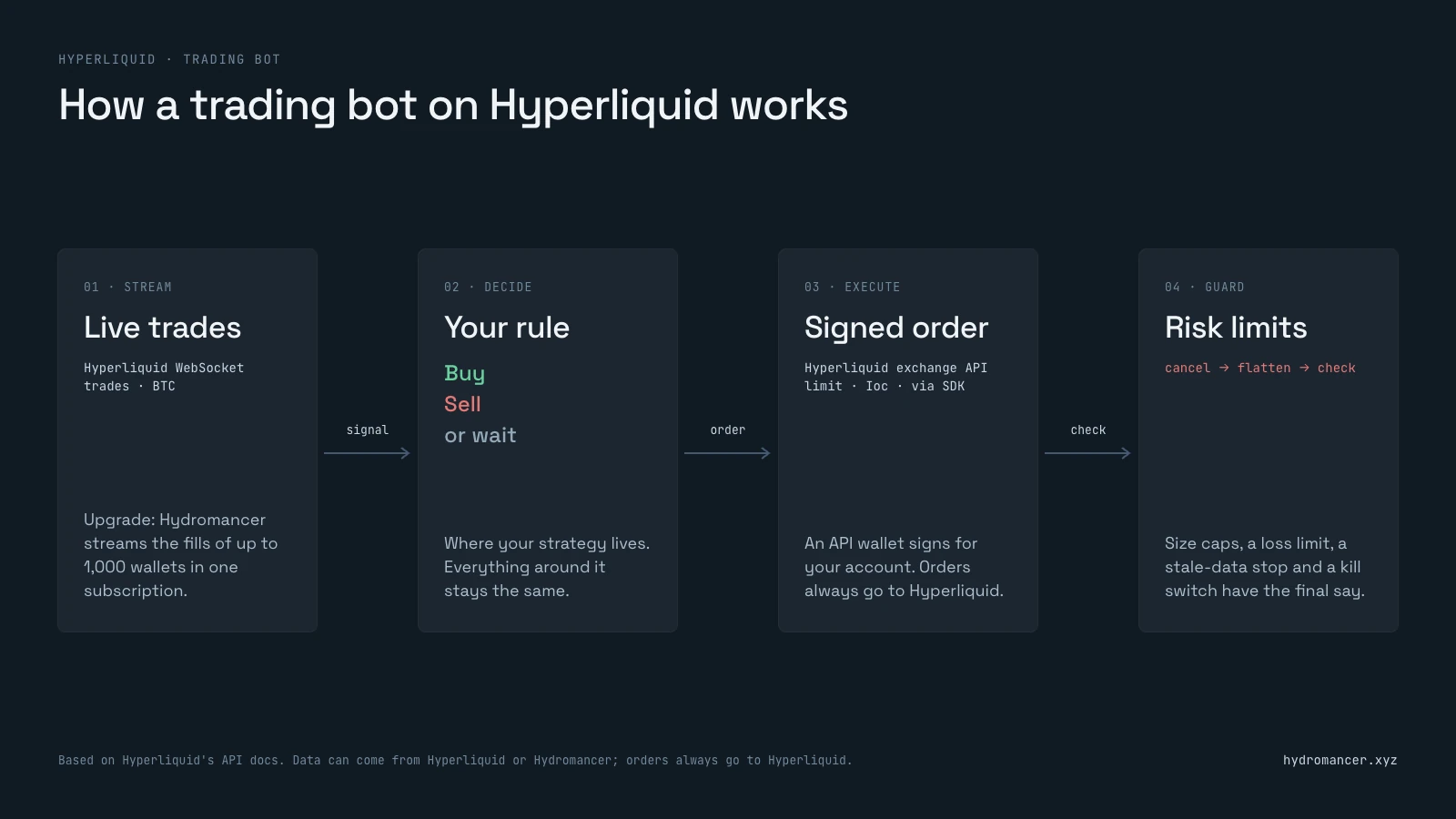
How the mini example works
| Part | What it does |
|---|---|
| Signal | Order flow from Hyperliquid's live BTC tradesfeed; later, top wallets' fills from Hydromancer |
| Decision | A toy rule: follow the side that traded more aggressively in the last 30 seconds |
| Orders | Immediate-or-cancel orders, priced off the live order book |
| Position | Always read back from the exchange, never counted locally |
| Safety | Size caps, a loss limit, a stale-data stop, a kill file, then cancel and flatten |
Before you start
- An SDK for your language (see below).
- A Hyperliquid account and an API wallet approved to trade for it.
- A Hydromancer API key, only for the upgrade at the end.
- Environment variables:
HYDROMANCER_API_KEY,HL_SECRET_KEY(the API wallet's key) andHL_ACCOUNT_ADDRESS(your main account).
Our Hyperliquid API guide explains API wallets and signing.
Choose your language
Reading data is plain HTTP requests and live streams, so any language works. Placing orders is harder, because each one must be signed exactly as Hyperliquid expects. Hyperliquid's signing docs recommend an existing SDK rather than writing your own.
| Language | SDK |
|---|---|
| Python | Official SDK ( pip install hyperliquid-python-sdk ) |
| TypeScript | Community SDKs, listed in Hyperliquid's API docs |
| Rust | A community SDK, listed in the same docs |
The examples below use Python with the official SDK. The requests behind them are the same in any language.
Step 1: Stream live trades from the market
Every bot needs a reason to trade, usually called a signal. In this example, the signal is order flow: over the last 30 seconds, did traders who crossed the spread buy more BTC than they sold? Those traders are called takers, and heavy taker buying suggests buyers are in a hurry.
To measure that, the bot needs every BTC trade the moment it happens. Hyperliquid's live feed pushes each trade to you, so you don't have to keep asking. Subscribe to BTC trades and read the first one:
import json
import websocket

ws = websocket.create_connection("wss://api.hyperliquid.xyz/ws")
sub = {"type": "trades", "coin": "BTC"}
ws.send(json.dumps({"method": "subscribe", "subscription": sub}))

while True:
    msg = json.loads(ws.recv())
    if msg.get("channel") == "trades":
        trade = msg["data"][0]
        break

side = "taker buy" if trade["side"] == "B" else "taker sell"
print(side, trade["sz"], "BTC @", trade["px"])taker buy 0.00724 BTC @ 80597.0Each trade has a side: B when the taker bought, A when they sold, plus a size (sz) and price (px). The bot keeps reading and adds up 30 seconds of them. Our data feeds guide covers the feed in depth.
Step 2: Turn the trades into a buy or sell decision
The decision rule is where your strategy lives. The mini example uses a deliberately simple one, only to exercise the rest of the bot:
- Add up the size of every taker buy and subtract every taker sell over the last 30 seconds.
- If the result is positive, buy. If it's negative, sell.
- Hold for 20 seconds, then close, and stop.
This rule isn't a strategy, and you shouldn't trade it. Swap in your own logic here, using whatever data it needs. The steps around it stay the same.
Step 3: Place the order on Hyperliquid
Once the rule decides, the bot sends a signed order to Hyperliquid's exchange API. The SDK handles the signing: you give it the coin, side, size, price and order type.
There's no plain market order in Hyperliquid's API. To trade "at market", send a limit order with time-in-force Ioc (immediate or cancel) at a price that crosses the book. It fills what it can right away and cancels the rest. Here's the call:
from hyperliquid.exchange import Exchange
from hyperliquid.utils import constants

# wallet: your API wallet
exchange = Exchange(wallet, constants.MAINNET_API_URL,
                    account_address=ACCOUNT)

# sell 0.0002 BTC, immediate-or-cancel
order = exchange.order(
    "BTC",
    False,    # is_buy
    0.0002,   # size
    price,    # limit price that crosses the book
    {"limit": {"tif": "Ioc"}},
)
print(order["response"]["data"]["statuses"][0]){'filled': {'totalSz': '0.0002', 'avgPx': '80951.2', 'oid': 63658735343}}Here wallet is your API wallet (loaded with eth_account from its private key), ACCOUNT is your main account's address, and price is the best bid, read just before the order, minus 0.1% and rounded to Hyperliquid's tick rules, so the sell crosses the book. While you test, swap constants.MAINNET_API_URL for constants.TESTNET_API_URL. To close the position later, exchange.market_close("BTC") sends a reduce-only order the same way.
Three things to get right:
- Price off a fresh book read. Read the best bid or ask right before each order, not a price from earlier in the loop.
- Check every order's status. A response can say
"ok"at the top while the order itself was rejected. - Respect the order rules. Orders must be worth at least $10, and prices and sizes must be rounded. See Hyperliquid's tick size docs.
Step 4: Add risk limits and a kill switch
A bot runs unattended, so it needs rules that override the trading logic when something goes wrong. The full mini example runs Steps 1 to 3 in a loop, and checks these limits before every order. The trading rule can ask for anything, but the limits have the final say:
| Limit | Setting in the mini example |
|---|---|
| Order size and position | 0.0002 BTC, one position at a time |
| Loss limit | Stop if the open loss passes $2 |
| Stale data | Stop if the newest trade is over 20 seconds old |
| Kill file | Stop when a file named STOP appears |
| Run time | Stop after 120 seconds |
Every stop goes through one shutdown routine: cancel open orders, close the position with a reduce-only order, then read the account again. If anything is left, the bot prints a warning and exits with an error code.
What one run did
Here's a test run of the full mini example (the loop, limits and shutdown), from its log. In this run, the trades came from Hydromancer's feed of the same Hyperliquid data, and the orders went to Hyperliquid's testnet:
| Time (UTC) | Event |
|---|---|
| 12:03:42 | Subscribed to live BTC trades |
| 12:04:13 | Signal: takers sold 0.072 BTC more than they bought in 30 seconds |
| 12:04:14 | Sold 0.0002 BTC, filled at 80,809 |
| 12:04:37 | Closed with a reduce-only buy at 80,798 |
| 12:04:37 | Final check: no open orders, no position |
We also stopped a second run with the kill file right after its entry. It closed the position and ended flat.
What to know before going live
- Test your code before you go live, but not your strategy. Pointing
HL_API_URLathttps://api.hyperliquid-testnet.xyzchecks that the bot connects, signs, places orders and shuts down cleanly. The run above did that. Testnet has its own markets, prices and liquidity, though, so it can't tell you whether a strategy makes money. - Don't trade the toy rule. It only proves the plumbing works. Replace it with your own logic, but keep the fresh reads and the stop check right before each order.
- Read your position from the exchange. Use
clearinghouseStatewith your main account's address; the API wallet's own address holds nothing. - Give each bot its own API wallet and coins if one account runs several bots.
- Check the account from outside the bot after every run, with
openOrdersandclearinghouseState. - Mind the rate limits. Hyperliquid gives each IP 1,200 request weight a minute. See Hyperliquid rate limits.
How Hydromancer's API comes in when building a trading bot on Hyperliquid
The steps above use Hyperliquid's own API, and orders always go there. Hydromancer comes in on the data side: what your bot can see, how many wallets it can follow, and how it recovers when a connection drops.
With vs without Hydromancer
| What the bot needs | Without Hydromancer (Hyperliquid's API only) | With Hydromancer's API |
|---|---|---|
| Follow wallets live | One subscription per wallet; the docs allow 10 unique users per IP | One userFills subscriberequest for up to 1,000 addresses; each counts toward your plan's subscription total (500 on Starter) |
| Read many accounts | clearinghouseState ,one wallet per request, from 1,200 weight a minute per IP | batchClearinghouseStates: up to 1,000 wallets in one request |
| See the order book | Price levels only (L2), 20 a side | Every resting order with its ID and address (L4) |
| Network-wide signals | Not part of the native API | Streams of every fill (allFills , an add-on) andevery leverage change |
| Recover after a drop | Resubscribe, then backfill over REST | Reconnect with a session ID to replay up to 30 seconds |
| History for backtests | A wallet's 10,000 most recent fills | Fills from 28 July 2025, plus the free Reservoir archive |
| Placing orders | Hyperliquid's exchange API | The same: orders always go to Hyperliquid |
Example: trade on what the top 100 wallets do
The bot above reacts to anonymous order flow. On Hyperliquid, it can do something a CEX can't: react to what specific traders do, because every wallet's fills are public. For example, "buy when the most profitable wallets buy".
Without Hydromancer: one subscription per wallet, and the docs cap you at 10 wallets per IP.
import json
import websocket

ws = websocket.create_connection("wss://api.hyperliquid.xyz/ws")

# one subscription per wallet; Hyperliquid's docs allow 10 users per IP
for wallet in TOP_WALLETS[:10]:
    sub = {"type": "userFills", "user": wallet}
    ws.send(json.dumps({"method": "subscribe", "subscription": sub}))
With Hydromancer: one subscription for all 100 wallets, on one connection.
import json
import os
import websocket

key = os.environ["HYDROMANCER_API_KEY"]
ws = websocket.create_connection("wss://api.hydromancer.xyz/ws?token=" + key)
ws.recv()  # the "connected" message

sub = {"type": "userFills", "addresses": TOP_WALLETS}
ws.send(json.dumps({"type": "subscribe", "subscription": sub}))

while True:
    msg = json.loads(ws.recv())
    if msg.get("type") == "userFills":
        wallet, fill = msg["fills"][0]
        break

print(wallet[:6] + "…" + wallet[-4:], fill["dir"], fill["sz"],
fill["coin"], "@", fill["px"])0xecb6…2b00 Open Long 21.7 SUI @ 0.91937TOP_WALLETS is the 100 wallets with the highest month PnL on Hyperliquid's leaderboard. Our leaderboard guide shows how to get it. To use them in Step 2's rule, keep the fills for the market you trade and add up buys minus sells by size, just as with the BTC order flow. Steps 3 and 4 stay the same.
To copy one trader's every move instead, see our copy trading bot guide.
FAQ
Do trading bots work on Hyperliquid?
A bot reliably does what you tell it: it watches the market around the clock and acts in moments. Whether it makes money depends on the strategy, fees and risk limits, not the bot. Hyperliquid is built for automated trading, with a public API, API wallets and an official SDK.
Is it allowed to run a trading bot on Hyperliquid?
Hyperliquid provides a public API, API wallets and an official SDK for trading programmatically, so bots use the same order path as the app. Rules on automated trading can differ by country, and this isn't legal advice.
Is there a free Hyperliquid trading bot on GitHub?
Hyperliquid's official Python SDK is free and open source, with example scripts for placing and cancelling orders. Hyperliquid's docs also list community SDKs for TypeScript and Rust. Start from those, then add your own strategy and risk limits.
Can I build a Hyperliquid trading bot without coding?
Yes, with no-code bot platforms that connect to Hyperliquid through an API wallet. They're quicker to start, but you're limited to the strategies and data they offer. Code lets you use any signal, such as the top-wallet fills shown above.
Does Hyperliquid have market orders in the API?
No plain market order. Send a limit order with time-in-force Ioc at a price that crosses the book. The SDK's market_open and market_close do this for you.
Can I test a Hyperliquid bot without real money?
You can test the code, using Hyperliquid's testnet and test USDC. Its markets, prices and liquidity aren't the same as mainnet's, so it won't show how a strategy would really perform. Our testnet guide covers setup.
What is the minimum order size?
Orders must be worth at least $10, and sizes must be rounded to the market's szDecimals.
Next steps
- Stream trades: run the Step 1 snippet. It needs no key.
- Place an order: try the Step 3 call with a small size.
- Upgrade the signal: follow the top wallets with the Hydromancer snippet.
- Round orders correctly: Hyperliquid's tick size docs.
- Need more market data for your rule? See Hydromancer's data streaming.
Read next

How to Build a Hyperliquid Copy Trading Bot
Learn how to build a Hyperliquid copy trading bot on Hyperliquid with the Hyperliquid API.
Read ↗
Hyperliquid Leaderboard: How to Track Top Addresses' PnL
How to get Hyperliquid leaderboard data using the Hyperliquid API.
Read ↗
How to Build a Hyperliquid Orderbook Heatmap
Learn how to build a Hyperliquid order book heatmap: sample l2Book snapshots, choose the price grouping, then read walls, pulled liquidity and depth.
Read ↗