Hyperliquid Builder Codes: How They Work and How to Track Your Fees
How Hyperliquid builder codes work: approval, fee limits, adding one to an order, and four ways to track the fills and fees your code earns.

A builder code lets your app add a small fee to the trades it sends to Hyperliquid for its users. The user approves the fee first, and it's paid to you onchain when the order fills.
Why builders explore builder codes
Building a trading product usually starts with a hard problem: liquidity. Without enough buyers and sellers on the other side, your users' orders don't fill, and they leave.
With Hyperliquid's builder codes, you skip that problem. Whether you're building a trading app, a bot, a wallet or a Telegram bot, every order you send goes into Hyperliquid's order books, the same ones its own app uses. Your users get that liquidity from day one, and you can focus on making a great app.
Builder codes are what turn that app into a business. They let you earn a fee on the trades you bring, without running an exchange or making markets yourself:
• You set the fee. You choose it order by order, up to 0.1% on perps and 1% on spot, and never above what the user approved.
• It's paid onchain. Hyperliquid takes it as part of its own fee logic when each order fills, so you never have to bill users.
• It isn't a referral code. Referrals pay you 10% of a referred user's fees, less any discount they get, and only for their first $1B in volume. A builder code is your own fee, on every filled order you send with it.
For a sense of scale, one large builder we tested for this guide had earned about 27.5 million USDC in builder fees by 21 October, according to Hyperliquid's own referral request. On 19 October alone, fills from more than 4,200 wallets paid it about 39,674 USDC.
This guide covers the three steps: getting users to approve your fee, adding the code to orders, and seeing what you earned. In the code, replace 0xYourBuilderAddress and the other placeholders with real addresses. If you don't write code, skip the code blocks and you'll still follow along.
How Hyperliquid builder codes work
The basics:
• The user approves a maximum fee first. They sign an ApproveBuilderFee action with their main wallet. An API wallet (a separate key that can trade for them) can't approve it. They can revoke the approval any time. Hyperliquid's app also has a Builder Code Approvals page.
• You add your code to each order. Every order your app sends can carry {"b": your_address, "f": fee}. f is in tenths of a basis point, so 10 means 0.01%. You can change it order by order, up to what the user approved.
• There are caps. At most 0.1% on perps and 1% on spot. On spot, the fee only applies when the user sells, because builder fees are charged in the quote or collateral asset, such as USDC. Each user can have up to 10 builder approvals active at once.
• The fee is added on top of Hyperliquid's own trading fee. In fill data, fee is the total paid, including builderFee. For one builder charging 0.05% on 19 October, a typical taker fill on Hyperliquid's own perps paid about 0.093% in total: 0.05% to the builder and about 0.043% to Hyperliquid.
Your builder address also needs at least 100 USDC of account value in perps and must use the standard account mode. You claim earnings through the normal referral rewards claim.
How users approve your fee
In a web app, the user signs ApproveBuilderFee with their own wallet, usually once, the first time they trade through you. With the Python SDK it's exchange.approve_builder_fee(builder, "0.05%"), signed by the main wallet. For a browser wallet in JavaScript, Privy's builder codes recipe shows the same step.
Signing it with an API wallet doesn't work. When we tried on testnet, the request was rejected with Must deposit before performing actions, because Hyperliquid treated the API wallet's own address as the user.
Check what a user has approved
Before you send an order with a fee, check the user's approval. If the fee on an order is higher than what they approved, the order is rejected.
import requests

INFO = "https://api.hyperliquid.xyz/info"
BUILDER = "0xYourBuilderAddress"   # your builder address
USER = "0xUserWalletAddress"       # the trader's wallet

max_fee = requests.post(INFO, json={
    "type": "maxBuilderFee", "user": USER, "builder": BUILDER,
}).json()

# The answer is in tenths of a basis point: 10 = 0.01%, 100 = 0.1%
print(f"Approved up to {max_fee / 1000:.3f}%")
Run against a real builder and one of its users, this printed Approved up to 0.050%.
Add your builder code to an order
With the Python SDK, the builder code is one extra argument. This example runs on testnet. It places a small buy far below the market, which should rest on the book rather than fill, and cancels it if it does. Set HL_SECRET_KEY to the key that signs for the account (the main wallet or an API wallet), and HL_ACCOUNT_ADDRESS to the trader's main wallet.
import os
import eth_account
from hyperliquid.exchange import Exchange
from hyperliquid.info import Info
from hyperliquid.utils import constants

URL = constants.TESTNET_API_URL            # practise on testnet first
wallet = eth_account.Account.from_key(os.environ["HL_SECRET_KEY"])
account = os.environ["HL_ACCOUNT_ADDRESS"]  # the trader's main wallet

info = Info(URL, skip_ws=True)
exchange = Exchange(wallet, URL, account_address=account)

# A small buy far below the market, meant to rest on the book rather than fill
price = round(float(info.all_mids()["BTC"]) * 0.5)
result = exchange.order(
    "BTC", True, 0.0003, price, {"limit": {"tif": "Gtc"}},
    builder={"b": "0xYourBuilderAddress", "f": 10},   # 10 = 0.01%
)

status = result["response"]["data"]["statuses"][0] if result["status"] == "ok" else result
print(status)
if "resting" in status:
    exchange.cancel("BTC", status["resting"]["oid"])
One gotcha: if the user hasn't approved your builder, the request still comes back with "status": "ok". The error sits inside the order status instead:
{'error': 'Builder fee has not been approved.'}So check each status, not just the top-level status. Our Hyperliquid API guide covers this and other silent rejections. If you're new to signing orders, try this on testnet first; our testnet guide shows how.
How to track your builder code revenue
Hyperliquid's info API gives you a running total, but no request for every fill under your code over a time range you choose. You have four options.
| You want… | Use | Covers |
|---|---|---|
| Your all-time total | Official referral request | One number |
| Fills for one day, as a file | Official daily CSV | One file per day, see the caveat below |
| Fills and fees for any time range | Hydromancer builderFillsByTime | From 28 Jul 2025 |
| Bulk history to analyse | Reservoir builder_fills files | Daily Parquet, from 28 Jul 2025 |
If you only want a dashboard of builder revenue across Hyperliquid, Flowscan's builders page already shows it, and we track the top builders by revenue on the blog.
1. Your all-time total
The referral request returns your total builder fees paid in USDC, in builderRewards:
import requests

INFO = "https://api.hyperliquid.xyz/info"
BUILDER = "0xYourBuilderAddress"

state = requests.post(INFO, json={"type": "referral", "user": BUILDER}).json()
print("All-time builder fees in USDC:", state["builderRewards"])
It's a single running number, with no breakdown by day, market or user.
2. The official daily CSV files
Hyperliquid also publishes each builder's fills as one compressed CSV file per day. The address in the URL must be lowercase, or the request is refused.
import io
import lz4.frame
import pandas as pd
import requests

BUILDER = "0xYourBuilderAddress".lower()   # the URL only works in lowercase
DAY = "20261019"                            # YYYYMMDD, UTC

url = f"https://stats-data.hyperliquid.xyz/Mainnet/builder_fills/{BUILDER}/{DAY}.csv.lz4"
resp = requests.get(url, timeout=60)
resp.raise_for_status()

fills = pd.read_csv(io.BytesIO(lz4.frame.decompress(resp.content)))
print(fills[["time", "user", "coin", "px", "sz", "builder_fee"]].head())
print("Fills:", len(fills), "| Fees:", round(fills["builder_fee"].sum(), 2))
print("Covers", fills["time"].min(), "to", fills["time"].max())
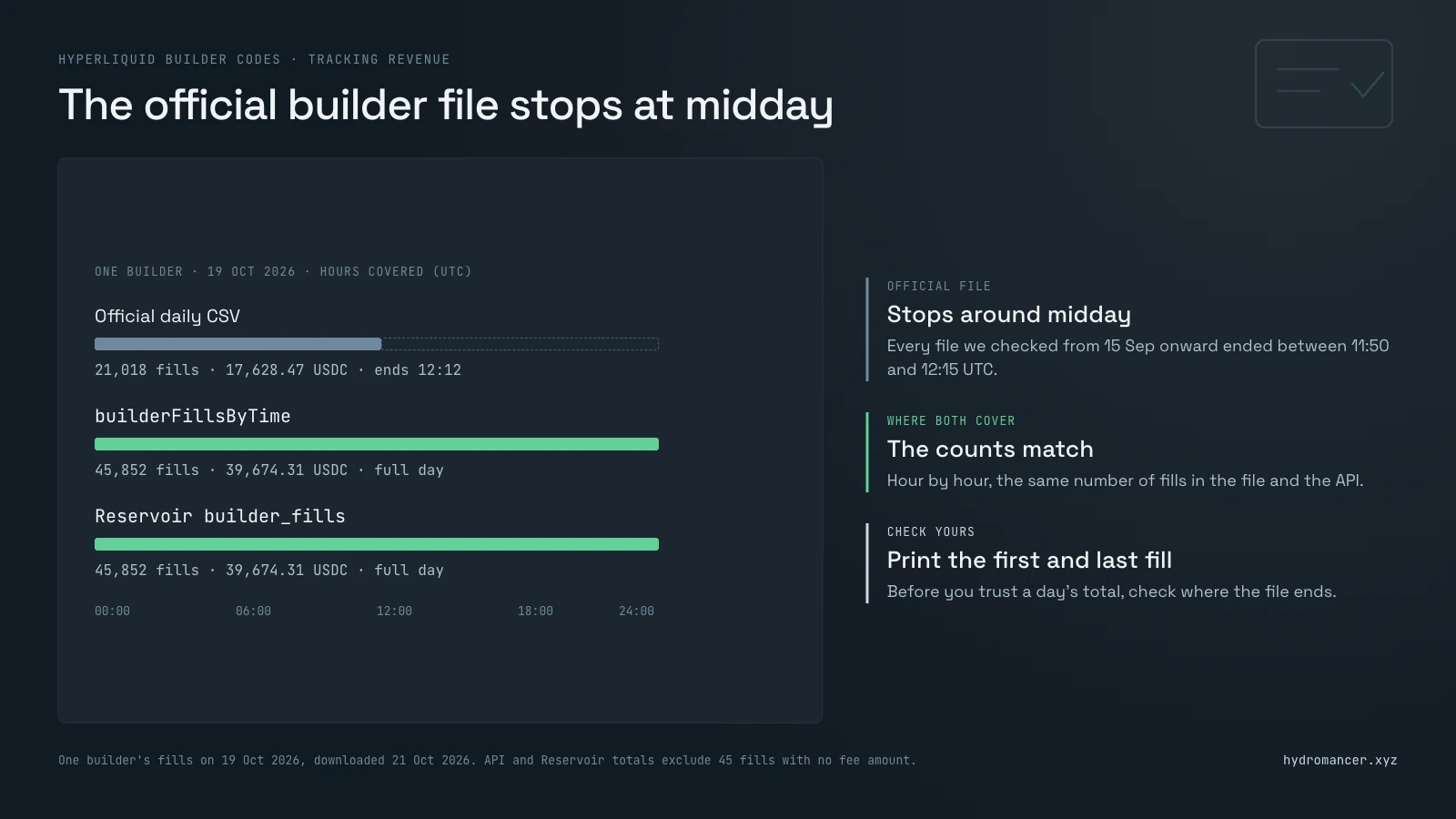
Check the time range before you trust the totals. On 21 October we downloaded these files for several large builders. Every file we checked from 15 September onward stopped around midday UTC (between 11:50 and 12:15), so it held roughly the first half of the day. The 1 September files ran to midnight. The script above prints the first and last fill times so you can check your own.
3. Any time range, by API
Hydromancer's builderFillsByTime returns the fills sent with your code between two times, with the user, market, price, size and builder fee. It returns up to 2,000 fills per request, so page through with the cursor until a page comes back short. It needs a Hydromancer API key.
import os
from collections import defaultdict
import requests

URL = "https://api.hydromancer.xyz/info"
HEADERS = {"Authorization": f"Bearer {os.environ['HYDROMANCER_API_KEY']}"}
BUILDER = "0xYourBuilderAddress"
START = 1792368000000   # 19 Oct 2026 00:00 UTC, in milliseconds
END = 1792454399999     # 19 Oct 2026 23:59:59.999 UTC

fills, cursor = [], None
while True:
    body = {"type": "builderFillsByTime", "builder": BUILDER,
            "startTime": START, "endTime": END}
    if cursor:
        body["cursor"] = cursor
    page = requests.post(URL, json=body, headers=HEADERS, timeout=60).json()
    fills += page
    if len(page) < 2000:          # a full page means there may be more
        break
    cursor = f"{page[-1]['time']}_{page[-1]['txIndex']}"

by_user, missing = defaultdict(float), 0
for f in fills:
    if f.get("builderFee") is None:   # a few fills have no fee amount
        missing += 1
        continue
    by_user[f["user"]] += float(f["builderFee"])

print("Fills:", len(fills), "| Users:", len(by_user), "| No fee amount:", missing)
print("Fees:", round(sum(by_user.values()), 2), "| Fee tokens:", {f["feeToken"] for f in fills})
for user, fee in sorted(by_user.items(), key=lambda x: -x[1])[:5]:
    print(user, round(fee, 2))
For the same builder and the same day, 19 October, this returned 45,852 fills and 39,674 USDC in fees. The official file for that day held 21,018 fills and 17,628 USDC, because it ended at 12:12 UTC. For each full hour both cover, the fill counts matched exactly.
A few fills come back with no fee amount (45 out of 45,852 that day). The script counts them and leaves them out of the total rather than guessing. It also prints the fee tokens; every fill that day was paid in USDC.
4. Bulk history from Reservoir
If you want months of builder fills to analyse, Reservoir has them as daily Parquet files. It's separate from the Hydromancer API: you don't need a plan or API key, but you do need an AWS account. The bucket is requester-pays, so AWS bills you for requests and downloads. Each venue has its own builder_fills folder, so Hyperliquid's own markets and each HIP-3 venue (such as xyz for Trade[XYZ]) are separate files.
This query uses the DuckDB setup from our Reservoir query guide. Write the builder address in lowercase, as it's stored that way.
SELECT coin,
       count(*)               AS fills,
       count(DISTINCT address) AS users,
       round(sum(builder_fee), 2) AS fees
FROM read_parquet('s3://hydromancer-reservoir/by_dex/hyperliquid/fills/perp/builder_fills/date=2026-10-19/fills.parquet')
WHERE builder = '0xyourbuilderaddress'
GROUP BY coin
ORDER BY fees DESC
LIMIT 10;
For that builder on 19 October, the hyperliquid, xyz and io builder files held 33,531, 12,310 and 11 fills. Together that's 45,852 fills and 39,674.31 USDC in fees, the same as builderFillsByTime.
FAQ
What is a builder code on Hyperliquid?
A builder address plus a fee that your app attaches to orders it sends for users. If the user has approved it, the fee goes to your address onchain when the order fills.
Do builder fees add to Hyperliquid's trading fees?
Yes. The user pays Hyperliquid's normal fee plus the builder fee, and a fill's fee field shows the total.
How much can a builder charge?
Up to 0.1% on perps and 1% on spot, and never more than the user approved.
Can an API wallet approve a builder fee?
No. The user must sign the approval with their main wallet.
How do I see every fill from my builder code?
Use the official daily CSV for a quick look and check where it ends. For full days and longer ranges, use builderFillsByTime or Reservoir.
Sources
[1] Hyperliquid docs: Builder codes
[2] Hyperliquid docs: Info endpoint
[3] Hyperliquid Python SDK: builder fee example
[4] Hydromancer docs: builderFillsByTime
[5] Hydromancer docs: Reservoir
[6] Privy: Builder codes recipe
Read next

How to Find a Reliable Peer for Your Hyperliquid Node
Why Hyperliquid nodes lose their peer and fall behind, how to find peers with free slots on Flowscan, and when a reserved peer is worth paying for.
Read ↗
How to View Entire Trader Positioning on Hyperliquid
See every open position on Hyperliquid at once: Flowscan Terminal in your browser, the perpSnapshots API in code, and Reservoir's free daily history.
Read ↗
Hyperliquid vs Hydromancer API: When to Upgrade?
We built 18 apps and ran each against the live Hyperliquid and Hydromancer APIs, with results showing when the free API is enough and when your app needs more.
Read ↗