Hyperliquid vs Hydromancer API: When to Upgrade?
We built 18 apps and ran each against the live Hyperliquid and Hydromancer APIs, with real results showing when the free API is enough and when your app needs more.

Hyperliquid's own API is free, needs no sign-up and covers a lot of projects well. Hydromancer builds on top of it, so the real question is when your app needs more than it was designed to give: more wallets at once, longer history, or data views across the whole market.
To find out, we built 18 small apps, from a price alert to an order-by-order book feed, and ran each against both APIs on 16 October 2026. Each scenario below shows the code and what came back.
Your numbers will differ because markets move. If you don't write code, skip the code blocks and read the results.
Hyperliquid API vs Hydromancer API at a glance
| What you're building | Official API | Hydromancer API |
|---|---|---|
| 1. Price alert | ✅ Works | ✅ Works |
| 2. One-wallet portfolio | ✅ Works | ✅ Works |
| 3. Watchlist of many wallets | One request per wallet | One request for up to 1,000 |
| 4. Market dashboard with history | Current numbers only | Hourly history |
| 5. Backtest | About 3.5 days of 1-minute candles | Older data, plus 1-second candles |
| 6. Slippage checker | One live snapshot | Depth figures and slippage history |
| 7. Trade journal or tax export | Last 10,000 fills | Fills back to 28 July 2025 for most wallets |
| 8. Market-wide liquidation history | ❌ No request | ✅ |
| 9. Builder revenue dashboard | All-time total, plus daily files | Fills and fees for any time window |
| 10. Trader leaderboard | One fixed list | Filters for trade count, account age and likely bots |
| 11. HIP-3 oracle price history | Current price only | ✅ |
| 12. Perps and spot for many wallets | Two requests per wallet | Both, for up to 500 wallets in one request (100 across every DEX) |
| 13. Builder order tracking | ❌ No request | ✅ |
| 14. Liquidation price map | Per known wallet, no market-wide view | Every open position in a market |
| 15. Stop-loss and take-profit map | Per known wallet, no market-wide view | Every waiting trigger order |
| 16. Live alerts for many wallets | Docs allow 10 wallets | Hundreds per connection |
| 17. Market-wide live liquidation feed | ❌ No channel | ✅ |
| 18. Order-by-order book | Price levels only | Each resting order, new ones with owner |
| 19. Building with an AI assistant | Generic error messages in our tests | More specific errors, with exceptions |
If you're only building the first two, the official API is all you need. From scenario 3 on, whether Hydromancer helps depends on how many wallets you track, how far back you need to go and whether you'd rather process raw files yourself.
There's also a third option for history, and it isn't an API. Reservoir is a free archive of Hyperliquid data that Hydromancer publishes on Amazon S3. It's separate from the Hydromancer API, so you don't need a plan or API key to use it.
You download or query its files with your own AWS account, and AWS charges its normal fees for requests and data transfer. We point it out below where it fits better than either API.
Simple apps where the free Hyperliquid API is enough
1. Price alert bot with Hyperliquid allMids
Want a bot that pings you when BTC crosses a price?
You need each market's current price every few seconds. allMids returns the mid price (halfway between the best buy and sell offer) for every market.
Good for: alerts, tickers and price widgets. Hydromancer adds nothing you'd notice here.
from hl_hm import hl, hm

_, official = hl({"type": "allMids"})
_, hydro = hm({"type": "allMids"})
print("official BTC:", official["BTC"])
print("hydro    BTC:", hydro["BTC"])
Result:
official BTC: 81790.5
hydro    BTC: 81790.5
Same price, give or take the seconds between the two calls. Stay on the official API.
2. One-wallet portfolio with clearinghouseState
Building a page that shows one wallet's positions?
clearinghouseState returns a wallet's open perp positions, margin (the money backing them) and account value. This covers the main perp DEX, not the whole wallet. Some accounts keep their collateral in spot balances, which is a separate request (scenario 12 shows both together).
Good for: a personal dashboard or a "connect wallet" page, one user at a time.
from hl_hm import hl, hm, busy_wallets

wallet = busy_wallets(1)[0]
_, official = hl({"type": "clearinghouseState", "user": wallet})
_, hydro = hm({"type": "clearinghouseState", "user": wallet})
print("official account value:", official["marginSummary"]["accountValue"])
print("hydro    account value:", hydro["marginSummary"]["accountValue"])
Result:
official account value: 3320.878182
hydro    account value: 3320.878182
Identical. The official API does this job well.
When your app needs more scale or history
3. Tracking positions for many wallets at once
What if you're following 50 wallets, or 1,000?
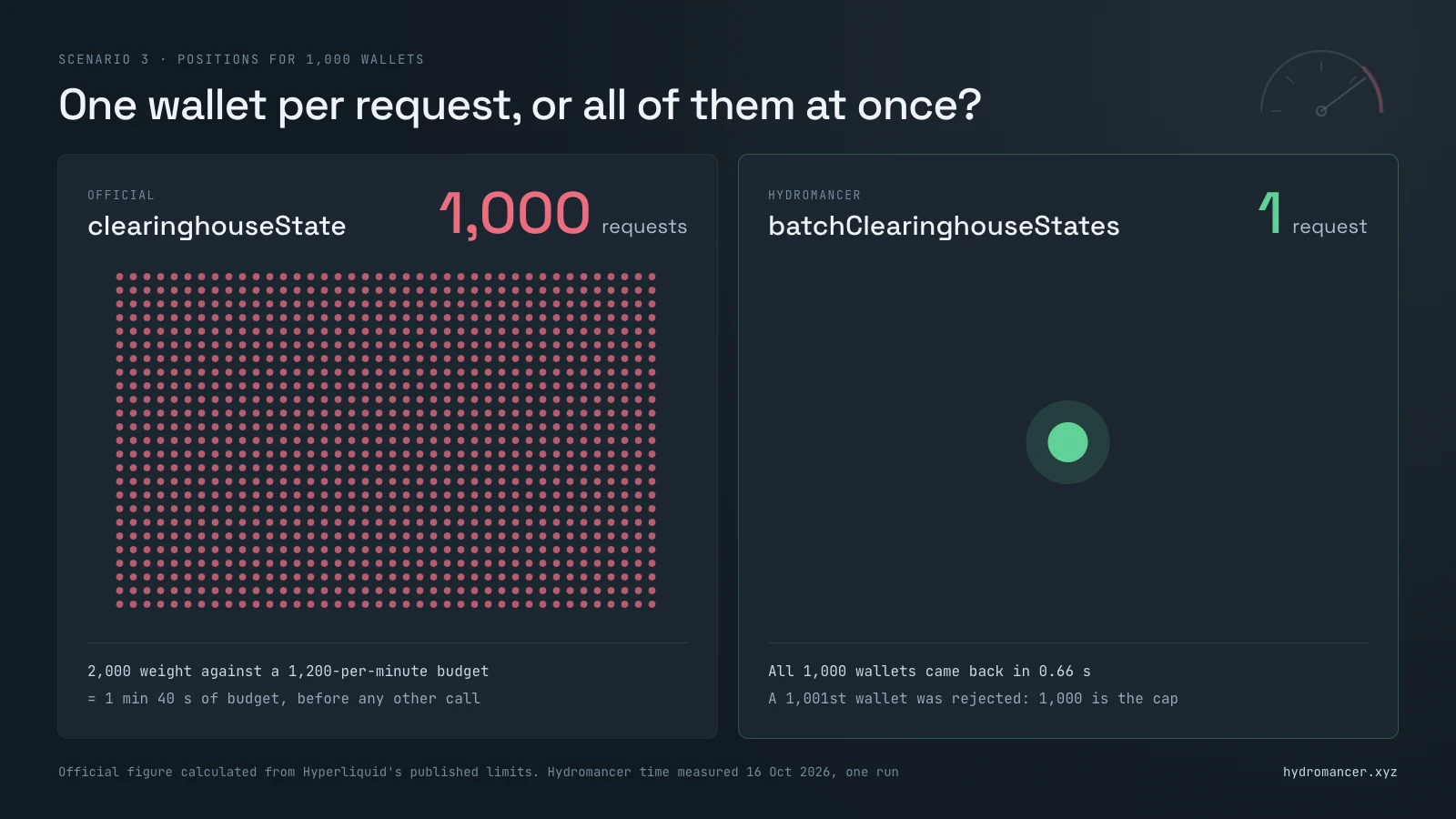
The official API takes one wallet per request, and every request spends part of a shared budget of 1,200 "weight" a minute. A position request costs 2, so you top out at about 600 wallets a minute before anything else. Hydromancer's batchClearinghouseStates takes up to 1,000 wallets in one request (100 if you ask across every DEX).
Good for: copy-trading apps, fund dashboards and anything that shows many users at once. This is often the first limit you'll hit. Our rate limits guide explains the budget.
import time
from hl_hm import hl, hm, busy_wallets

wallets = busy_wallets(50)

start = time.time()
ok = 0
for w in wallets:                      # official: one request per wallet
    status, state = hl({"type": "clearinghouseState", "user": w})
    ok += state is not None
print(f"official: {len(wallets)} requests, {ok} answered, "
      f"{time.time() - start:.1f}s")

start = time.time()                    # Hydromancer: one request for all
_, hydro = hm({"type": "batchClearinghouseStates", "users": wallets})
print(f"hydro:    1 request, {len(hydro['successful_states'])} answered, "
      f"{time.time() - start:.1f}s")
Result:
official: 50 requests, 50 answered, 7.0s
hydro:    1 request, 50 answered, 0.4s
A full 1,000-wallet request came back in 0.66 seconds, and a 1,001st wallet was rejected. On the official API, those 1,000 wallets would use 1 minute 40 seconds of rate-limit budget. Our official script asks one wallet at a time, so a cleverer setup could close some of the time gap, but not the request count.
4. Hyperliquid open interest history
Want a chart of open interest over the last month?
Open interest counts the positions still open in a market, long and short sides together. We chart its dollar value, which rises when positions grow or when the price goes up.
The official metaAndAssetCtxs gives today's number but no history. You'd have to record it yourself from today, or unpack Hyperliquid's raw S3 archive, which updates about once a month.
Good for: market dashboards, research and newsletters. Not needed if you only show today's figure.
import time
from hl_hm import hl, hm

month_ago = int(time.time() * 1000) - 30 * 86_400_000
body = {"type": "openInterestHistory", "coin": "BTC",
        "interval": "1h", "startTime": month_ago}

status, _ = hl(body)
print("official:", status)              # no such request

status, rows = hm(body)
print("hydro:   ", status, len(rows), "hourly rows")
if rows:
    print("first:", rows[0]["oiUsd"], "last:", rows[-1]["oiUsd"])
Result:
official: 422
hydro:    200 719 hourly rows
first: 2736160144.99776 last: 3384763878.44078
Error 422 means the official API doesn't recognise the request. Hydromancer returned a month of hourly figures in one call.
5. Backtesting with Hyperliquid historical candles
Testing a trading strategy on past prices?
Backtesting means running your rules over old prices to see how they'd have done. You need candles, which sum up each minute (or second) as open, high, low and close prices.
The official API keeps only the latest 5,000 candles of each size, about three and a half days of 1-minute candles.
Good for: testing over days or weeks through an API. For months of history, the free Reservoir archive's daily 1-second candle files are usually a better fit.
import time
from hl_hm import hl, hm

now = int(time.time() * 1000)
day = 86_400_000
old_day = {"type": "candleSnapshot", "req": {"coin": "BTC", "interval": "1m",
           "startTime": now - 30 * day, "endTime": now - 29 * day}}
seconds = {"type": "candleSnapshot", "req": {"coin": "BTC", "interval": "1s",
           "startTime": now - 600_000, "endTime": now}}

for name, call in [("official", hl), ("hydro", hm)]:
    s1, old = call(old_day)
    s2, sec = call(seconds)
    print(f"{name}: 1m candles 30 days ago = {len(old or [])}, "
          f"1s candles = {len(sec) if s2 == 200 else 'HTTP ' + str(s2)}")
Result:
official: 1m candles 30 days ago = 0, 1s candles = HTTP 422
hydro: 1m candles 30 days ago = 1441, 1s candles = 601
A day from a month ago was outside the official API's window, and it doesn't offer 1-second candles. Hydromancer returned both.
6. Hyperliquid slippage and order book depth
Checking how much a big order would move the price?
Slippage is the gap between the price you see and the average price you get. Big orders eat through several price levels, so they fill worse. The official l2Book shows the top 20 levels each side right now. Hydromancer's marketLiquidity gives ready-made depth figures, and slippageHistory records the estimated cost of an order size every 15 minutes.
Good for: execution tools and "is now a good time to trade size?" checks. To work out past slippage yourself, Reservoir keeps an order book snapshot every minute.
import time
from hl_hm import hl, hm

week_ago = int(time.time() * 1000) - 7 * 86_400_000
_, book = hl({"type": "l2Book", "coin": "BTC"})
print("official: one snapshot,", len(book["levels"][0]), "levels per side")

_, depth = hm({"type": "marketLiquidity", "market": "BTC", "limit": 1})
print("hydro: BTC within 10 bps of mid:", depth[0]["bidDepth10bps"],
      "BTC bid /", depth[0]["askDepth10bps"], "BTC ask")

_, hist = hm({"type": "slippageHistory", "coin": "BTC", "amount": 100000,
              "startTime": week_ago, "limit": 2000})
known = [row["buySlippageBps"] for row in hist
         if row["buySlippageBps"] is not None]   # None = not enough liquidity
worst = max(known, default="no estimate")
print(f"hydro: {len(hist)} samples, highest estimate for a $100k buy "
      f"{worst} bps, {len(hist) - len(known)} with too little liquidity")
Result:
official: one snapshot, 20 levels per side
hydro: BTC within 10 bps of mid: 384.50381 BTC bid / 376.92908 BTC ask
hydro: 675 samples, highest estimate for a $100k buy 2.4 bps, 0 with too little liquidity
The highest estimate for a $100,000 BTC buy across the week's samples was 2.4 basis points (0.024%). It's an estimate, not a guarantee, and moments between samples could have been worse. The official API has no ready-made answer without your own recordings or its raw monthly archive.
7. Older Hyperliquid trade history for journals and tax
Building a trade journal or tax export?
You need every fill (executed trade) a wallet has made. The official userFillsByTime reaches only the latest 10,000 fills, which for an active trader can be a few days. Hydromancer backfilled fills from 28 July 2025 for most wallets (TWAP fills from 2 August 2025). Its docs say some very high-volume addresses aren't complete. Both APIs return 2,000 fills per page, so a full export needs a loop through the pages; this script only compares how far back each one starts.
Good for: journals, tax tools and performance reports. If your users trade a few times a week, 10,000 fills may cover everything. For a one-off export, Reservoir's daily fill files are another route.
from datetime import datetime, timezone
from hl_hm import hl, hm, busy_wallets

day = lambda ms: datetime.fromtimestamp(ms / 1000, timezone.utc).date()

for wallet in busy_wallets(10):
    body = {"type": "userFillsByTime", "user": wallet,
            "startTime": 1753660800000}    # everything since 28 July 2025
    _, official = hl(body)
    _, hydro = hm(body)
    if official and hydro:
        # Both return the oldest fills first, so row 0 shows how far back
        # each one reaches for this wallet.
        print(f"{wallet[:10]}  official from {day(official[0]['time'])}"
              f"  |  hydro from {day(hydro[0]['time'])}")
Result:
0xbb160cb6  official from 2026-10-15  |  hydro from 2025-11-27
0x35636048  official from 2026-08-07  |  hydro from 2026-08-07
0xf0899d40  official from 2026-08-30  |  hydro from 2026-08-30
0x97d2767d  official from 2025-07-28  |  hydro from 2025-07-28
0x65408685  official from 2026-10-15  |  hydro from 2025-07-28
0x7d055164  official from 2026-09-23  |  hydro from 2026-09-23
0xa522301c  official from 2026-02-11  |  hydro from 2026-02-11
0x372a5654  official from 2026-06-09  |  hydro from 2026-06-09
0xa175cdfe  official from 2026-10-02  |  hydro from 2026-03-03
0x5ac69645  official from 2026-10-07  |  hydro from 2025-10-16
Hydromancer went further back for 4 of these 10 wallets, and matched the official API for the other 6. An earlier run on 12 other wallets split 9 and 3. It depends on how much your users trade.
Hyperliquid data with no official API request
Some of this data exists on Hyperliquid's side in raw archives or partial form, but not as a request you can call. Where there's no request at all, the official API returns error 422.
8. Hyperliquid liquidation history
Want to see who got liquidated, and for how much?
A liquidation is when the exchange force-closes a position whose margin ran out. The official API only reports liquidations for wallets you already follow. Hydromancer's liquidationHistoryByTime covers every market, newest first.
Good for: market recaps, risk dashboards and research. Our liquidation data guide goes deeper. For a past sell-off, Reservoir's daily liquidations file is much smaller than a full day of trades.
from hl_hm import hl, hm

status, _ = hl({"type": "liquidationHistoryByTime", "limit": 1000})
print("official:", status)              # no such request

_, rows = hm({"type": "liquidationHistoryByTime", "limit": 1000})
if not rows:
    raise SystemExit("hydro: no liquidations returned")
hours = (rows[0]["time"] - rows[-1]["time"]) / 3_600_000
notional = sum(float(r["px"]) * float(r["sz"]) for r in rows)
print(f"hydro: {len(rows)} liquidations, ${notional:,.0f}, "
      f"last {hours:.1f} hours")
Result:
official: 422
hydro: 1000 liquidations, $1,645,264, last 4.8 hours
9. Builder code revenue from Hyperliquid builder fills
Running a builder-code app and want to know what you earned?
Builder codes let a front-end charge a small fee on trades it sends to Hyperliquid. The official referral request gives your all-time builder earnings as one number, and Hyperliquid publishes a compressed daily file of your fills.
Hydromancer's builderFillsByTime returns fills and fees for any time window. Swap our example builder address for yours.
Good for: revenue dashboards, user counts and fee reports. Reservoir also has daily builder fill files for bulk analysis.
import time
from collections import defaultdict
from hl_hm import hl, hm

builder = "0x1924b8561eef20e70ede628a296175d358be80e5"   # replace with yours
now = int(time.time() * 1000)

_, ref = hl({"type": "referral", "user": builder})
print("official: all-time builder rewards", ref["builderRewards"])

body = {"type": "builderFillsByTime", "builder": builder,
        "startTime": now - 86_400_000, "endTime": now}
fills, cursor = [], None
for _ in range(50):                        # safety limit on pages
    _, page = hm({**body, "cursor": cursor} if cursor else body)
    fills += page
    if len(page) < 2000:
        break                              # last page reached
    next_cursor = f"{page[-1]['time']}_{page[-1]['txIndex']}"
    if next_cursor == cursor:
        raise RuntimeError("cursor stopped moving")
    cursor = next_cursor
else:
    raise RuntimeError("hit the page limit: results are incomplete")

fees = defaultdict(float)
for f in fills:
    fees[f.get("feeToken", "?")] += float(f.get("builderFee") or 0)
users = len({f["user"] for f in fills})
print(f"hydro: {len(fills)} fills from {users} users in the last 24h")
print("hydro: builder fees", {t: round(v, 2) for t, v in fees.items() if v})
Result:
official: all-time builder rewards 15428261.1650439706
hydro: 5382 fills from 268 users in the last 24h
hydro: builder fees {'USDC': 2601.66}
The official total shows what you've earned so far. The Hydromancer result shows the last 24 hours and how many users, which is what a revenue dashboard needs.
10. Hyperliquid trader leaderboard and PnL
Looking for traders worth following?
Hyperliquid publishes a leaderboard file with each wallet's profit, return and volume by day, week, month and all time. That's enough for a simple ranking. Hydromancer's userPnlLeaderboard adds win rate and trade counts, ranks by profit on closed trades after fees and funding, and filters out wallets with few trades, new accounts or likely bots.
The bot filter uses a "human score", a 0 to 100 estimate of how likely a wallet is a person.
Good for (a paid add-on): copy-trading discovery, leaderboards and research like our study of front-end traders. Past profit doesn't promise future profit.
import requests
from hl_hm import hm

board = requests.get("https://stats-data.hyperliquid.xyz/Mainnet/leaderboard",
                     timeout=60).json()["leaderboardRows"]
print("official:", len(board), "wallets, with PnL, ROI and volume per window")

_, ranked = hm({"type": "userPnlLeaderboard", "window": "30d",
                "sortBy": "totalPnl", "limit": 10,
                "minTrades": 20, "minHumanScore": 70})
print("hydro:", ranked["total"], "wallets left after filters. Top 3:")
for u in ranked["users"][:3]:
    print(f"  {u['user'][:10]}  pnl {float(u['totalPnl']):,.0f}  "
          f"win {u['winRate']:.0%}  trades {u['totalTrades']}")
Result:
official: 47346 wallets, with PnL, ROI and volume per window
hydro: 58817 wallets left after filters. Top 3:
  0x469e9a7f  pnl 10,994,319  win 77%  trades 60
  0xf29c6bc1  pnl 4,930,894  win 53%  trades 43
  0x9546b9d4  pnl 4,519,275  win 12%  trades 24
11. HIP-3 oracle price history
Running or watching a HIP-3 market?
HIP-3 markets are perpetual futures (perps: contracts that track a price with no expiry) launched by outside teams, often on stocks or commodities. Their prices come from the deployer's oracle, the price feed they publish.
The official API shows the current oracle price, not its history. perpPriceHistoryByTime records the accepted oracle and mark price for each oracle round. If one block holds several rounds, you get the last.
Good for: deployers checking their oracle, and traders checking a market's price history.
import time
from hl_hm import hl, hm

hour_ago = int(time.time() * 1000) - 3_600_000
body = {"type": "perpPriceHistoryByTime", "coin": "xyz:GOLD",
        "startTime": hour_ago, "includeHeight": True}

status, _ = hl(body)
print("official:", status)              # no such request

_, data = hm(body)
rows = data["prices"]
print("hydro:", len(rows), "oracle rounds in the last hour")
if rows:
    print("last:", rows[-1]["oraclePx"], "oracle /", rows[-1]["markPx"], "mark")
Result:
official: 422
hydro: 1201 oracle rounds in the last hour
last: 4166.00 oracle / 4167.10 mark
Endpoints Hydromancer added that Hyperliquid doesn't have
Hydromancer's docs mark some requests with "💧 New endpoint", meaning it's not part of the original Hyperliquid API and was added for builders. We counted 38 of them: 17 REST requests and 21 WebSocket streams. You've already met a few: batchClearinghouseStates (scenario 3), builderFillsByTime (9), and the liquidationFills and l4BookUpdates streams (17 and 18).
Here are four more.
12. Full account view for many wallets with batchPortfolioStates
Need each wallet's perps and spot balances together?
Some Hyperliquid accounts keep their collateral in spot balances, so perp positions alone can understate what a wallet holds. On the official API that's two requests per wallet: clearinghouseState and spotClearinghouseState.
Hydromancer's batchPortfolioStates returns both for up to 500 wallets in one request. That's the main perp DEX plus spot; ask for ALL_DEXES to include every perp DEX, up to 100 wallets.
Good for: portfolio dashboards and copy-trading pages that show each wallet's perps and spot together.
import time
from hl_hm import hl, hm, busy_wallets

wallets = busy_wallets(50)

start = time.time()                    # official: two requests per wallet
for w in wallets:
    hl({"type": "clearinghouseState", "user": w})
    hl({"type": "spotClearinghouseState", "user": w})
print(f"official: {2 * len(wallets)} requests, {time.time() - start:.1f}s")

start = time.time()                    # Hydromancer: perp + spot in one request
_, hydro = hm({"type": "batchPortfolioStates", "users": wallets})
states = hydro["successful_states"]
spot = sum(len(s["spotClearinghouseState"]["balances"]) for _, s in states)
print(f"hydro:    1 request, {len(states)} wallets, {spot} spot balances, "
      f"{time.time() - start:.1f}s")
Result:
official: 100 requests, 12.2s
hydro:    1 request, 50 wallets, 509 spot balances, 0.3s
13. Builder order tracking with builderOrdersByTime
Want to see every order your app sent, not just the ones that filled?
Fills tell you what traded. They don't show orders that were cancelled, rejected or are still waiting. builderOrdersByTime returns the status updates for orders sent through your builder code in a time window: opened, filled, cancelled and so on.
One order can appear several times as its status changes, so group by order ID before working out how many filled.
Good for: support teams checking a user's "my order didn't go through" report, and conversion stats on how many orders actually fill.
import time
from collections import Counter
from hl_hm import hl, hm

builder = "0x1924b8561eef20e70ede628a296175d358be80e5"   # replace with yours
now = int(time.time() * 1000)
body = {"type": "builderOrdersByTime", "builder": builder,
        "startTime": now - 3_600_000, "endTime": now}

status, _ = hl(body)
print("official:", status)              # no such request

_, orders = hm(body)
if len(orders) >= 2000:
    print("hydro: page is full, fetch the next page for the rest")
users = len({o["user"] for o in orders})
print(f"hydro: {len(orders)} order updates from {users} users in the last hour")
print("hydro:", dict(Counter(o["status"] for o in orders)))
Result:
official: 422
hydro: 83 order updates from 28 users in the last hour
hydro: {'open': 40, 'filled': 22, 'canceled': 20, 'reduceOnlyCanceled': 1}
14. Hyperliquid liquidation price map with perpSnapshots
Where would a sharp move start forcing positions closed?
perpSnapshots returns every open position in a market, with each one's size, entry price, leverage and liquidation price. The official API shows positions one wallet at a time, so you'd need to know every address first. It's a paid add-on, and it replies in a compressed binary format, so you'll need the msgpack library.
Good for: liquidation heatmaps, risk research and "how crowded is this trade?" dashboards. A liquidation price can move as traders add margin, so treat it as a snapshot, not a forecast.
import math
import msgpack
from hl_hm import hl, session, HM, KEY

status, _ = hl({"type": "perpSnapshots", "market_names": ["BTC"]})
print("official:", status)              # no such request

r = session.post(HM, json={"type": "perpSnapshots", "market_names": ["BTC"]},
                 headers={"Authorization": f"Bearer {KEY}"}, timeout=120)
r.raise_for_status()
snapshot, coin, positions, wallets = msgpack.unpackb(r.content)
price = float(hl({"type": "allMids"})[1]["BTC"])

# Each position: size, value, funding, entry price, isolated?, leverage,
# liquidation price, account value
near = [p for p in positions
        if math.isfinite(p[6]) and abs(p[6] - price) / price < 0.05]
print(f"hydro: {len(positions)} open BTC positions in snapshot {snapshot}")
print(f"hydro: {len(near)} have a liquidation price within 5% of "
      f"${price:,.0f}, worth ${sum(p[1] for p in near):,.0f}")
Result:
official: 422
hydro: 38855 open BTC positions in snapshot 20261016_1185530000
hydro: 5421 have a liquidation price within 5% of $82,160, worth $401,887,271
That's the combined value of long and short positions whose estimated liquidation price sits within 5% of the current price. It's not an amount that would be liquidated after a 5% move: liquidations use the mark price, and margin, funding and other positions shift each threshold. Reservoir has free daily position snapshots if you want to look back over past days.
15. Stop-loss and take-profit map with tpslBook
Where are traders' stop losses waiting?
Stop losses and take profits are trigger orders: they wait off the order book until the price reaches their trigger. The official frontendOpenOrders shows them for any wallet you already know. tpslBook returns every waiting one across the market, with its wallet, trigger price and size. The reply is binary and compressed, and the docs allow 10 requests every 5 minutes, so pair it with the tpslUpdates stream for live changes.
Good for: seeing where a move could set off a wave of stop orders, and execution research.
import struct
import msgpack, zstandard
from hl_hm import hl, session, HM, KEY

status, _ = hl({"type": "tpslBook", "coins": ["BTC"]})
print("official:", status)              # no such request

r = session.post(HM, json={"type": "tpslBook", "coins": ["BTC"]},
                 headers={"Authorization": f"Bearer {KEY}"}, timeout=120)
r.raise_for_status()
data, orders = r.content, []
count, height, block_time = struct.unpack_from("<IQQ", data, 0)
pos = 20
for _ in range(count):                  # one compressed block per market
    (size,) = struct.unpack_from("<I", data, pos)
    blob = zstandard.ZstdDecompressor().decompress(
        data[pos + 4:pos + 4 + size], max_output_size=500_000_000)
    coin, rows = msgpack.unpackb(blob)
    orders += rows
    pos += 4 + size

# Each order: id, coin, wallet, side, trigger price, limit price, size,
# condition, order type, ...
stops = [o for o in orders if "Stop" in o[8]]
profits = [o for o in orders if o[8].startswith("Take Profit")]
print(f"hydro: {len(orders)} waiting BTC trigger orders "
      f"from {len({o[2] for o in orders})} wallets")
print(f"hydro: {len(stops)} stop losses, {len(profits)} take profits")
Result:
official: 422
hydro: 18345 waiting BTC trigger orders from 9793 wallets
hydro: 7540 stop losses, 10805 take profits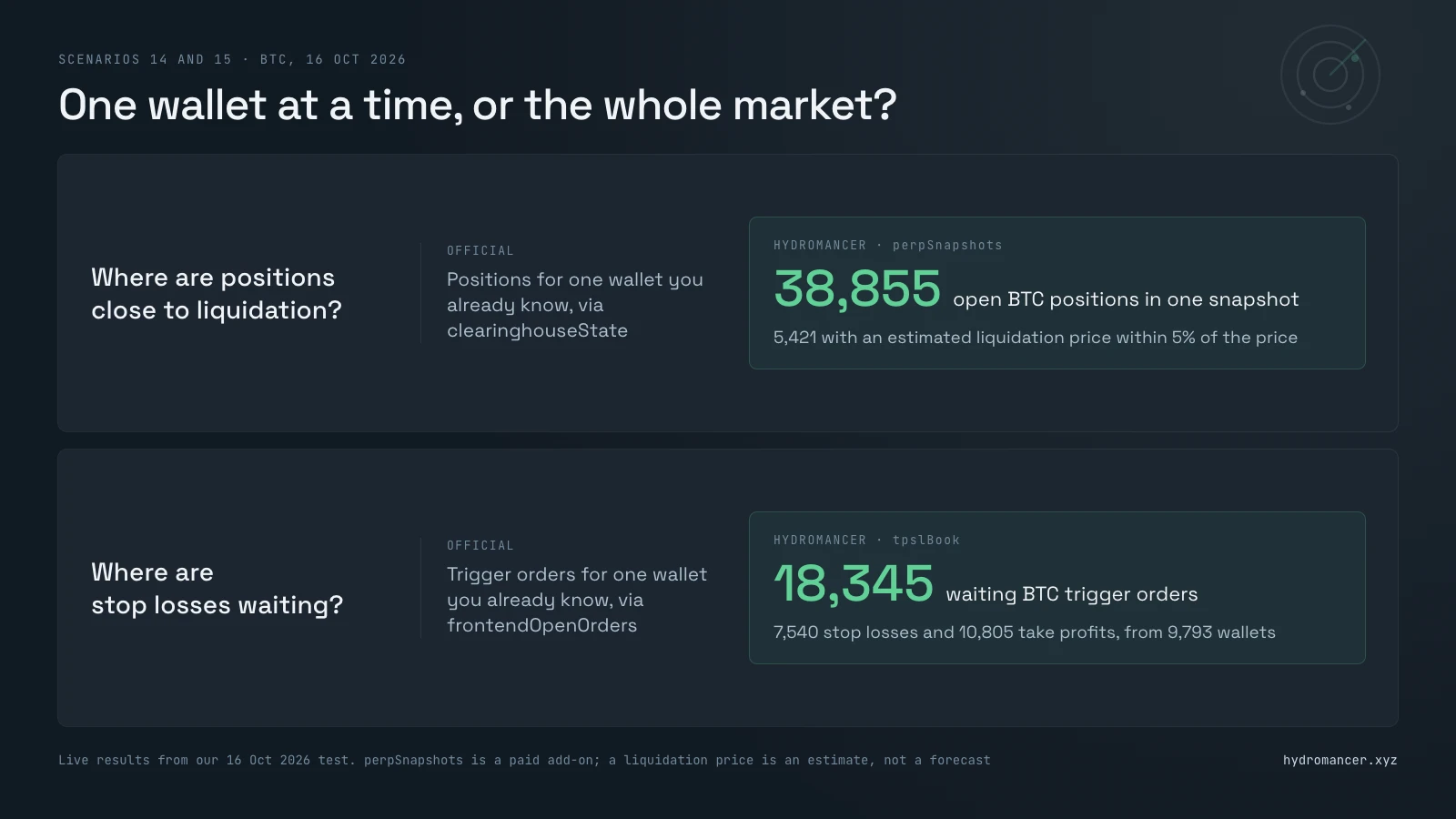
Real-time apps: Hyperliquid WebSocket and Hydromancer streams
A WebSocket is a connection that stays open, so updates arrive as they happen.
16. Live trade alerts for many Hyperliquid wallets
Want an alert the moment any of your tracked wallets trades?
On the official WebSocket you subscribe one wallet at a time, up to a cap. On Hydromancer you send one subscription with a list of addresses.
Good for: whale trackers, copy-trading and team dashboards. Our whale tracker guide builds one from scratch.
import asyncio, json, os, time
import websockets
from hl_hm import busy_wallets

KEY = os.environ["HYDROMANCER_API_KEY"]
wallets = busy_wallets(50)

async def official():
    async with websockets.connect("wss://api.hyperliquid.xyz/ws") as ws:
        for w in wallets:
            await ws.send(json.dumps({"method": "subscribe",
                "subscription": {"type": "userFills", "user": w}}))
        ok, errors = 0, set()
        end = time.time() + 10
        while time.time() < end:
            try:
                m = json.loads(await asyncio.wait_for(ws.recv(), 1))
            except asyncio.TimeoutError:
                continue
            if m["channel"] == "subscriptionResponse":
                ok += 1
            elif m["channel"] == "error":
                errors.add(m["data"])
        print(f"official: {ok} wallets accepted, errors: {errors}")

async def hydro():
    url = f"wss://api.hydromancer.xyz/ws?token={KEY}"
    async with websockets.connect(url) as ws:
        fills, followed = 0, set()
        end = time.time() + 30
        while time.time() < end:
            try:
                m = json.loads(await asyncio.wait_for(ws.recv(), 1))
            except asyncio.TimeoutError:
                continue
            if m["type"] == "connected":
                await ws.send(json.dumps({"type": "subscribe",
                    "subscription": {"type": "userFills", "addresses": wallets}}))
            elif m["type"] == "ping":
                await ws.send(json.dumps({"type": "pong"}))
            elif m["type"] == "subscriptionUpdate":
                print("hydro: subscribed, failed =", m["failed"])
            elif m["type"] == "error":
                print("hydro error:", m.get("message"))
            elif m["type"] == "userFills":
                for address, fill in m["fills"]:
                    fills += 1
                    followed.add(address)
        print(f"hydro: {fills} fills from {len(followed)} wallets in 30s")

asyncio.run(official())
asyncio.run(hydro())
Result:
official: 15 wallets accepted, errors: {'Cannot track more than 15 total users.'}
hydro: subscribed, failed = []
hydro: 661 fills from 34 wallets in 30s
The official server stopped at 15 wallets. Its docs set the limit at 10 per IP address, so don't count on the extra five. Hydromancer took all 50 in one message. 400 also worked; 600 was rejected because our plan allows 500 subscriptions, one per wallet.
17. Real-time Hyperliquid liquidation feed
Want a live feed of liquidations as they happen?
The official WebSocket only tells you when a wallet you follow is liquidated. It has no market-wide channel. Hydromancer's liquidationFills pushes each one as it fills.
Good for: liquidation bots, alert channels and live risk screens.
import asyncio, json, os, time
import websockets

KEY = os.environ["HYDROMANCER_API_KEY"]

async def official():
    async with websockets.connect("wss://api.hyperliquid.xyz/ws") as ws:
        await ws.send(json.dumps({"method": "subscribe",
                                  "subscription": {"type": "liquidationFills"}}))
        print("official:", json.loads(await ws.recv())["channel"])

async def hydro(seconds=300):
    url = f"wss://api.hydromancer.xyz/ws?token={KEY}"
    count, total = 0, 0.0
    async with websockets.connect(url) as ws:
        end = time.time() + seconds
        while time.time() < end:
            try:
                m = json.loads(await asyncio.wait_for(ws.recv(), 1))
            except asyncio.TimeoutError:
                continue
            if m["type"] == "connected":
                await ws.send(json.dumps({"type": "subscribe",
                    "subscription": {"type": "liquidationFills"}}))
            elif m["type"] == "ping":
                await ws.send(json.dumps({"type": "pong"}))
            elif m["type"] in ("subscriptionUpdate", "error"):
                print("hydro:", m.get("subscribed") or m.get("message"))
            elif m["type"] == "liquidationFills":
                for user, fill in m["fills"]:
                    count += 1
                    total += float(fill["px"]) * float(fill["sz"])
                    print(f"  {fill['coin']:>10}  {fill['dir']:<12} "
                          f"${float(fill['px']) * float(fill['sz']):,.0f}")
    print(f"hydro: {count} liquidations, ${total:,.0f} in {seconds}s")

asyncio.run(official())
asyncio.run(hydro())
Result:
official: error
hydro: ['liquidationFills']
    xyz:SPCX  Close Short  $3,834
  xyz:UNITREE  Close Short  $527
  para:UNITREE  Close Short  $13
  ...
  xyz:UNITREE  Close Short  $11
hydro: 17 liquidations, $5,950 in 300s
Seventeen liquidation fills in five minutes, all on HIP-3 markets. They come in bursts, so a quiet window can show none. On our plan, a key can hold one liquidation subscription at a time, and a second connection with the same key got a limit error.
18. Hyperliquid L4 order book streaming
Need to see every order in the book, not just the price levels?
The official l2Book stream adds up all orders at each price into one level: 20 levels every few seconds by default, or 5 levels about twice a second in fast mode. Hydromancer's l4BookUpdates sends each order as it's placed, changed or cancelled, and new orders come with the wallet that placed them.
Good for: market making, order-flow research and spotting large players. Our post on BBO vs L2Book vs L4Book explains the book types.
import asyncio, json, os, time
import websockets

KEY = os.environ["HYDROMANCER_API_KEY"]

async def official(seconds=30):
    async with websockets.connect("wss://api.hyperliquid.xyz/ws") as ws:
        for fast in (False, True):          # default 20 levels, fast 5 levels
            await ws.send(json.dumps({"method": "subscribe", "subscription":
                {"type": "l2Book", "coin": "BTC", "fast": fast}}))
        counts, end = {}, time.time() + seconds
        while time.time() < end:
            try:
                m = json.loads(await asyncio.wait_for(ws.recv(), 1))
            except asyncio.TimeoutError:
                continue
            if m["channel"] == "l2Book":
                levels = len(m["data"]["levels"][0])
                counts[levels] = counts.get(levels, 0) + 1
        for levels, n in sorted(counts.items()):
            print(f"official l2Book: {n} snapshots of {levels} levels "
                  f"in {seconds}s")

async def hydro(seconds=30):
    url = f"wss://api.hydromancer.xyz/ws?token={KEY}"
    async with websockets.connect(url) as ws:
        updates, changes, owners = 0, 0, set()
        end = time.time() + seconds
        while time.time() < end:
            try:
                m = json.loads(await asyncio.wait_for(ws.recv(), 1))
            except asyncio.TimeoutError:
                continue
            if m["type"] == "connected":
                await ws.send(json.dumps({"method": "subscribe",
                    "subscription": {"type": "l4BookUpdates", "coins": ["BTC"]}}))
            elif m["type"] == "ping":
                await ws.send(json.dumps({"type": "pong"}))
            elif m["type"] == "error":
                print("hydro error:", m.get("message"))
            elif m["type"] == "l4BookUpdates":
                updates += 1
                for d in m["data"].get("diffs", []):
                    changes += 1
                    if d["type"] == "new":      # only new orders carry the owner
                        owners.add(d["user"])
        print(f"hydro l4BookUpdates: {updates} updates, {changes} order "
              f"changes, new orders from {len(owners)} wallets in {seconds}s")

asyncio.run(official())
asyncio.run(hydro())
Result:
official l2Book: 58 snapshots of 5 levels in 30s
official l2Book: 6 snapshots of 20 levels in 30s
hydro l4BookUpdates: 415 updates, 11262 order changes, new orders from 227 wallets in 30s
Even fast mode is a series of photos of the top five levels. The L4 feed is closer to a video of every order. To keep a complete book, you'd also start from a snapshot, which the Hydromancer docs walk through.
Which Hyperliquid API is easier for AI coding assistants?
If ChatGPT, Claude or Cursor writes your Hyperliquid code, which API will it get right with less help from you?
An AI assistant writes a request, reads the reply and fixes what went wrong. So three things matter: the schema (the names and layout of fields in requests and replies), how easily it can read the docs, and whether errors say what to change.
Good for: anyone building with an AI assistant or agent. Less relevant if you write every request by hand.
| Official API | Hydromancer API | |
|---|---|---|
| Requests both offer | Short field names: o, h, l, c for candle prices, px and sz for price andsize | Mostly the same names and request bodies. A few replies add fields or use a different format |
| Hydromancer's own requests | Not offered | Spelled-out names: bidDepth10bps, buySlippageBps, oiClose, winRate, humanScore |
| Docs written for AI | An llms.txt index. Themain request page is about 55 KB and covers 29 requests | An llms.txt index, withone page per request. The typical page is under 5 KB |
| Error messages | The same generic message for each broken request we tried | Usually names the field or value that's wrong |
| Reply format | JSON | Mostly JSON. Some requests, including l2Book, reply in abinary format |
Short pages help because an AI reads docs into a limited working memory, and a page about one request leaves more room for your code.
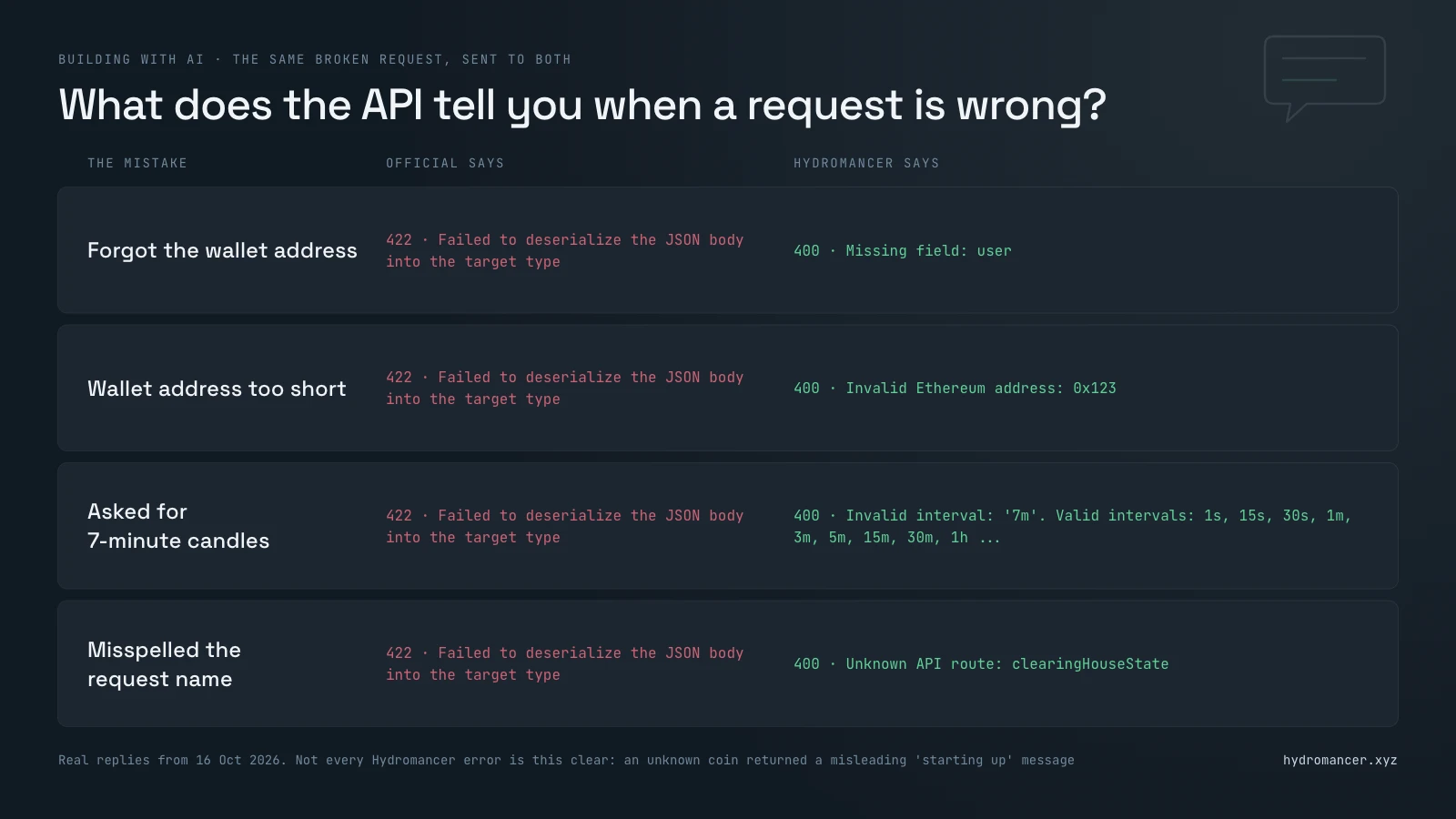
The error messages differ most. Here are three deliberately broken requests sent to both:
from hl_hm import HL, HM, KEY, session

mistakes = [
    {"type": "clearinghouseState"},                       # forgot the wallet
    {"type": "clearinghouseState", "user": "0x123"},      # address too short
    {"type": "candleSnapshot", "req": {"coin": "BTC", "interval": "7m",
                                       "startTime": 0, "endTime": 1}},
]
for body in mistakes:
    a = session.post(HL, json=body, timeout=30)
    b = session.post(HM, json=body, timeout=30,
                     headers={"Authorization": f"Bearer {KEY}"})
    print(f"official {a.status_code}: {a.text[:70]}")
    print(f"hydro    {b.status_code}: {b.text[:70]}\n")
Result:
official 422: Failed to deserialize the JSON body into the target type
hydro    400: {"error":"Missing field: user"}

official 422: Failed to deserialize the JSON body into the target type
hydro    400: {"error":"Invalid Ethereum address: 0x123"}

official 422: Failed to deserialize the JSON body into the target type
hydro    400: {"error":"Invalid interval: '7m'. Valid intervals: [\"1s\", \"15s\", \
We then tested whether that helps. A fresh AI model (GPT 6.1 Sol) with no docs got a goal, a broken request, the API's reply and up to three tries. We used four broken requests per group and ran each three times.
Two catches. Some Hydromancer replies, including l2Book, use a binary format called MessagePack, so your AI needs the docs to decode them. And for a coin that doesn't exist, Hydromancer said its order book service might be starting up, which could send an AI the wrong way.
This was one model on a handful of requests, so treat it as a hint, not a benchmark. On shared requests, expect about the same from either API. Hydromancer helps most with the extra data, where its error messages alone got the AI there without you.
When to upgrade from the Hyperliquid API to Hydromancer
You probably don't need to upgrade if:
Consider adding Hydromancer when:
Why you still need the Hyperliquid API to trade
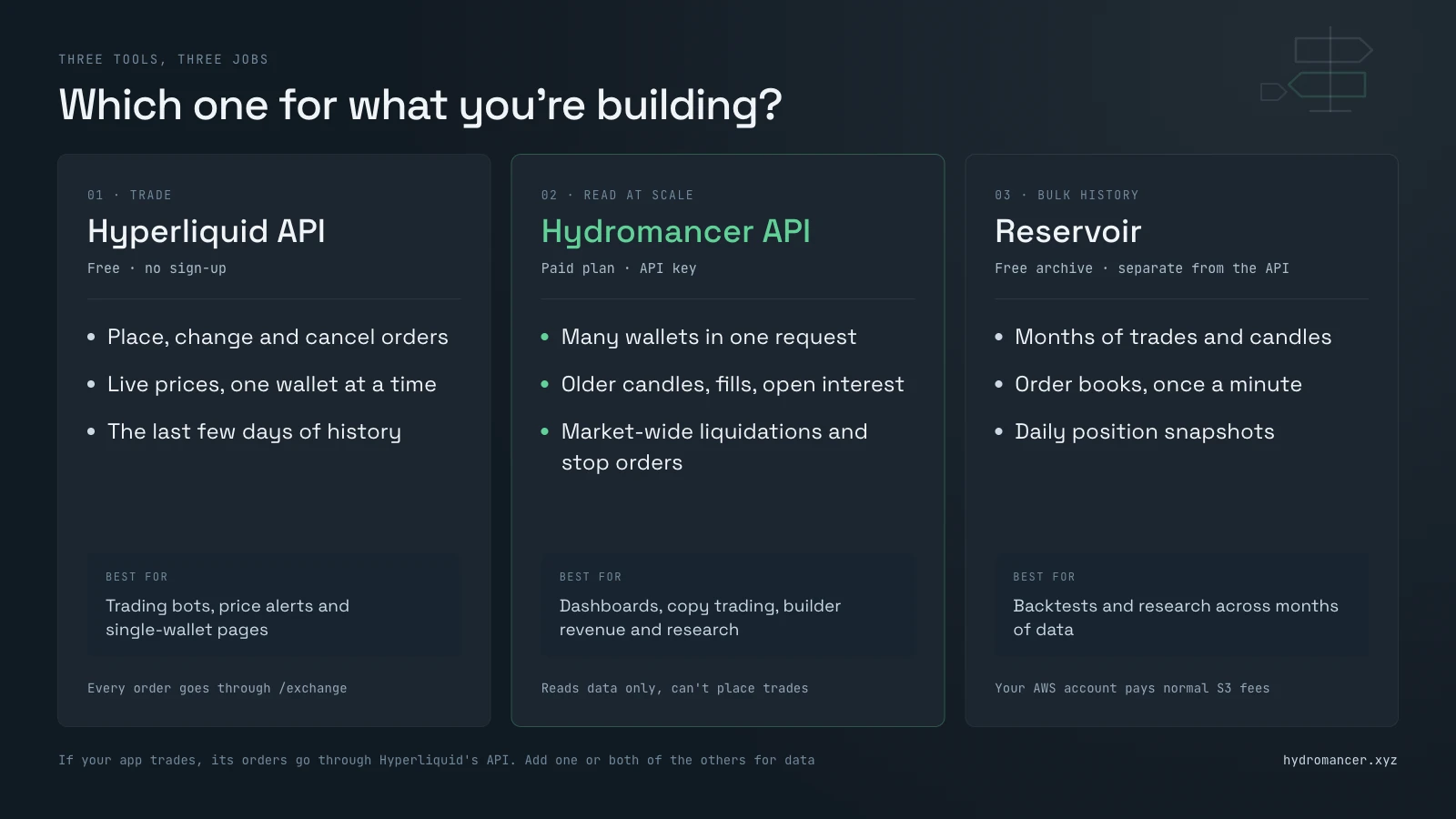
Upgrading doesn't mean leaving, because Hydromancer can't place trades for you. Its API only reads data. Every order you place, change or cancel still goes to Hyperliquid's own /exchange endpoint, signed by your wallet or an API wallet you've approved. If your app trades at all, it keeps the official API for that.
So in practice you use three tools:
Many shared requests take the same body, so moving one over is mostly a change of address plus your key. Check the docs for each, though: Hydromancer's allMids, for example, returns perp prices only, not spot.
On cost, the official API is free. Hydromancer's plans start at $300 a month for 500,000 tokens (its unit of usage), and most requests cost one token. Position requests cost 0.025 tokens per wallet per DEX, capped at 25 tokens a batch. Some requests, including the trader leaderboard and position snapshots, are paid add-ons. The pricing page has the details. For every option, including running your own node, see how to get Hyperliquid data.
Run the Hyperliquid API tests yourself
Every script imports this helper. Save it as hl_hm.py in the same folder, run pip install requests websockets msgpack zstandard, and set your key with export HYDROMANCER_API_KEY=your_key.
import os
import requests

HL = "https://api.hyperliquid.xyz/info"   # official, free, no key
HM = "https://api.hydromancer.xyz/info"   # Hydromancer, needs a key
KEY = os.environ["HYDROMANCER_API_KEY"]
session = requests.Session()              # reuse connections for both

def hl(body):
    r = session.post(HL, json=body, timeout=30)
    if r.status_code == 422:              # official API doesn't know this request
        return 422, None
    r.raise_for_status()
    return 200, r.json()

def hm(body):
    r = session.post(HM, json=body, timeout=60,
                     headers={"Authorization": f"Bearer {KEY}"})
    r.raise_for_status()
    return 200, r.json()

def busy_wallets(n=50):
    """Wallets that traded in the last few minutes, from public trades."""
    seen = []
    for coin in ["BTC", "ETH", "SOL", "HYPE", "XRP", "DOGE"]:
        for trade in hl({"type": "recentTrades", "coin": coin})[1]:
            for user in trade["users"]:
                if user not in seen:
                    seen.append(user)
    return seen[:n]
busy_wallets() picks addresses from recent public trades, so you test on real, active wallets. These are short demos, not production code: a real app also needs to reconnect when a connection drops and check for gaps.
Sources
Read next

Hyperliquid API Guide for Builders
A builder's guide to the Hyperliquid API: which endpoint answers which question, API keys, testnet USDC, tested limits and common mistakes, with code.
Read ↗
How to Build a Hyperliquid Whale Tracker (Live Positions, Fills and Alerts)
Find the biggest traders on Hyperliquid, see what they hold and get an alert when they move, first with the official Hyperliquid API, then without its limits.
Read ↗
How to Build with Liquidation Data from Hyperliquid
Learn how to build a Hyperliquid liquidation dashboard with historical data, live events and reliable monitoring.
Read ↗