How to Build a Hyperliquid Orderbook Heatmap
Learn how to build a Hyperliquid order book heatmap: sample l2Book snapshots, choose the price grouping, then read walls, pulled liquidity and depth.
Some orders on Hyperliquid's book are walls that price keeps bouncing off. Others vanish just before price gets there. An order book heatmap shows both, price by price, over time, so you can see where the big orders sit.
What Hyperliquid's on-chain order book adds to a heatmap
On a centralized exchange (CEX), the order book runs on the exchange's own servers, and you see what its feed chooses to publish. Hyperliquid's order book is on-chain, which changes what a heatmap can show:
| Order book on Hyperliquid | Order book on a CEX | |
|---|---|---|
| Where it lives | On-chain: every order, cancel and trade is public | Typically on the exchange's private servers |
| What you can see | Price levels, and with order-level (L4) data, every resting order with its address | Usually price levels only |
| Who placed a wall | Visible from L4 data | Usually not visible |
So on Hyperliquid, a heatmap can go further: not only where size sits, but who's behind it.
Below, we pull an order book snapshot, record a few minutes of them into a heatmap, and go through how to read walls without fooling yourself. Then we look at what a deeper, faster feed adds. Numbers are from our test runs.
What an order book heatmap shows
| Chart | What it shows | Good for |
|---|---|---|
| Depth chart | Bids and asks at one moment, added up from the best price | How deep the book is right now |
| Heatmap | Resting size at each price, over time | Walls, pulled liquidity, levels that hold |
In a heatmap, price runs up the side and time runs along the bottom. Brighter cells hold more size. A bright horizontal band is a level that stayed big for a while. Three patterns to look for:
- Walls. A level with far more size than its neighbors. Watch whether price slows or turns when it gets there.
- Pulled liquidity. A band that vanishes before price reaches it. If price never reached it, those orders weren't filled; they were cancelled or moved.
- Sliding liquidity. Size that keeps re-posting a fixed distance from the price. That's often quotes moving with the market.
To run the snippets, you'll need requests, plus websocket-client for the live example, and HYDROMANCER_API_KEY set for the Hydromancer one.
Step 1: Get an order book snapshot from Hyperliquid
A heatmap is built from many snapshots of the order book, each one showing how much size rests at each price. Hyperliquid's free l2Book request returns that snapshot: total size and order count at each price, up to 20 levels a side. The nSigFigs option groups prices into wider levels, so the same 20 levels cover more of the book:
import requests

book = requests.post(
    "https://api.hyperliquid.xyz/info",
    json={"type": "l2Book", "coin": "BTC", "nSigFigs": 4},
).json()

bids, asks = book["levels"]
print(f"{len(bids)} bid levels, {bids[0]['px']} down to {bids[-1]['px']}")20 bid levels, 80800.0 down to 80610.0Each level has a price (px), total size (sz) and the number of orders behind it (n). How much of the book you see depends on the grouping:
| Setting | BTC price step | Window each side |
|---|---|---|
Raw (no nSigFigs) | $1 | About $20 |
nSigFigs: 4 | $10 | About $190 |
nSigFigs: 3 | $100 | About $1,900 |
For a heatmap that spans minutes, the window needs to be wider than the price move over that time. Four significant figures is a good start for BTC. For the order book levels in general, see BBO vs L2Book vs L4Book.
Step 2: Record snapshots and draw the heatmap
One snapshot shows a single moment. A heatmap needs a snapshot every few seconds, so instead of polling, subscribe to the same book over Hyperliquid's live feed. Send {"method": "subscribe", "subscription": {"type": "l2Book", "coin": "BTC", "nSigFigs": 4}}, then save each snapshot with its time. Put each snapshot into a 5-second column and plot size by price. The recorder and plotting code aren't shown here; any streaming client and plotting library will do. Here are ten minutes of BTC:
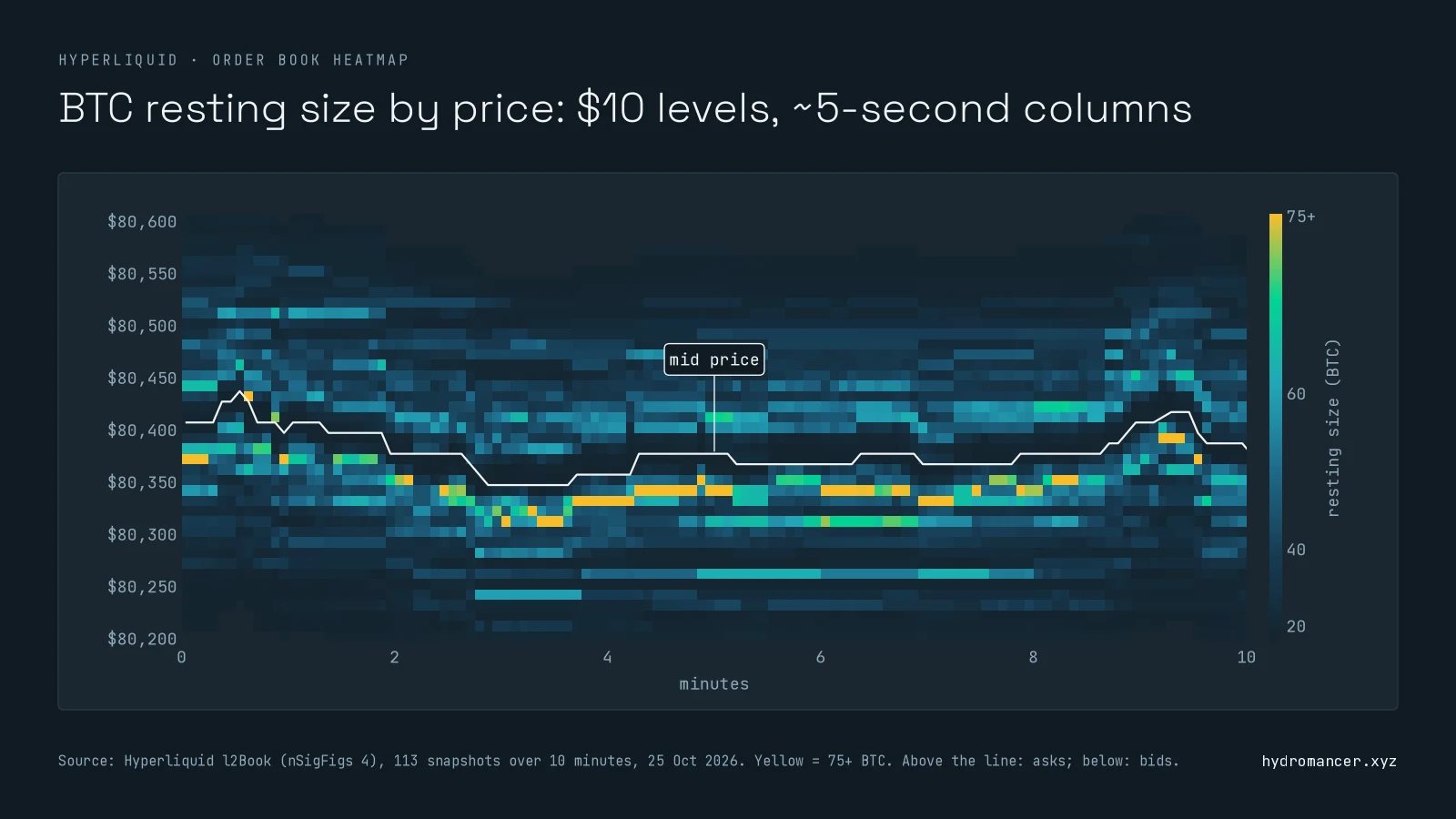
What this one shows:
- Two bid walls persisted. The biggest levels, at $80,330 and $80,310, stayed large in most snapshots, and the best bid never reached them in any snapshot.
- The whole move stayed in view. The sampled mid price moved within about $90, well inside the $190 window each side.
- Size thins out right at the price. In this recording, the best level held a median of about 8 BTC, against 24 to 54 BTC a few levels away.
Step 3: Read walls without fooling yourself
A heatmap shows what was posted, not what was meant. Keep three things in mind:
- One cell can be one order or a hundred. An L2 level gives total size and an order count, not who placed them.
- Walls can be pulled in the next block. A wall that keeps vanishing as price approaches deserves less trust than one that stays.
- Anything outside the window is invisible, however big. Widen the grouping if levels drop off the edges.
Deeper and faster Hyperliquid order book data
Steps 1 to 3 use Hyperliquid's own API, and that's enough for a basic heatmap. Hydromancer adds depth, detail and history:
| What you need | Without Hydromancer (Hyperliquid's API only) | With Hydromancer's API |
|---|---|---|
| How far you see | 20 levels a side | l2Book up to 50levels a side |
| How often snapshots arrive | At most once every 0.5 seconds, per Hyperliquid's docs | Every block, about 70 ms, per our docs |
| Many coins | One subscription per coin | One subscription for a list of coins |
| Who is behind a wall | Not available: price levels only | l4Book : everyresting order with its ID and address |
| Follow orders over time | Your own orders only ( orderUpdates ) | l4BookUpdates :every new, changed and removed order on the market, by ID |
| Heatmaps over days or weeks | Record it yourself | Reservoir : 20-level snapshots every minute for every perp, spot and HIP-4 market (requester-pays S3) |
Example: a wider window for the same heatmap
Without Hydromancer: Step 1's request stops at 20 levels, so at four significant figures you see about $190 each side of the price.
With Hydromancer: the same grouping with 50 levels a side:
import json
import os
import websocket

key = os.environ["HYDROMANCER_API_KEY"]
url = "wss://api.hydromancer.xyz/ws?token=" + key
ws = websocket.create_connection(url, timeout=30)
ws.recv()  # the "connected" message

sub = {"type": "l2Book", "coins": ["BTC"], "nSigFigs": 4, "nLevels": 50}
ws.send(json.dumps({"method": "subscribe", "subscription": sub}))

while True:
    msg = json.loads(ws.recv())
    if msg.get("type") == "l2Book":
        book = msg["data"]
        break

bids, asks = book["levels"]
print(f"{len(bids)} bid levels, {bids[0]['px']} down to {bids[-1]['px']}")50 bid levels, 80830 down to 80340That's about $490 of the book each side, two and a half times the window. A heatmap built on it keeps walls in view through much bigger moves.
What L4 adds: who is behind a wall
From one BTC snapshot of Hydromancer's l4Book, two levels near the price looked much the same on an L2 heatmap:
| Biggest bid level near the price | Best ask level | |
|---|---|---|
| Size | 13.97 BTC | 13.79 BTC |
| Orders | 10, from 8 addresses | 71, from 57 addresses |
| Largest single order | 60% of the level | Under 10% of the level |
With L4 data, one is mostly a single order and the other is a crowd. The full BTC book in that snapshot held 42,360 resting bids, far beyond any 20- or 50-level window.
For a heatmap of where size sits, Hyperliquid's free l2Book does the job. Add Hydromancer when you want a wider or faster book, to see who is behind a wall, or history without recording it yourself. Our order book data page covers the L2 and L4 feeds.
What to know before you build
- Subscribe instead of polling. Each
l2Bookpoll uses part of the 1,200 request weight each IP gets per minute. See Hyperliquid rate limits. - Size your columns to the snapshot rate. We used 5-second columns. Use 30- or 60-second columns for charts over an hour or more.
- Send a ping on quiet connections. Hyperliquid closes a connection that's been silent for 60 seconds. Our data feeds guide covers reconnecting.
FAQ
Is there a free Hyperliquid order book heatmap?
You can build one for free: Hyperliquid's l2Book request and live feed need no API key. The steps above show the data and how to turn it into a heatmap.
What's the difference between an order book heatmap and a liquidation heatmap?
An order book heatmap shows resting orders: size waiting at each price. A liquidation heatmap estimates where open positions would be forcibly closed. They answer different questions; our liquidation data guide covers the second.
Can I get Hyperliquid order book data by API?
Yes. l2Book on Hyperliquid's info endpoint returns up to 20 price levels a side, free. For more levels, every block, or every individual order, use Hydromancer's l2Book and l4Book.
How many levels does Hyperliquid's order book API return?
Up to 20 a side from l2Book. Use nSigFigs to group prices into wider levels when you need to see further from the price.
Can an order book heatmap detect spoofing?
Not on its own. Posting and pulling size is also what honest market making looks like. Order-level data, with order IDs and addresses, is what lets you tell one order from many.
Next steps
- Try the request: run the Step 1 snippet for your coin and pick a grouping.
- Learn the order book levels: BBO vs L2Book vs L4Book.
- Get history without recording: Hyperliquid historical data in Reservoir.
- Need order-level detail? See Hydromancer's L2 and L4 order book data.
Read next
How to Build a Hyperliquid Copy Trading Bot
Learn how to build a Hyperliquid copy trading bot on Hyperliquid with the Hyperliquid API.
Read ↗
Hyperliquid Leaderboard: How to Track Top Addresses' PnL
Learn how to get Hyperliquid leaderboard data using the Hyperliquid API.
Read ↗
How to Build a Hyperliquid Trading Bot
Learn how to build a Hyperliquid trading bot: a signal from market data, signed orders through Hyperliquid's API, risk limits and a kill switch, with examples.
Read ↗