Hyperliquid Vaults API: Track Performance and Depositors
Learn how to check any vault’s APR, PnL and depositors, from HLP to every vault, using the API.

The Hyperliquid app lists every vault, but its list won't tell you which one is worth depositing in. To compare thousands of vaults on your own terms, or build a screener that ranks them, you need the same data through the API.
Hyperliquid vaults vs managed products on a CEX
Vaults are Hyperliquid's built-in way to let someone else trade your money. Unlike managed products on a centralized exchange (CEX), everything about them is on-chain:
| Vaults on Hyperliquid | Managed products on a CEX | |
|---|---|---|
| Positions and trades | Public on-chain, readable through the free API | Usually only the stats the exchange shows |
| Deposits and withdrawals | Every one is recorded on-chain | Usually not visible |
| Leader's terms | Set by the protocol: user-vault leaders keep at least 5% of the vault and take 10% of profits; HLP has no profit share | Set by each product |
| Which ones you can study | Every vault, including Hyperliquid's own HLP | The exchange's own listings |
Below, we cover how vaults work, then read one vault's performance and depositors, list every vault, and track money moving in and out. The examples use HLP, Hyperliquid's own vault, with numbers from our test runs.
How Hyperliquid vaults work
A vault is a trading account that runs on pooled money. A leader trades it, and depositors share its profits and losses in proportion to their stake. There are two kinds, per Hyperliquid's vault docs:
| HLP (protocol vault) | User vault | |
|---|---|---|
| Who trades | Protocol strategies: market making and liquidations | The leader |
| Leader's profit share | None | 10% of profits |
| Lock-up after your latest deposit | 4 days | 1 day |
| Leader's minimum stake | n/a | 5% of the vault |
The docs now call user vaults "HyperCore vaults (legacy)". They trade validator-operated perps only, with no spot or HIP-3.
Here's how the profit share works, from the depositor docs. You deposit 100 USDC into a vault holding 900, so you own 10%. The vault grows to 2,000, and your share is now worth 200. When you withdraw, the leader takes 10% of your 100 profit, so you receive 190 USDC.
For reading data, a vault is just an address. Account requests such as clearinghouseState and userFills work on it like on any wallet.
Which request gives you what
| You want | Request |
|---|---|
| One vault's APR, history, settings and largest depositors | vaultDetails |
| The vaults an address has deposited in | userVaultEquities |
| Whether an address is a vault | userRole returns{"role": "vault"} |
| A vault's deposits and withdrawals | userNonFundingLedgerUpdateson the vault's address |
| A vault's positions and trades | clearinghouseState, userFills , asfor any wallet |
| Every vault | Hyperliquid's app list file (undocumented, below) |
The documented requests are free, read-only POSTs to https://api.hyperliquid.xyz/info. Details are in Hyperliquid's info endpoint docs.
You only need requests to run the snippets, plus HYDROMANCER_API_KEY for the Hydromancer example.
Step 1: Read one vault's performance with vaultDetails
Most of a vault's page comes from one request. Give vaultDetails a vault's address and you get its APR, settings, account value and PnL history, and its largest depositors (we saw 100):
import requests

vault = requests.post(
    "https://api.hyperliquid.xyz/info",
    json={"type": "vaultDetails", "vaultAddress": HLP},
).json()

day = dict(vault["portfolio"])["day"]
value = float(day["accountValueHistory"][-1][1])
print(vault["name"], f"| APR {vault['apr']:.2%} | account value ${value:,.0f}",
f"| depositors listed: {len(vault['followers'])}")Hyperliquidity Provider (HLP) | APR 3.69% | account value $175,284,089 | depositors listed: 100HLP here is HLP's address, 0xdfc24b077bc1425ad1dea75bcb6f8158e10df303. The fields you'll use most:
| Field | What it holds |
|---|---|
apr | The APR the app shows, as a fraction (0.0369 is 3.69%) |
portfolio | Account value and PnL history for day, week, month and all time |
followers | The largest depositors (we saw 100), each with equity, PnL and lock-up end |
leaderCommission | The leader's profit share: 0.1 on user vaults, 0 on HLP |
relationship | Whether the vault is a parent or child (HLP has seven children) |
The portfolio history is what you chart. Here's HLP's all-time window:
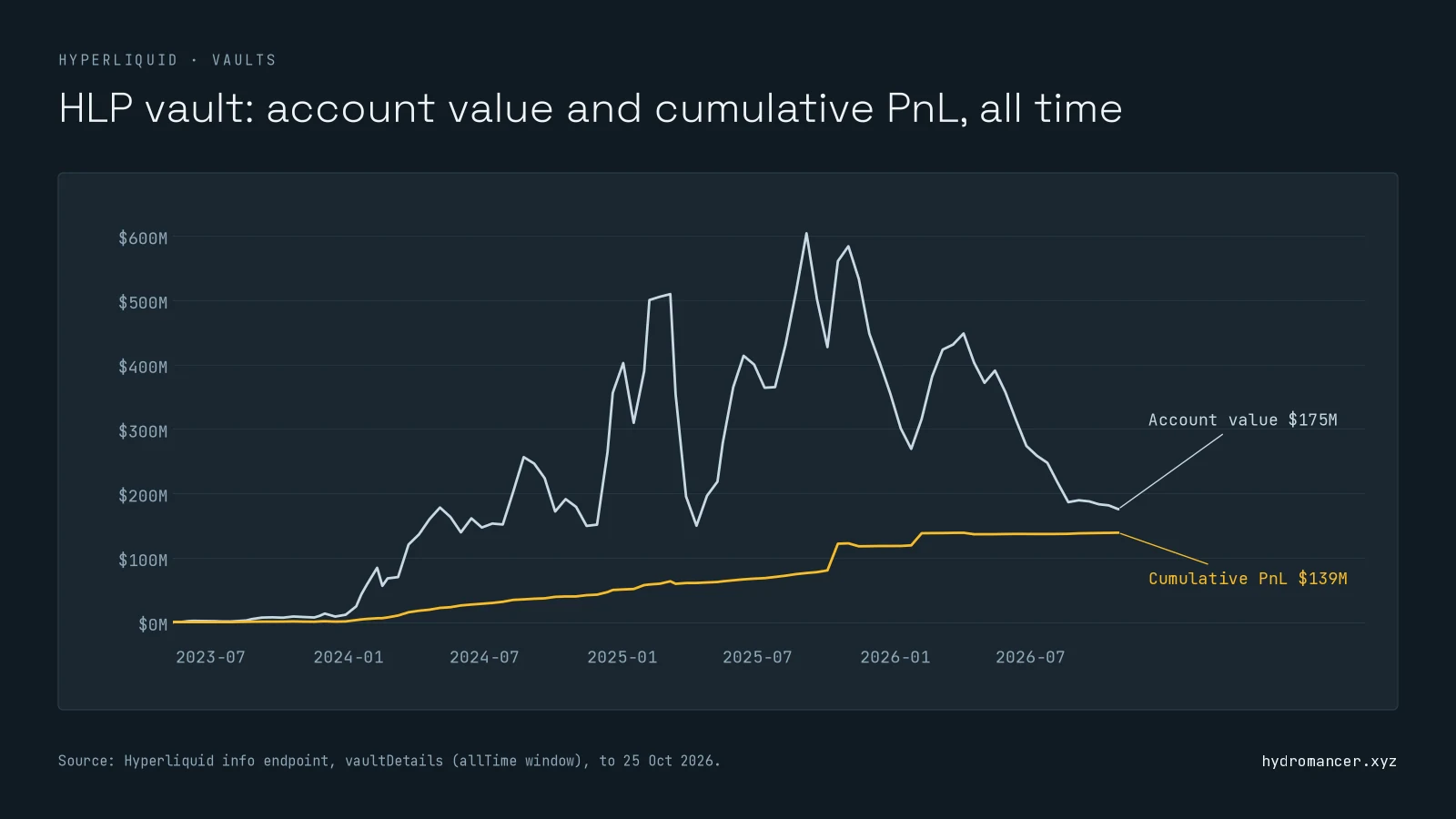
Account value swings with deposits and withdrawals. PnL doesn't, because Hyperliquid adjusts it for money moving in and out, per its portfolio graphs docs. That's why PnL rises fairly smoothly while account value swings. Use pnlHistory to judge performance.
Step 2: List every vault on Hyperliquid
There's no documented request that lists every vault. Hyperliquid's app reads its vault list from a public file. It's undocumented, so it can change, but it works:
import requests

# undocumented: the app's vault list
vaults = requests.get(
    "https://stats-data.hyperliquid.xyz/Mainnet/vaults"
).json()

open_vaults = [v["summary"] for v in vaults if not v["summary"]["isClosed"]]
open_vaults.sort(key=lambda s: -float(s["tvl"]))

largest = open_vaults[0]
print(f"{len(vaults):,} vaults, {len(open_vaults):,} open. Largest:",
largest["name"], f"${float(largest['tvl']):,.0f}")9,478 vaults, 3,076 open. Largest: Hyperliquidity Provider (HLP) $175,283,592Use the file to find vaults, then call vaultDetails on the ones you care about. Most listed vaults are closed, so filter them out before ranking. And don't add HLP's children to its total: the parent holds their equity, so adding both counts it twice.
Step 3: Track deposits, withdrawals and depositors
Money moving in and out of a vault tells you whether people trust it. Three requests cover it:
- Flows:
userNonFundingLedgerUpdateson the vault's address returnsvaultDepositandvaultWithdrawentries. Withdrawals name the user and the amount received; deposits show only the amount. Page forward from the last timestamp. - One depositor: add
"user"tovaultDetailsand readfollowerState. - From the depositor's side:
userVaultEquitieslists every vault an address holds, with its equity and lock-up end.
Track many Hyperliquid vaults at once
The per-vault requests above handle one vault or one address per request. That's fine for a single vault page. A screener or risk dashboard that follows hundreds of vaults hits the limits fast. Because a vault is just an address, Hydromancer's API can watch many at once:
| What you need | Without Hydromancer (Hyperliquid's API only) | With Hydromancer's API |
|---|---|---|
| Positions for many vaults | clearinghouseState ,one vault per request, from 1,200 weight a minute per IP | batchClearinghouseStates: up to 1,000 vaults in one request |
| Live trades from many vaults | One live subscription per vault; the docs allow 10 users per IP | One userFillssubscribe request for up to 1,000 addresses; each counts toward your plan's subscription total (500 on Starter) |
| Vaults an address holds or leads | userVaultEquities; leadingVaultsworks but isn't in Hyperliquid's docs | userVaultEquitiesand leadingVaults, both documented |
| One vault's details and history | vaultDetails , free | The same: use Hyperliquid's vaultDetails |
Example: watch the 50 largest vaults' positions
Without Hydromancer: one request per vault.
import requests

states = []
for v in VAULTS:  # one request per vault
    states.append(requests.post(
        "https://api.hyperliquid.xyz/info",
        json={"type": "clearinghouseState", "user": v},
    ).json())

print(len(states), "vaults,", len(VAULTS), "requests,",
2 * len(VAULTS), "of your 1,200 weight a minute")50 vaults, 50 requests, 100 of your 1,200 weight a minuteWith Hydromancer: one request for all of them.
import os
import requests

batch = requests.post(
    "https://api.hydromancer.xyz/info",
    json={"type": "batchClearinghouseStates", "users": VAULTS},
    headers={"Authorization": f"Bearer {os.environ['HYDROMANCER_API_KEY']}"},
).json()

print(len(batch["successful_states"]), "vaults, 1 request")50 vaults, 1 requestVAULTS is the 50 largest open vaults from Step 2. Refreshing them every 10 seconds on Hyperliquid's API would use half your request budget. With Hydromancer it's one request each time. Our whale tracker guide shows the same batch requests for any list of wallets.
What to know
- Withdrawals can move positions. If a withdrawal needs margin, the vault cancels orders and closes part of its positions until the money is free.
- History is sampled. The all-time window is thinned to roughly one point every two weeks. For a denser history, store
vaultDetailsresponses as you fetch them. - Deposits and withdrawals are signed actions (
vaultTransferon the exchange endpoint). Everything in this guide is read-only.
FAQ
What are vaults on Hyperliquid?
Vaults are trading accounts that run on pooled money. A leader trades the vault, and depositors share its profits and losses in proportion to their stake. HLP is Hyperliquid's own protocol vault; anyone can also open a user vault.
How do I check a Hyperliquid vault's performance?
Send vaultDetails with the vault's address to https://api.hyperliquid.xyz/info. Use pnlHistory in portfolio to judge performance, because it's adjusted for deposits and withdrawals; account value isn't.
What is HLP on Hyperliquid?
HLP (Hyperliquidity Provider) is Hyperliquid's protocol vault. It runs market-making and liquidation strategies, has no leader profit share, and locks each deposit for 4 days.
How do I get a list of all Hyperliquid vaults?
There's no documented request for it. Hyperliquid's app reads its list from stats-data.hyperliquid.xyz/Mainnet/vaults, an undocumented file you can fetch directly.
How do I see who has deposited into a vault?
vaultDetails lists the largest depositors in followers (we saw 100). For one address, add it as "user" and read followerState.
What is the lock-up on Hyperliquid vaults?
For HLP, you can withdraw 4 days after your most recent deposit; another deposit resets that. User vaults lock for 1 day.
Next steps
- Read a vault now: run the Step 1 snippet with any vault address.
- Learn the API basics: our Hyperliquid API guide.
- Plan your requests: Hyperliquid rate limits.
- Watching many vaults? See Hydromancer's REST API.
Read next

How to Build a Hyperliquid Copy Trading Bot
Learn how to build a Hyperliquid copy trading bot on Hyperliquid with the Hyperliquid API.
Read ↗
Hyperliquid Leaderboard: How to Track Top Addresses' PnL
Learn how to get Hyperliquid leaderboard data using the Hyperliquid API.
Read ↗
How to Build a Hyperliquid Trading Bot
Learn how to build a Hyperliquid trading bot: a signal from market data, signed orders through Hyperliquid's API, risk limits and a kill switch, with examples.
Read ↗