Hyperliquid Stop-Loss: Guide for Traders & Builders
How stop-loss and take-profit orders work on Hyperliquid, why every waiting one is public, and how traders and builders can read where they sit.

A stop-loss on Hyperliquid is an order that waits for a price you choose, then closes your position. A take-profit does the same on the winning side.
What's unusual about Hyperliquid is that every one of those waiting orders is public. The full list is what we call stop-loss data: for each order, the wallet that placed it, the price that sets it off, and its size.
That matters, because the order book shows none of them. A stop does nothing until the price reaches it, so the book can't tell you what a 2% drop would set off, and this list can.
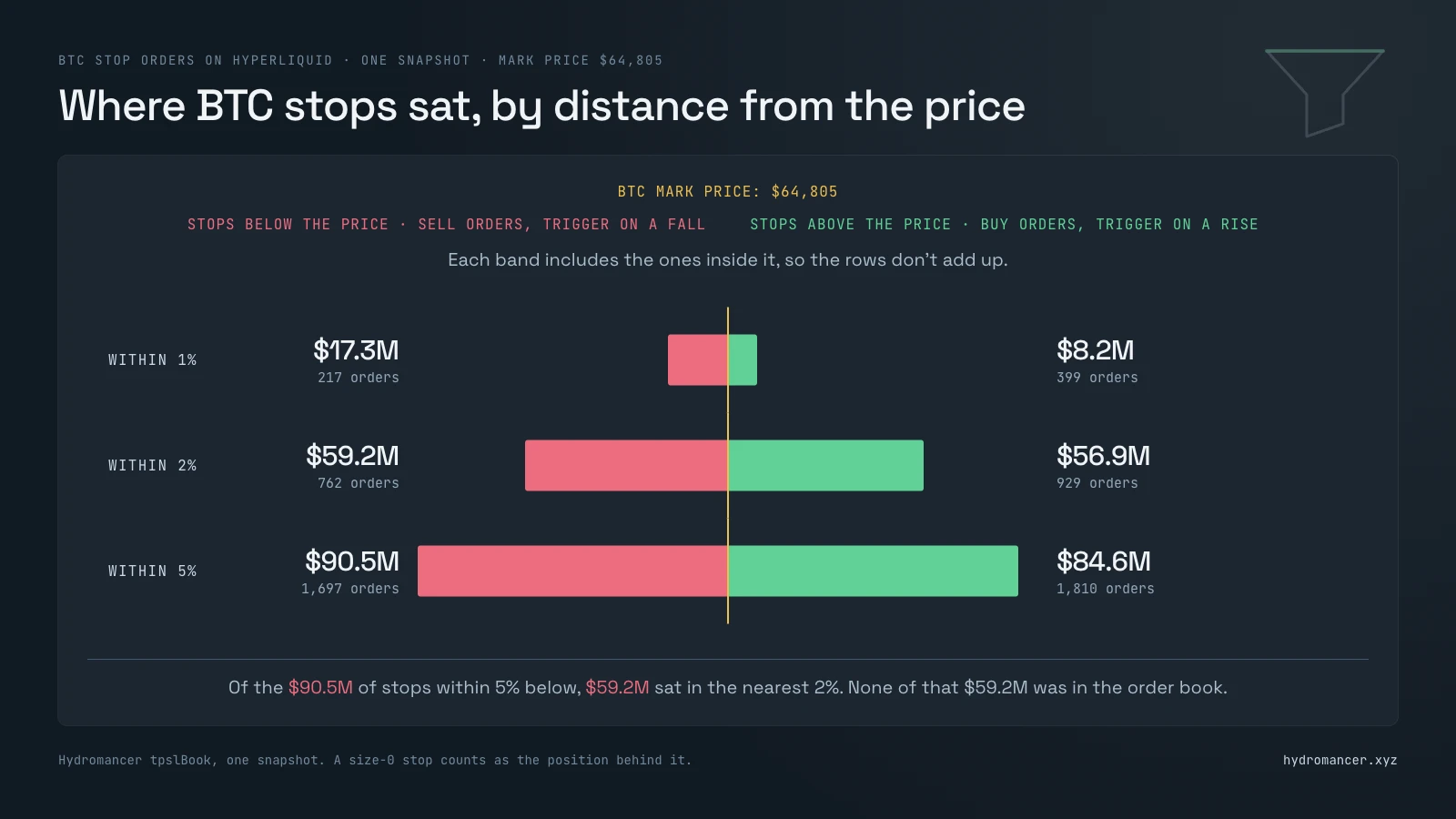
130,385 of these orders were waiting across 346 markets. On BTC, with the price at $64,805, 762 stops worth $59.2M sat within 2% below it.
Those figures are one moment in time. They'll have moved by the time you read this, so take the shape from them and not the exact numbers.
If you'd rather see the proof first, you can skip straight to the Test and Validation section. It covers when the numbers were taken, how each one was counted and how it was checked against Hyperliquid's own API.
This guide covers:
1. Why this data matters on Hyperliquid, and where it's used
2. What the BTC picture looked like
3. The kinds of stop you can place, and how each one triggers
4. How to pull them, for one wallet or for a whole market
5. How to keep the picture live, and when you need Hydromancer for it
6. How to read a cluster of stops once you have it
Why stop-loss data matters on Hyperliquid
#1: It shows where a move would speed up
Picture a price level with many stops behind it. When the price gets there, those orders all arrive at once: a long's stop sells, and a short's stop buys.
That's why we think a move through a level like that can speed up. On BTC, $59.2M of stops sat within 2% below the price, and $56.9M within 2% above it.
#2: Builders use it to map stop levels
Each waiting order comes with its trigger price and its size, which means you can group them by price and see where they bunch.
Here's what builders can do with that, and where each one ends up:
• A heatmap of where stops and take-profits cluster, beside the order book in a trading terminal
• A check on how much stop selling sits just under the price, in a risk dashboard
• A view of where the largest wallets have placed their stops, in a whale tracker
#3: On Hyperliquid it's public
On a centralized exchange, waiting stops aren't published.
Hyperliquid works differently. Every order is placed on-chain, so anyone can read it, with its wallet, trigger price and size, even while it waits outside the order book.
These orders are unlisted, not hidden.
#4: It tells you who is behind a level
Every waiting order comes with the wallet that placed it. That means you can tell a crowd of small traders from one large wallet, which an order book added up by price can't show you.
On BTC, the 762 stops within 2% below the price came from 679 wallets, and one of them held $19.2M of the $59.2M.
#5: It covers stocks and commodities, not only crypto
Hyperliquid also lists markets deployed by outside teams, known as HIP-3 markets, and many of them track stocks, indexes and commodities. Stops on those markets are public in exactly the same way.
They were a large share of the total. 41% of all waiting orders were on HIP-3 markets, including ones for Nvidia, the S&P 500 and gold.
Hyperliquid stop-loss data at a glance
BTC had more waiting orders than any other market, so let's use it as the example:
| Waiting on BTC | |
|---|---|
| Orders | 20,643 |
| Wallets that placed them | 9,917 |
| Stop orders | 7,473 |
| Take-profit orders | 13,170 |
Most of those orders sat more than 5% from the price. The ones worth your attention first are the stops a small move would reach:
| Distance from the price | Stops below it (sell orders) | Stops above it (buy orders) |
|---|---|---|
| Within 1% | 217 orders, $17.3M | 399 orders, $8.2M |
| Within 2% | 762 orders, $59.2M | 929 orders, $56.9M |
| Within 5% | 1,697 orders, $90.5M | 1,810 orders, $84.6M |
Each row includes the rows above it, and how each one is counted is further down.
Now read down the left column, and notice how close to the price the dollar value was. Of the $90.5M of stops within 5% below, $59.2M sat in the nearest 2%, which was 65% of it.
None of that $59.2M was in the order book, because none of it had triggered yet.
How stop-loss and take-profit orders work on Hyperliquid
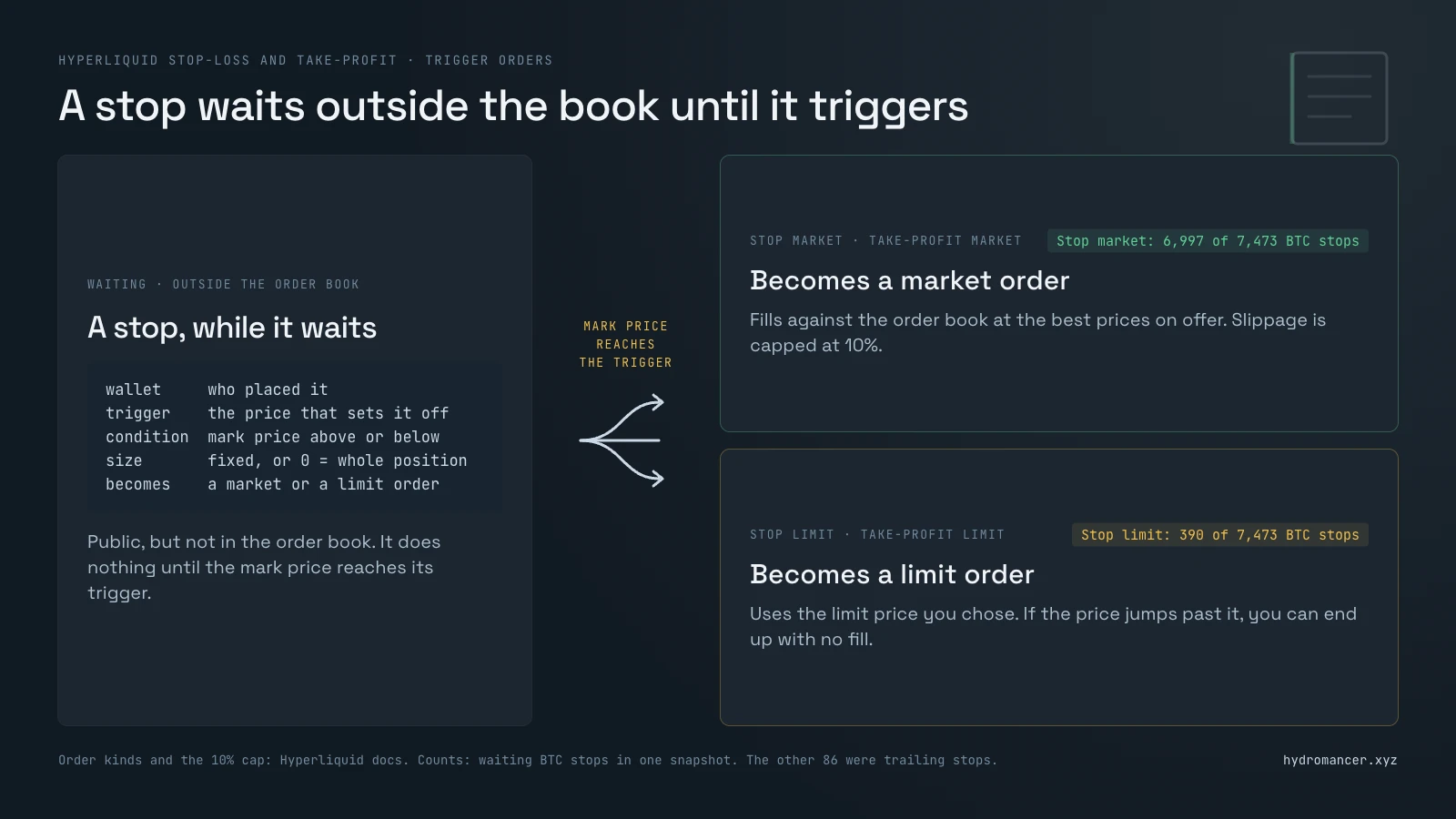
A stop-loss or a take-profit is a trigger order. It waits outside the book, and it only becomes a real order when the mark price reaches its trigger.
The mark price is Hyperliquid's own reference price, not the last trade. Our oracle price vs mark price guide covers how it's set.
What happens next depends on the kind of order you placed. They differ in two ways: what the order becomes at the trigger, and how big it is.
#1: Stop market, where the stop becomes a market order
A stop market order turns into a market order when the mark price reaches your trigger. It fills against the order book at the best prices on offer.
Hyperliquid caps the slippage on these orders at 10%.
On BTC it was by far the most common kind: 6,997 of the 7,473 waiting stops were stop market orders.
#2: Stop limit, where you set the worst price you'll accept
A stop limit order turns into a limit order at the trigger, at a limit price you choose.
That protects you from a bad fill, but there's a trade-off: you can end up with no fill at all. Hyperliquid's docs give the example of a stop on a long with its trigger and its limit both at $10.
If the price drops straight from $11 to $9, that order can be left resting at $10, with the position still open.
On BTC it was rare: 390 of the waiting stops were stop limit orders. Rare by count was not small by value: within 2% below the price, 10 stop limit orders held $19.4M of the $59.2M.
#3: Trailing stop, where the trigger follows the price
A trailing stop has no fixed trigger. It follows the best mark price reached since the stop was activated, and fires as a market order when the mark price pulls back from there by a distance or a percentage you set.
For a long, the trigger follows the highest price and never moves back down. For a short, it follows the lowest and never moves back up.
On BTC they were rarer still: 86 of the waiting stops.
#4: Take-profit, the same idea on the winning side
A take-profit works like a stop in reverse. It waits for the mark price to reach a level where you're in profit, then closes the position.
It comes in the same two kinds, market and limit. On BTC there were 11,907 take-profit market orders and 1,263 take-profit limit orders waiting, which was more orders than all the stops put together.
#5: A stop on a whole position has no size of its own
A stop-loss or take-profit set on a position covers the whole position by default. It tries to close whatever the position is when it triggers, even if you've added to it since, unless you gave it a size of its own.
#6: A stop attached to a new order waits for that order
You can also attach a stop-loss or a take-profit to an order as you place it. That stop has the fixed size of the order, and it is placed only once the order fills in full.
If you cancel the order after a part fill, its stops are canceled too. The one exception is a part-filled order canceled for lack of margin, which places the stops as if it had filled.
#7: A stop can open a position too
Most waiting orders are marked reduce-only, so they can only shrink a position. A few aren't, so they can open a position or add to one, for example a buy that triggers when the price breaks above a level.
On BTC, 893 of the 20,643 waiting orders were not reduce-only, or 4.3%. So a buy order waiting above the price isn't always a short protecting itself.
What a waiting stop looks like in the data
Because it waits outside the book, a trigger order is described by things a book entry never has: a trigger price, a condition, and the type of order it will turn into.
This is one order from the Hydromancer docs, trimmed to the fields that describe the trigger:
{
  "coin": "BTC",
  "side": "B",
  "triggerPx": "71000",
  "limitPx": "63900",
  "sz": "0.00789",
  "triggerCondition": "Price below 71000",
  "orderType": "Take Profit Market",
  "isPositionTpsl": false,
  "reduceOnly": true
}
That one is a take-profit for a short: it buys 0.00789 BTC if the mark price falls below $71,000. The prices are the docs' own example and have nothing to do with the BTC figures in this article.
sz is the size. A stop on a whole position has a size of 0, and on BTC 30% of the waiting trigger orders did.
So what is a size-0 order worth? It's worth the position behind it, and near the price those orders carried much of the value.
Of the $17.3M of BTC stops within 1% below, $12.0M came from size-0 orders. Within 5% below it was $38.9M of the $90.5M.
If you only add up the sz field, you'll miss that $38.9M.
How to get stop-loss data from the Hyperliquid API
You have several ways to get this data, and the right one depends on whether you already know the wallets.
#1: One wallet at a time, with Hyperliquid's own API
Start with Hyperliquid's own API. It's free, needs no key, and returns the waiting stop-loss and take-profit orders of any wallet you already know.
Ask for the wallet's open orders with frontendOpenOrders and keep the ones marked isTrigger:
import os, collections, requests

orders = requests.post("https://api.hyperliquid.xyz/info", json={
    "type": "frontendOpenOrders", "user": os.environ["WALLET"]}).json()
waiting = [o for o in orders if o["isTrigger"]]
print(len(orders), "open orders,", len(waiting), "waiting on a trigger")
print(dict(collections.Counter(o["orderType"] for o in waiting)))4 open orders, 4 waiting on a trigger
{'Stop Market': 2, 'Take Profit Market': 2}The limit is that it works one wallet at a time, and only for wallets you've already found. Hyperliquid's API docs list no request for the trigger orders of a whole market.
It also covers Hyperliquid's own markets by default: to read a HIP-3 exchange, a set of markets deployed by an outside team, add its name in a dex field.
#2: A wallet's past stops, with Hyperliquid's historicalOrders
Open orders show you what is waiting now. To see what happened to a wallet's earlier stops, ask Hyperliquid's API for its past orders with historicalOrders.
It returns up to 2,000 of the wallet's most recent orders, and an order can appear more than once, with a row for each status it has had. Pick out the ones that were ever marked isTrigger and take each one's final status:
import os, collections, requests

rows = requests.post("https://api.hyperliquid.xyz/info", json={
    "type": "historicalOrders", "user": os.environ["WALLET"]}).json()
stops = {r["order"]["oid"] for r in rows if r["order"]["isTrigger"]}
last = {}  # an order can have several rows: keep its latest that isn't open
for r in rows:
    oid = r["order"]["oid"]
    if oid in stops and last.get(oid, "open") == "open":
        last[oid] = r["status"]
print(len(last), "stops and take-profits, and what became of them:")
for status, n in collections.Counter(last.values()).items():
print(n, status)11 stops and take-profits, and what became of them:
1 canceled
4 open
4 reduceOnlyCanceled
1 filled
1 siblingFilledCanceledopen means the order is still waiting, and those four are the same four the open-orders request returns for this wallet. filled means the stop fired and the order went through.
canceled means the trader canceled it. siblingFilledCanceled means it was canceled because the stop or take-profit set alongside it filled.
reduceOnlyCanceled means it would no longer have reduced the position.
#3: A whole market at once, with Hydromancer's tpslBook
If you want a whole market, that's what Hydromancer's tpslBook request is for. It returns every waiting stop-loss and take-profit order in a market, each with its wallet, trigger price and size.
Leave the market name out and the same request returns every market at once.
You'll need pip install requests msgpack zstandard and your key in HYDROMANCER_API_KEY. The reply is compressed binary with one block per market, so the code unpacks it before counting:
import os, struct, requests, msgpack, zstandard

HL, HM = "https://api.hyperliquid.xyz/info", "https://api.hydromancer.xyz/info"
key = {"Authorization": "Bearer " + os.environ["HYDROMANCER_API_KEY"]}
price = float(requests.post(HL, json={"type": "allMids"}).json()["BTC"])
r = requests.post(HM, json={"type": "tpslBook", "coins": ["BTC"]}, headers=key)
r.raise_for_status()
size = struct.unpack_from("<I", r.content, 20)[0]  # one market, one block
coin, orders = msgpack.unpackb(zstandard.ZstdDecompressor().decompress(
    r.content[24:24 + size], max_output_size=10**9))
stops = [o for o in orders if "Stop" in o[8]]  # o[8] is the order type
near = [o for o in stops if o[7].startswith("Price below")  # the condition
        and 0.98 * price <= float(o[4]) < price]  # o[4] is the trigger
print(f"{len(orders)} waiting BTC orders, {len(stops)} of them stops")
print(f"{len(near)} stops trigger within 2% below ${price:,.0f}")20738 waiting BTC orders, 7534 of them stops
1097 stops trigger within 2% below $64,600When you run it, expect different numbers from the ones printed here, and from the 762 in the BTC table (why). The count near the price moves whenever the price does, and orders are placed and removed all the time.
Hyperliquid API vs Hydromancer API, side by side
The two main requests answer different questions. Hyperliquid's tells you which stops one wallet has, and Hydromancer's tells you which stops are waiting in a market.
| Hyperliquid API | Hydromancer API | |
|---|---|---|
| Request | frontendOpenOrders | tpslBook |
| What comes back | One wallet's open orders, with its waiting stops and take-profits marked | Every waiting stop and take-profit in a market, each with its wallet, trigger price and size |
| What you need first | The wallet's address | The market's name, or nothing for every market |
| Covered by one request | One wallet, on Hyperliquid's own markets or one HIP-3 exchange | One market, several, or every market at once |
| Limit | About 60 wallets a minute per IP | 10 requests every 5 minutes |
| Key | None | API key |
| Reply | JSON | Compressed binary, one block per market |
| Positions, for orders with a size of 0 | clearinghouseState:one wallet per request | batchClearinghouseStates: upto 1,000 wallets per request |
| Fits | Your own users, or a short watchlist | A whole market: heatmaps, risk views, whale trackers |
Going further: keep it live and add dollar values
One tpslBook reply is a picture of one moment, and it goes out of date.
#1: Keep it live with the tpslUpdates stream
Half of the waiting BTC orders had been placed in the previous two days, so a reply taken two days earlier would have missed about half of them.
For anything live, pair one reply with the tpslUpdates stream, which sends each new order and each removed order, block by block.
Subscribe to the stream before you send the tpslBook request, so nothing is lost in between. Our TP/SL heatmap streaming guide has the full steps.
#2: Add dollar values with wallet positions
Some waiting orders have a size of 0, because they close the wallet's whole position when they trigger. To put a dollar value on them, fetch each wallet's position and use its size.
Hyperliquid's clearinghouseState returns one wallet per request, so thousands of wallets mean thousands of requests. Hydromancer's batchClearinghouseStates returns up to 1,000 at once.
#3: Put liquidation prices beside the stops
A stop is a trader choosing to get out. A liquidation is Hyperliquid forcing them out, at a price set by the position's margin.
Put the two side by side and you see both kinds of order that a move would set off. Our liquidation data guide shows how to get liquidation prices for many wallets at once.
Where Hydromancer fits
How much of this you need depends on how many wallets you watch.
If you only care about your own users, or a short watchlist, Hyperliquid's API is enough: ask for each wallet's open orders and keep the trigger ones. You don't need Hydromancer for that, and we'd rather say so.
A whole market is different. To hold every waiting order in a market and keep it current, you'd use tpslBook plus tpslUpdates, and both have limits you should plan around:
• tpslBook allows 10 requests every 5 minutes.
• tpslUpdates covers up to 5, 50 or 200 markets, depending on your plan.
• Subscribing to every market at once needs an add-on.
What to know before you read a stop cluster
Once the orders are on screen, you'll be looking at clusters: price levels with many waiting stops behind them. Here's what to keep in mind before you read one.
A cluster can tell you what waits at a level. It can't tell you whether the price will get there.
#1: Order counts and dollar values tell different stories
Waiting stops come in very different sizes. Half of the BTC stops with a size of their own were under $289, while the largest single stop was $19.2M.
Among BTC trigger orders with a size, ten wallets held half the dollar value.
The same holds inside a single band. Of the 679 wallets with stops within 2% below the price, about half held under $1,000 each.
So when you look at a level, check both: how many orders, and how many dollars.
#2: Check the round numbers
You can set a trigger at almost any price, yet many BTC triggers sat on round numbers.
18% of BTC trigger prices sat on an exact multiple of $1,000, and 28% on a multiple of $100.
#3: Take-profits wait in the same place and trade the other way
A take-profit closes a position at a profit, so a short's take-profit is a buy order waiting below the price.
That means a fall triggers stops that sell and take-profits that buy. Within 5% below the price, $18.0M of take-profit buying sat against $90.5M of stop selling, about five times as much.
#4: Check how old the orders are
Every waiting order carries the time it was placed, so you can tell fresh orders from forgotten ones.
On BTC, waiting orders ranged from seconds old to more than three years old, and the old ones sat far away. Of the 1,612 orders more than 90 days old, only 47 were within 5% of the price.
Near the price it was the opposite. Half of the stops within 2% below had been placed in about the previous 7 hours.
Next steps
• Build the live version with the TP/SL heatmap streaming guide.
• See tpslBook next to the other requests Hyperliquid's API lacks in Hyperliquid API vs Hydromancer API.
• Run the first code block on your own wallet to see what everyone else can see.
Test and Validation
Every number in this article comes from one snapshot of Hyperliquid, taken on 17 November 2026. Live values change with every block, so treat them as a picture of that moment.
What we requestedOne tpslBook request for every market, with prices read from Hyperliquid's API at the same moment. Then positions for the 2,086 wallets whose BTC trigger orders within 5% of the price had a size of 0, read about 2 seconds after the snapshot.
An order with a size is worth its size times its trigger price.
An order with a size of 0 is worth the wallet's BTC position at the mark price. It's counted once per wallet in each distance band, and only when the order would reduce that position.
What the distance bands leave outA band holds only the orders that a move in that direction would trigger.
Two groups are in no band: 347 BTC orders that were already past their trigger price, and 86 trailing stops, whose trigger price moves with the market.
The round-number shares and the "half were under $289" figure leave out 59 trailing stops whose trigger price was 0.
Triggering is not the same as filling. 10 of the 762 stops within 2% below were stop limit orders, which can rest in the book after they trigger.
Those 10 held $19.4M of the $59.2M. Within 5% below, 37 stop limit orders held $21.1M of the $90.5M.
How the other figures are countedAn order's age is the time between its own timestamp and the snapshot. An order that can open or add to a position is one not marked reduce-only.
A wallet's share of a band is the value of its stops there, counted as described above. The past-orders code block was run for the same wallet as the open-orders one, a few hours after the snapshot.
Other BTC figures used in the article| Figure | Count |
|---|---|
| Stop market orders | 6,997 |
| Stop limit orders | 390 |
| Trailing stops | 86 |
| Take-profit market orders | 11,907 |
| Take-profit limit orders | 1,263 |
| Orders with a size of 0 | 6,168 of 20,643 (30%) |
| Orders that could open or add to a position | 893 of 20,643 (4.3%) |
| Orders more than 90 days old | 1,612, of which 47 were within 5% of the price |
| HIP-3 markets, all of Hyperliquid | 167 of 346 markets, with 53,933 of the 130,385 orders (41%) |
Hyperliquid's API rejected a tpslBook request with HTTP 422, which fits its docs listing no such request. One BTC stop from the snapshot, looked up by wallet through frontendOpenOrders, came back with the same order ID, trigger price, limit price, size and type.
The past-orders code block was checked the same way. Its result was compared with Hyperliquid's order status for each of the 11 orders, and all 11 agreed.
Why the code prints 1,097 and the table says 762The whole-market code block ran about 28 minutes after the snapshot, with BTC near $64,600, so its 2% band reached further down.
It also uses the mid price, halfway between the best buy and sell offers, where the snapshot uses the mark price. Run against the saved snapshot at the mark price, the same filter returns 762.
The full BTC table| Distance from the price | Stops below | Take-profits below | Stops above | Take-profits above |
|---|---|---|---|---|
| Within 1% | 217 orders, $17.3M | 140 orders, $1.6M | 399 orders, $8.2M | 217 orders, $1.9M |
| Within 2% | 762 orders, $59.2M | 437 orders, $7.9M | 929 orders, $56.9M | 469 orders, $3.5M |
| Within 5% | 1,697 orders, $90.5M | 1,158 orders, $18.0M | 1,810 orders, $84.6M | 1,149 orders, $18.0M |
Orders below the price trigger on a fall, and orders above it on a rise.
FAQ
Can other traders see my stop-loss on Hyperliquid?
Yes. A waiting stop is public: anyone can read it, with your wallet address, trigger price and size.
We'd assume the market can see yours.
Do Hyperliquid stops trigger on the last trade or the mark price?
The mark price, according to Hyperliquid's docs.
Does stop-loss data cover HIP-3 markets?
Yes. HIP-3 markets are perpetual futures markets deployed by outside teams, and their waiting stops and take-profits are public in the same way.
tpslBook returns them under the exchange's prefix, such as xyz:GOLD.
Does Hyperliquid have a trailing stop-loss?
Yes. The trigger follows the best mark price reached since the stop was activated, and fires when the mark price pulls back by the distance or percentage you set.
Are spot orders included?
No. Trigger orders exist only on perpetual futures markets, known as perps.
How many stop-loss and take-profit orders are waiting on Hyperliquid?
The number changes with every block, so any figure is out of date as soon as it's written. One tpslBook request with no market name returns the current count.
Sources
1. Hyperliquid docs: take profit and stop loss orders
2. Hyperliquid docs: order types
3. Hyperliquid docs: info endpoint
4. Hyperliquid docs: rate limits and user limits
5. Hyperliquid docs: about Hyperliquid
6. Hyperliquid docs: HIP-3, builder-deployed perpetuals
7. Hydromancer docs: tpslBook
8. Hydromancer docs: tpslUpdates
9. Hydromancer docs: batchClearinghouseStates
10. Hydromancer docs: TP/SL heatmap streaming
Read next

How to Launch Point & Referral Programs on Your Hyperliquid App
Run referrals and points on Hyperliquid builder codes: discount referred users, pay referrers from real fills, score points fairly and spot farming.

Hyperliquid Slippage: What Market Orders Cost by Size
Measured slippage on Hyperliquid for $1,000 to $1 million market orders on BTC, ETH, HYPE and HIP-3 markets, plus how to estimate it for your own order.

Hyperliquid Open Interest Explained: Live Data and History
What open interest means on Hyperliquid, why the reported number counts both sides, how to read it live, how caps work and where to get the history.