Hyperliquid Tick Data: What It Is and Where to Get It
What counts as tick data on Hyperliquid, and where to get it: live trades, the last 24 hours over REST, and free daily fill history on S3.

Hyperliquid tick data is the finest record the exchange leaves behind: every trade (also stored as fills) and every change to the resting order book, in sequence. Unlike candles, ticks preserve who traded, in what order and at what size.
Builders and quants use ticks to backtest execution, run live tapes and model order queues, and every route here needs code. On Hyperliquid, ticks are on-chain and name both wallets, but they span live streams, 24-hour APIs and daily S3 archives.
The short answer: use Reservoir on free S3 for fill history up to yesterday, and Hyperliquid's free stream for live trades on a few coins. Use Hydromancer or a node for gap-free live feeds, 24-hour backfill or order-level book updates.
Reservoir holds every fill on Hyperliquid's own markets since 28 July 2025, and the busiest hours produce about 300 fills a second according to Hydromancer's docs.
For the live BTC trade counts, 10-minute paging output and Reservoir fill checks behind the code below, see Test and Validation.
Hyperliquid tick data at a glance, by time window
The right source depends on how far back you need to reach and whether you need trade ticks or book updates.
| Window | Trade ticks | Book ticks | Cost |
|---|---|---|---|
| From now on (single coins) | Native tradesWebSocket | Native l2BookWebSocket (snapshots, not every block) and l2 (20-leveldiffs) | Free |
| From now on (gap-free or all markets) | Hydromancertrades andallFills firehose(add-on), with replay | Hydromancerl4BookUpdates(replay up to 3 minutes) and l2BookDiff (noreplay), per block | Paid API key |
| Last 24 hours | HydromancertradesByTime andfillsByTime overREST | None | Paid API key |
| Since 28 Jul 2025 (up to yesterday) | Reservoir Parquet fills, one file per day | Reservoir L2 snapshots, once a minute, from 15 Dec 2025 | Free (AWS requester pays) |
| Raw, self-hosted | Your own non-validator node, or Hyperliquid's hl-mainnet-node-dataS3 bucket (raw formats) | Nodenode_raw_book_diffs | Your infrastructure, or AWS requester pays |
How Hyperliquid tick data works
Hyperliquid splits tick data into trade executions and order book changes, and most projects only need one of the two.
Trade ticks, one row per execution
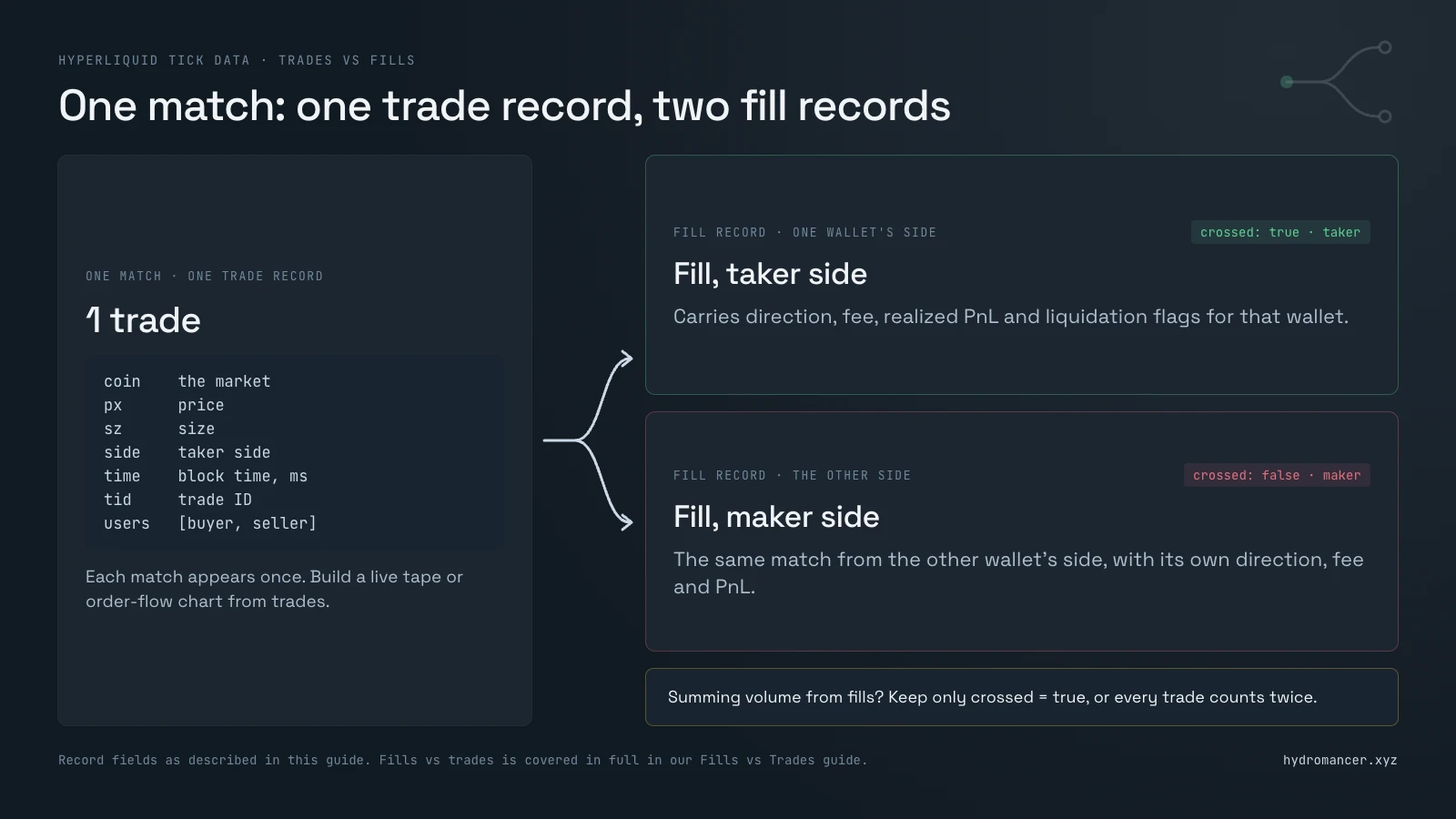
A trade tick records one matched execution between a buyer and a seller. Each record includes coin, price, size, taker side, block time in milliseconds, a trade ID and both wallets.
On a centralized exchange, public trades show price, size and side without revealing accounts. Hyperliquid adds [buyer, seller] to every trade, letting you tie order flow to wallets and power tools like a whale tracker.
Book ticks, every change to resting orders
A book tick records a change to orders waiting in the book: a price level growing, shrinking or disappearing. At L4, the book of single orders, each tick is one order added, resized or canceled.
Use book ticks for queue modeling or market-making research, where executed trades alone miss resting liquidity.
Trades vs fills, two records of one match
On Hyperliquid, every match appears two ways: as one trade record, or as two fill records, one for each wallet's side. Build a live tape or order-flow chart from trades, since each match appears once.
Use fills when you need direction, fees, realized PnL or liquidation flags, which only fills carry. If you sum volume from fills, keep only the taker side (crossed = true), or you will count every trade twice.
Our Hyperliquid Fills vs Trades guide compares both formats in full.
How to get Hyperliquid tick data from the API
Two APIs serve live Hyperliquid ticks, and only Hydromancer's also reaches back 24 hours. The split comes down to what happens when your connection drops.
Live ticks from Hyperliquid's native streams
Hyperliquid's own API is the free place to start for live trade ticks. Its trades subscription on wss://api.hyperliquid.xyz/ws sends each trade for one coin as it happens, with no API key.
You'll need pip install websockets.
# Expected output: "1782203279565 BTC B 62541.0 0.0006" per trade until stopped
import json
from websockets.sync.client import connect

sub = {"type": "trades", "coin": "BTC"}
with connect("wss://api.hyperliquid.xyz/ws") as ws:
    ws.send(json.dumps({"method": "subscribe", "subscription": sub}))
    for raw in ws:
        msg = json.loads(raw)
        if msg.get("channel") == "trades":
            for t in msg["data"]:
                print(t["time"], t["coin"], t["side"], t["px"], t["sz"])
Over a 40-second BTC sample, that stream printed 115 trade lines, while a recentTrades request returned only 10 BTC trades spanning about 6 seconds. If your process drops for 10 minutes, native endpoints cannot fill that gap.
The first message after subscribing replays the latest trades, so drop duplicates on tid and time when you reconnect.
For native book ticks, l2Book pushes snapshots rather than diffs and not on every block. That works for a depth chart, but it is too coarse for per-block microstructure.
Hyperliquid's l2 channel sends a 20-level snapshot per side followed by diffs. Its docs don't say how often those diffs arrive.
Last 24 hours with Hydromancer's tradesByTime and fillsByTime
When a stream drops, you need somewhere to backfill the missing window. Hydromancer keeps the last 24 hours of market-wide ticks behind two REST requests:
• tradesByTime returns trades in the exact object shape the trades WebSocket sends, so backfilled records match live messages.
• fillsByTime returns fills for every wallet, adding user, direction, fee and builder fields.
Both take a startTime and an optional coin or dex, returning up to 2,000 rows per page, oldest first. A startTime older than 24 hours is moved forward to 24 hours ago.
This script pages through the last 10 minutes of BTC trades. You'll need pip install requests and your key in HYDROMANCER_API_KEY.
# Expected output: "<n> BTC trades in the last 10 minutes", then one trade
import os, time, requests

HDR = {"Authorization": "Bearer " + os.environ["HYDROMANCER_API_KEY"]}
start = int(time.time() * 1000) - 600_000
body = {"type": "tradesByTime", "coin": "BTC", "startTime": start}
trades = []
while True:
    r = requests.post("https://api.hydromancer.xyz/info", headers=HDR,
                      json=body, timeout=30)
    r.raise_for_status()
    page = r.json()
    trades += page["trades"]
    if not page.get("hasMore"):
        break
    body = {"type": "tradesByTime", "coin": "BTC", "cursor": page["cursor"]}
print(len(trades), "BTC trades in the last 10 minutes")
print(trades[0])
For one 10-minute BTC window, the query returned 1,797 trades in a single page (hasMore was false), each carrying both wallets under users.
Filter by coin when you can. Because busy hours reach about 300 fills a second according to Hydromancer's docs, an unfiltered 2,000-fill fillsByTime page covers only a few seconds.
Hydromancer's trades and allFills streams attach a cursor to every message and a seq to every live one. Reconnecting with your session ID and cursor replays up to 15 minutes on most channels, after which you fall back to REST.
Hyperliquid API vs Hydromancer API, side by side
Both APIs return the same trade objects. The difference is gap recovery and how many markets one connection covers.
| Hyperliquid API | Hydromancer API | |
|---|---|---|
| Request | trades stream | trades stream, andtradesByTime over REST |
| What comes back | Each trade on one coin, as it happens | The same trade objects, live or from the last 24 hours |
| What you need first | The coin's name | The coin's name, or nothing for every market (an add-on on the stream) |
| Covered by one subscription or request | One coin | Several coins per stream; up to 2,000 trades per REST page |
| After a disconnect | Lost, unless you backfill from another source | Replayed for up to 15 minutes, then backfilled over REST |
| Documented limit | 1,000 subscriptions and 10 connections per IP | 20, 100 or 200 coins per API key, by plan |
| Key | None | API key, on a paid plan |
| Reply | JSON | JSON |
| Fits | A live tape for a few coins | A tape that can't have gaps, or every market at once |
Where Hydromancer fits
If you only need live trades on a few coins, Hyperliquid's free stream is enough, and you don't need us for that. For history up to yesterday, Reservoir is free apart from AWS transfer charges.
Hydromancer's paid API covers what sits between the two: the last 24 hours over REST, disconnect replay, the allFills market-wide firehose add-on, and per-block l2BookDiff and l4BookUpdates streams without running a node.
REST and WebSocket access require an API key on a paid plan, which the docs say starts at $300 a month. See Hyperliquid historical data and real-time data streaming.
Historical ticks and full book history
Past the last 24 hours, the live and backfill APIs stop and historical archives take over.
Every fill since July 2025 from Reservoir
For history older than a day, Reservoir is Hydromancer's free archive on S3. It holds every fill on Hyperliquid's own markets since 28 July 2025, and on each HIP-3 venue from its launch, as one Parquet file per day.
Files are free under CC BY 4.0, and you pay only AWS requester-pays charges. Each row is one fill with 27 columns, including price, size, side, millisecond timestamp, trade_id, address and crossed.
To turn fills into trade ticks, keep the taker side (crossed = true) so each trade appears once. You'll need pip install duckdb pandas and configured AWS credentials, because requester pays refuses anonymous reads.
# Expected output: BTC taker fills, one per trade, 2026-10-08 15:35-15:36 UTC
import duckdb

con = duckdb.connect()
con.execute("""INSTALL httpfs; LOAD httpfs; SET TimeZone = 'UTC';
CREATE SECRET (TYPE s3, PROVIDER credential_chain, REGION 'ap-northeast-1');
SET s3_requester_pays = true;""")
day = "s3://hydromancer-reservoir/by_dex/hyperliquid/fills/perp/all/date="
ticks = con.execute(f"""
SELECT timestamp, coin, price, size, side, trade_id
FROM read_parquet('{day}2026-10-08/fills.parquet')
WHERE coin = 'BTC' AND crossed
  AND timestamp >= TIMESTAMPTZ '2026-10-08 15:35:00+00'
  AND timestamp <  TIMESTAMPTZ '2026-10-08 15:36:00+00'
ORDER BY timestamp""").df()
print(ticks)
In that one-minute BTC slice, filtering for crossed = true cut 5,890 fill rows to 2,945 trade ticks with 2,945 distinct trade IDs. Taker and maker volume matched at 409.89 BTC.
Spot fills and HIP-4 fills live under global/fills/spot/ and global/fills/outcome/. Each day lands the next day, usually between 10:00 and 12:00 UTC, so Reservoir ends at yesterday at the latest.
Setup, folder paths and transfer costs are covered in How to Query Reservoir's Hyperliquid Data.
Historical book ticks, sampled or self-recorded
No free archive stores every historical book change. Reservoir and Hyperliquid's own S3 archive both keep sampled L2 snapshots, with Reservoir storing 20 levels once a minute starting 15 December 2025 for Hyperliquid's own markets.
If you need every book update, record a per-block feed yourself starting now. Rebuilding and storing a book from snapshots plus diffs is covered in Hyperliquid Historical Order Book Data: Download & Replay.
Raw node data from Hyperliquid's bucket or your own node
Hyperliquid also publishes node output to requester-pays S3. s3://hl-mainnet-node-data/node_fills_by_block holds fills streamed from a non-validating node, with older history in different formats under node_fills and node_trades.
Unlike a centralized exchange, Hyperliquid lets you run your own non-validator node to write trades, fills, order statuses and raw book diffs to disk in real time. Hyperliquid's node data docs list each file it writes.
Hyperliquid's docs say the network generates around 100 GB of logs a day with default settings, so plan to archive or prune. Our guide How to set up a Hyperliquid non-validator node walks through it.
What to check before you analyze tick data
Five quirks in Hyperliquid tick files will skew a result or a storage bill if you miss them.
Plan storage before you download
Tick files are large, and their size depends on the venue and the day. These were Reservoir's file sizes for one day, Sunday 18 October 2026:
| Dataset | Size for one day |
|---|---|
| Hyperliquid perp fills | about 360 MB |
| Every fill on every venue | about 640 MB |
| Spot fills | about 26 MB |
| One market's minute order book | about 0.2 to 0.45 MB |
A month of every fill on every venue came to about 19 GB. Parquet is compressed and columnar, so selecting only the columns you need cuts what you read.
If you record live per-block book updates yourself, there is no published size to plan from. Measure a busy hour for your markets first, then extrapolate.
Many ticks share one millisecond
Every trade in a block carries that block's time, so many ticks share the same millisecond. Don't assume time alone is unique, and keep the order the source gives you within a block.
Hydromancer's fillsByTime, for example, sorts by time and then by txIndex.
A trade ID alone isn't a unique key
Hyperliquid's docs describe tid as a hash of the buyer's and seller's order IDs. For a key that stays unique across the whole market, use block time, coin and tid together.
Quiet periods have no rows
A tick file only has a row when something traded, so a quiet minute is simply missing. Don't fill the gap with invented ticks.
If a model needs a value for every second, carry the last price forward and mark those seconds as having no trades.
Market names depend on the market type
The coin field isn't always a ticker. HIP-3 coins carry a dex prefix (xyz:GOLD), spot pairs other than PURR/USDC use an index (@107) and HIP-4 outcomes start with #.
Reservoir's order-book files are one exception: the dex sits in the folder path, so a HIP-3 file is named for the coin without its prefix.
Next steps
• Pull one minute of BTC ticks with the Reservoir query above, then read How to Query Reservoir's Hyperliquid Data for the folders and costs.
• Read Hyperliquid Fills vs Trades before you pick a record to count volume from.
• Run the first code block to watch Hyperliquid's live BTC tape, free and with no key.
Test and Validation
Code blocksAll three code blocks were run as printed on 19 November 2026.
Hyperliquid's trades streamThe stream ran for 40 seconds and printed 115 BTC trade lines, such as 1795072566437 BTC A 63601.0 0.11787. Its first message replayed trades from just before the subscription.
A recentTrades request the same day returned 10 BTC trades, spanning about 6 seconds.
The paging code made one request and printed 1797 BTC trades in the last 10 minutes, then the first trade. That trade carried coin, side, px, sz, hash, time, tid and users, the two wallets.
The whole window fit in one page of up to 2,000 trades, so hasMore was false. A busier 10 minutes needs more pages, and each page is one request.
The Reservoir code read BTC's fills for 8 October 2026 and printed 2,945 rows, from 15:35:00.028 to 15:35:59.987 UTC. It ran with DuckDB 2.0.0 and pandas 3.1.
The minute held 5,890 fill rows, and keeping the taker side left 2,945, with 2,945 distinct trade IDs. Each trade appeared once, and taker and maker sizes matched at 409.89 BTC.
Storage figuresThe file sizes under Plan storage before you download come from How to Query Reservoir's Hyperliquid Data, which lists them for 18 October 2026.
FAQ
Does Hyperliquid provide tick data?
Yes, live. Its trades WebSocket sends every trade for a coin as it happens, free.
It doesn't serve a long tick history over the API, so for the past you need an archive such as Reservoir or Hyperliquid's node data on S3.
How far back does Hyperliquid tick data go?
Reservoir's fills cover Hyperliquid's own markets from July 2025, with HIP-3 venues from their launch dates. Hyperliquid's hl-mainnet-node-data bucket holds node fills too, with its older data in earlier formats.
Is Hyperliquid tick data free?
The live native stream is free, and Reservoir's history is free apart from AWS requester-pays charges. Hydromancer's 24-hour REST backfill and per-block book streams need a paid API key.
Should I use trades or fills as my tick data?
Use trades for a tape, volume and order flow, since each match appears once. Use fills when you need each wallet's direction, fee, realized PnL or liquidation flag.
If you use fills for volume, keep only the taker side.
Can I get historical order book ticks for Hyperliquid?
Not as a complete record. Public archives store sampled L2 snapshots, such as Reservoir's once-a-minute, 20-level books.
For every book change, record a per-block feed going forward or run a node.
Sources
1. Hyperliquid docs: subscriptions
2. Hyperliquid docs: info endpoint
3. Hyperliquid docs: rate limits and user limits
4. Hyperliquid docs: historical data
5. Hyperliquid docs: L1 data schemas
6. Hydromancer docs: tradesByTime
7. Hydromancer docs: fillsByTime
8. Hydromancer docs: trades
9. Hydromancer docs: allFills
10. Hydromancer docs: session management and reconnection
11. Hydromancer docs: l2BookDiff
12. Hydromancer docs: l4BookUpdates
13. Hydromancer docs: plans
14. Reservoir docs: fills
15. Reservoir docs: order book
16. How to Query Reservoir's Hyperliquid Data
Read next

Hyperliquid Frontend: Top Launch Checklist for Builders
Launch checklist for a Hyperliquid trading frontend: builder code fees, API wallet security, HIP-3 and HIP-4 markets, referrals, analytics and monitoring.

Hyperliquid Smart Money: How to Read Wallet Labels
Tell Hyperliquid market makers, delta-neutral wallets, vaults, whales and new wallets apart, and see why a wallet's label matters more than its size.

Deploy a HIP-3 Market on Hyperliquid: Guide for Builders
Step-by-step HIP-3 deployment on Hyperliquid: the 500k HYPE stake, the Dutch auction, registerAsset2, setOracle, margin tables, OI caps and fees.